In-flight mode ( )
Set to the in-flight mode ( ) where the
reception may influence operation of other
electronics devices in an airplane, etc.
In the in-flight mode ( ), the GPS signal
reception (time zone adjustment, manual
time adjustment, and automatic time
adjustment) does not work.
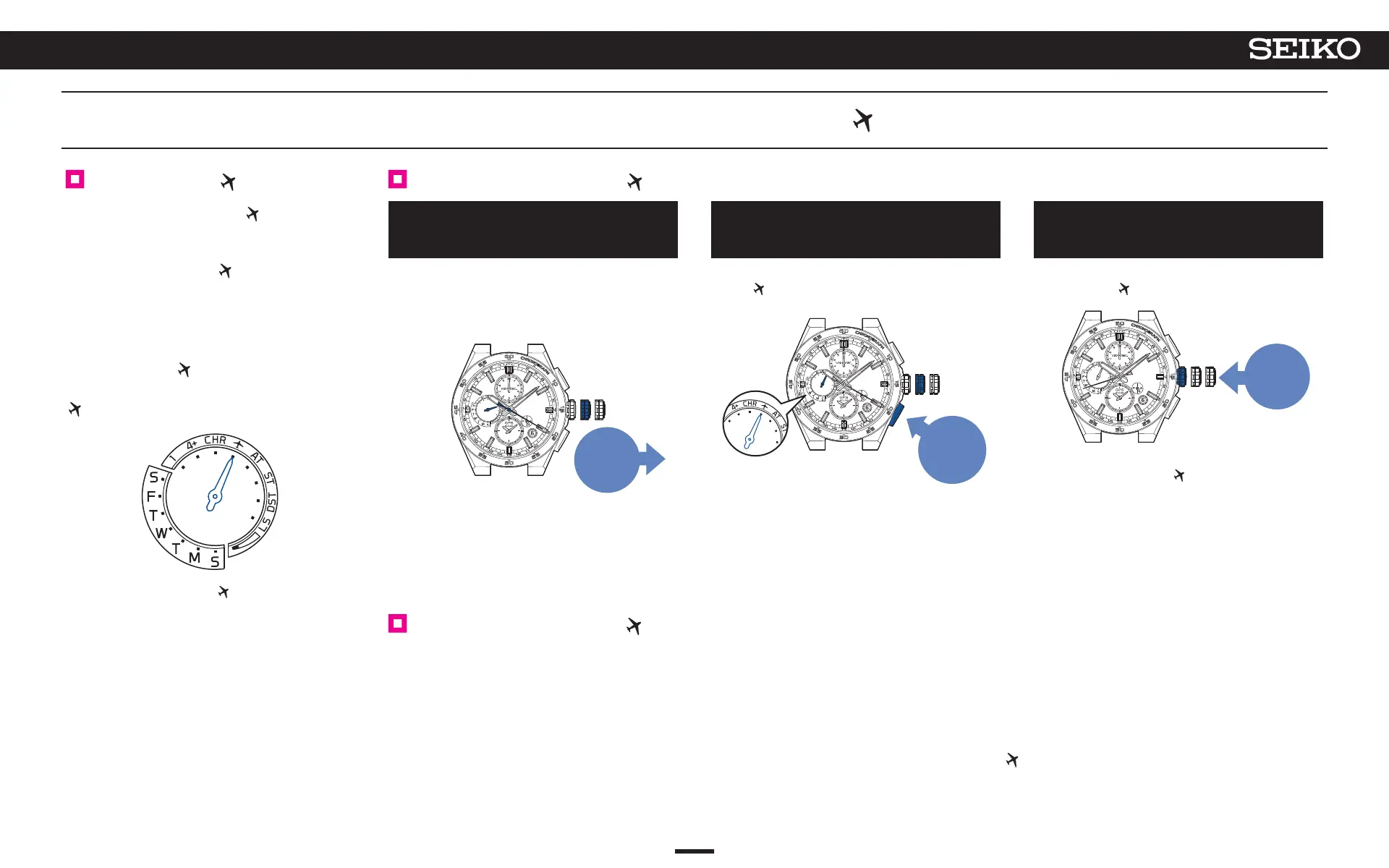
< In-flight mode ( ) >
The multi-function indicator hand points to
.
* When the in-flight mode ( ) is reset, the multi-
function indicator
hand indicates the day of the week
(or the energy level).
1
Pull out the crown to the first click
The seconds hand moves to display the currently set
time zone.
The multi-function indicator hand indicates DST
(Daylight Saving Time) setting.
Pull out
to the
first
click
2
Continue to press Button B
(3 seconds)
The multi-function indicator hand displays the in-flight
mode (
). (5 seconds)
Afterward, it
indicates the DST (Daylight Saving Time).
Press for
3 seconds
3
Push the crown back in
The multi-function indicator hand returns to display the
in-flight mode (
).
Push
back in
When the in-flight mode ( ) is set, the multi-function
indicator hand does not indicate the day of the week.
Set to the in-flight mode ( ).
* Note that by rotating the crown after A and B are completed, the time zone will switch.
→ To set the watch to the local time of the destination in an airplane, etc.
(Manual time zone setting) P. 25
Reset the in-flight mode ( ).
Turn off the in-flight mode when leaving an airplane, etc.
If it is not turned off, the watch will not be able to receive GPS signals.
Carry out operation A to C.
B will make the multi-function indicator hand point to “4+
”, indicating that in-flight mode has been turned off. (5 seconds)
Afterward, it indicates the DST (Daylight Saving Time).
C
will make the multi-function indicator hand display the day of the week, and the in-flight mode (
) will be turned off.
* If the energy level is low, the day of the week is not displayed, and the watch returns to a charging status display of “low.”
When boarding (in-flight mode (
))
32
4
BASIC OPERATION (HOW TO SET THE TIME/HOW TO RECEIVE GPS SIGNALS, ETC.)
5X83 GPS SOLAR



 To Next Page