Manual time zone setting of the sub-dial
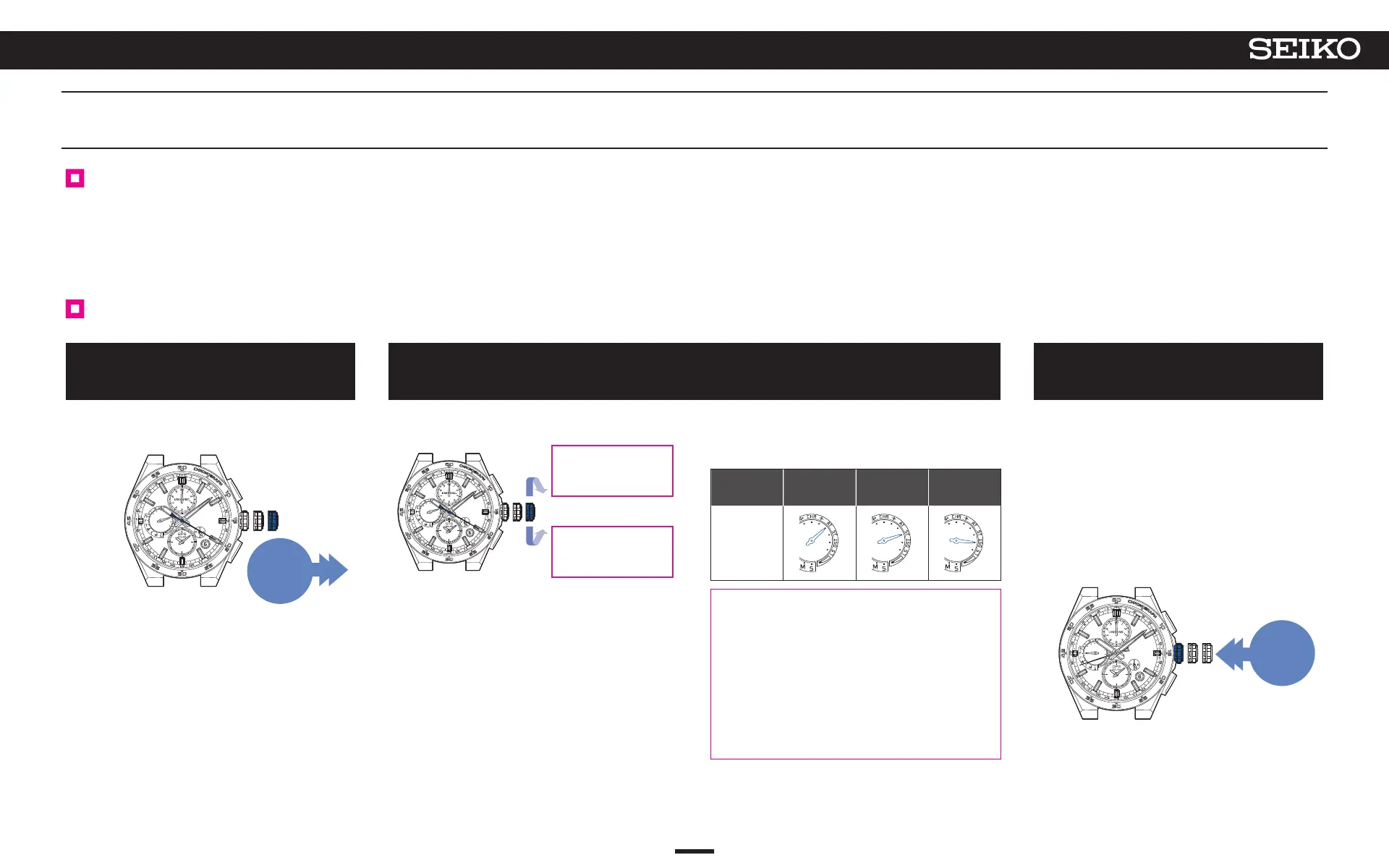
The sub-dial can be set to a time zone of your choice.
Adjust the sub-dial by selecting the time of the time zone.
* The sub-dial cannot be adjusted to a time outside the time zone.
How to manually set the time zone of the sub-dial
1
Pull out the crown to the second
click
The seconds hand moves to display the sub-dial of the
currently set time zone.
Pull out
the crown to
the second
click
When the crown is turned, the seconds hand moves to
the next zone.
Turn the crown
clockwise to advance
1 time zone.
Turn the crown counter
clockwise to set back
1 time zone.
<Multi-function indicator hand display>
Displays ON/OFF setting of DST (Daylight Saving
Time).
Hand
position
AT
(automatic)
ST
(OFF)
DST
(ON)
Display
* When you have selected a new time zone, even
if it was “AT (automatic)” before the time zone
selection, it switches to “DST (ON)” or “ST
(OFF).”
*
If the DST (Daylight Saving Time) of the subdial
is not correct, change over ON/OFF with
reference to “Set the DST (Daylight Saving
Time) of the sub-dial.” P. 29 in the operation
B.
3
Push the crown back in
The seconds hand returns to the time display mode.
The multi-function indicator hand returns to display the
day of the week.
* If the energy level is low, the day of the week is not
displayed,
and
the watch returns to a charging status
display of “low.”
* The buttons cannot be operated while the hour and
minute hands, multi-function indicator hand, or sub-
dial is moving.
Push
back in
2
Turn the crown and set the seconds hand to the time zone of the destination
To adjust time on sub-dial
28
4
BASIC OPERATION (HOW TO SET THE TIME/HOW TO RECEIVE GPS SIGNALS, ETC.)
5X83 GPS SOLAR



 To Next Page