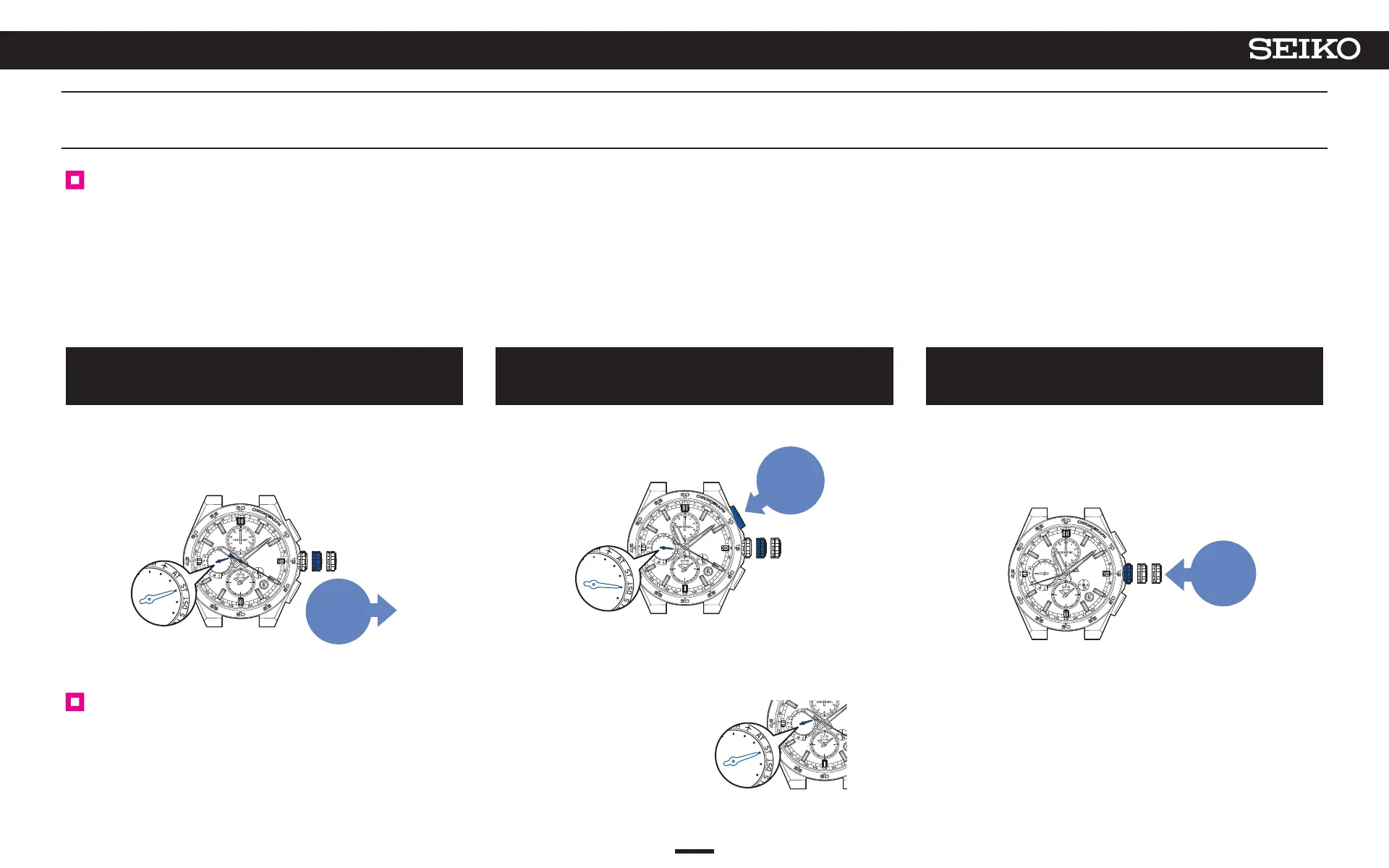
Turn ON DST (Daylight Saving Time)
DST (Daylight Saving Time) can be manually set.
Be sure to do the settings in the following situations.
• When the main-dial is adjusted using the manual time zone setting and DST (Daylight
Saving Time) is implemented.
• When the time zone is the same, but the settings for DST (Daylight Saving Time) differ
according to the area to which you move.
→ Set the DST (Daylight Saving Time) of the sub-dial. P. 29
* The indicator’s DST (Daylight Saving Time) is not changed to “AT (automatic)” if you have done the manual time
zone setting.
Turn DST (Daylight Saving Time) manually on or off, according to whether DST (Daylight Saving Time) is
implemented or not.
1
Pull out the crown to the first click
The multi-function indicator hand moves to indicate the current DST
(Daylight Saving Time) setting. The seconds hand displays the current time
zone.
< When DST (Daylight Saving Time) setting is OFF >
Pull out
to the
first
click
2
Continue to press Button A (3 seconds)
The multi-function indicator hand moves to point to “DST”, and the hour and
minute hands advance by one hour.
Press for
3 seconds
*
In the Lord Howe Island time zone in Australia, the time is advanced by
30 minutes while DST (Daylight Saving Time) is in effect. This watch
corresponds to DST in Lord Howe Island time zone.
3
Push the crown back in
The seconds hand returns to the time display mode.
The multi-function indicator hand returns to display the day of the week.
* If the energy level is low, the day of the week is not displayed, and the
watch returns to a charging status display of “low.”
Push
back in
Turn OFF DST (Daylight Saving Time)
Carry out operation of A to C in the state where DST (Daylight Saving Time) setting is ON.
In operation of
B, adjust the multi-function indicator hand to the “ST (OFF)” position as shown in
the figure at the right.
The hour and minute hands return by one hour.
Set DST (Daylight Saving Time)
26
4
BASIC OPERATION (HOW TO SET THE TIME/HOW TO RECEIVE GPS SIGNALS, ETC.)
5X83 GPS SOLAR



 To Next Page