Check the time zone and DST (Daylight Saving Time) settings
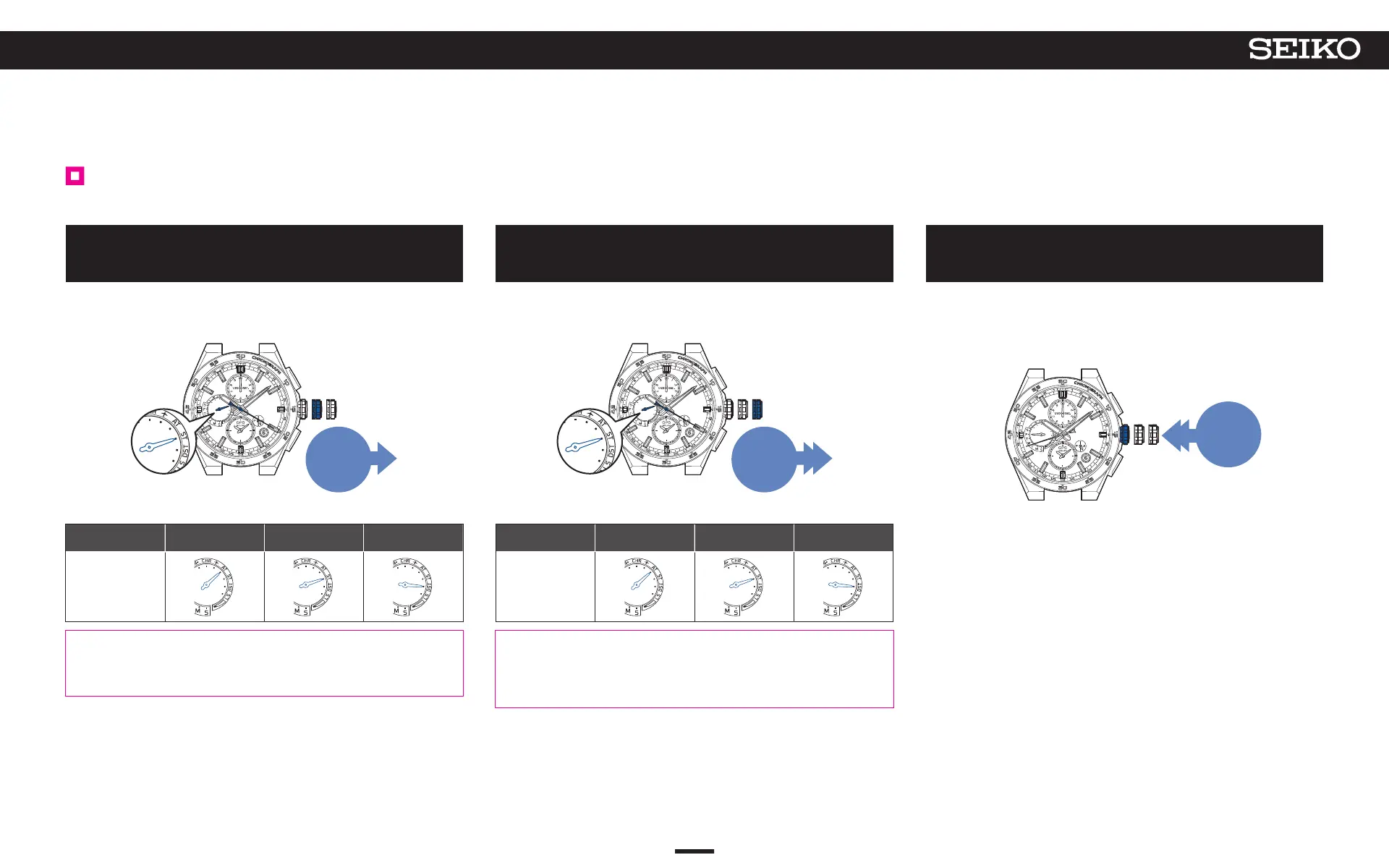
The timezone and DST (Daylight Saving Time) can be checked for each of the main-dial and sub-dial.
1
Pull out the crown to the first click
The seconds hand moves to display the currently set time zone.
The multi-function indicator hand indicates DST (Daylight Saving Time)
setting.
Pull out
to the
first
click
<Multi-function indicator hand display>
Displays the status for DST (Daylight Saving Time).
Hand position
AT
(automatic)
ST
(OFF)
DST
(ON)
Display
AT (automatic):
“AUTO (automatic)” is set when your watch successfully adjusts the time zone in a region
that has adopted DST (Daylight Saving Time).
The basic time automatically changes due to your watch adapting to the implementation of
DST (Daylight Saving Time) for the time zone (region) set for the main-dial.
* To change the time zone setting
• When you are in a place where GPS signals can be easily received
How to adjust the time zone P. 22
• When you are in a place where GPS signals cannot be received
How to manually set the time zone P. 25
* For the relationship between the seconds hand position and time zone, refer to the
“Time zone display and list of time zones around the world
” P. 13
2
Pull out the crown to the second click
The seconds hand moves to display the currently set time zone of the sub-
dial. The multi-function indicator hand displays the DST (Daylight Saving
Time) setting of the sub-dial.
Pull out
the crown to
the second
click
<Multi-function indicator hand display>
Displays the status for DST (Daylight Saving Time).
Hand position
AT
(automatic)
ST
(OFF)
DST
(ON)
Display
AT (automatic):
“AUTO (automatic)” is set when the main dial and sub-dial are switched after your
watch successfully adjusts the time zone in a region that has adopted DST (Daylight
Saving Time).
The sub-dial automatically changes due to your watch adapting to the implementation
of DST (Daylight Saving Time) for the time zone (region) set for the sub-dial.
* Changing the time zone settings for the sub-dial
How to manually set the time zone of the sub-dial P. 28
*
For the relationship between the seconds hand position and time zone, refer to the
“Time zone display and list of time zones around the world” P. 13
3
Push the crown back in
The seconds hand returns to the time display mode.
The multi-function indicator hand returns to display the day of the week.
* If the energy level is low, the day of the week is not displayed, and the
watch returns to a charging status display of “low.”
Push
back in
27
4
BASIC OPERATION (HOW TO SET THE TIME/HOW TO RECEIVE GPS SIGNALS, ETC.)
5X83 GPS SOLAR



 To Next Page