(3)Batterylifeindicatorandpowerreserve
■Powerreserve
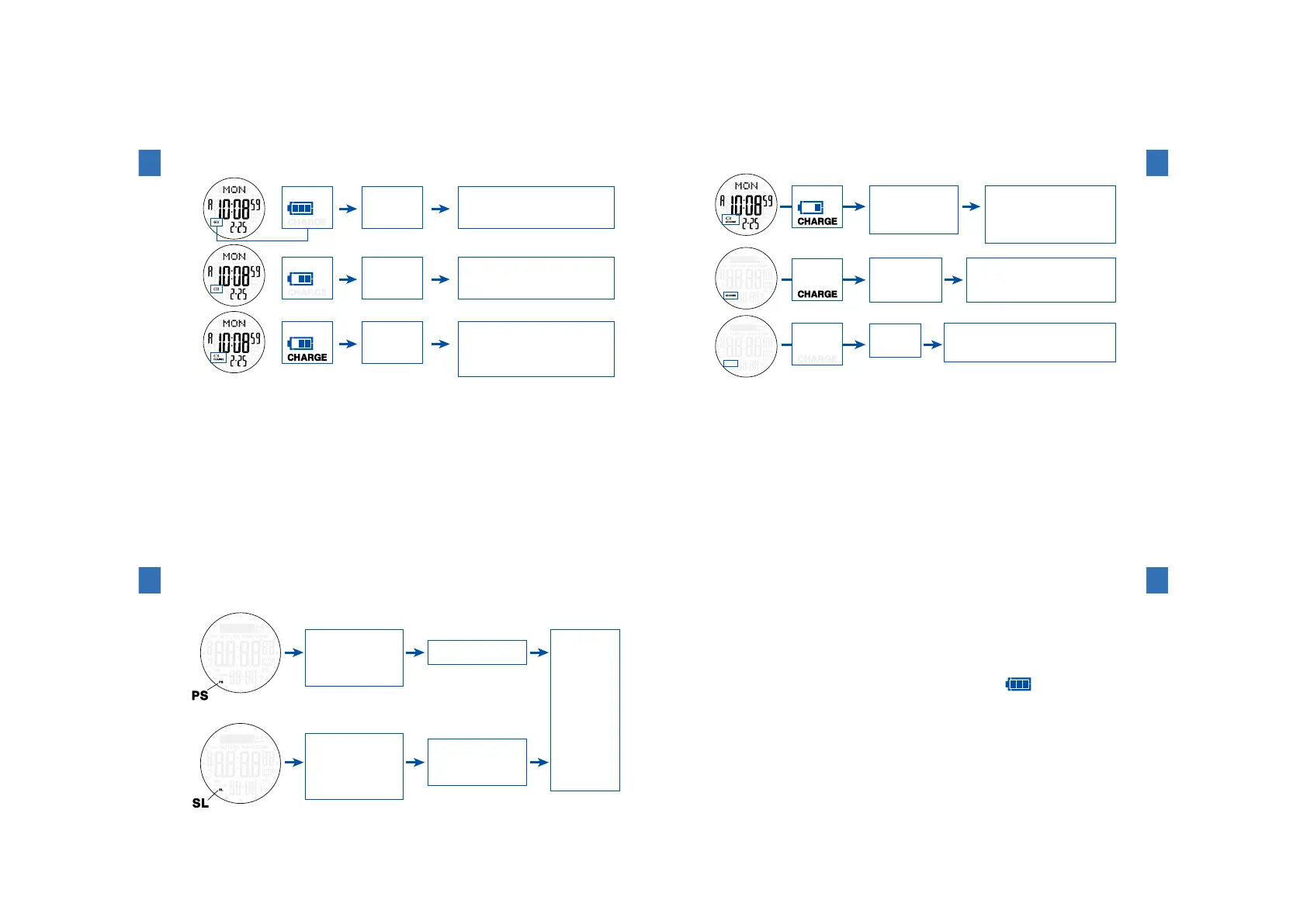
Thebatterylifeindicatoronthedisplayshowstheremainingamountofbatterypower.
❶
❷
❸
Batterylifeindicator
Sufficient
Restrictionson
operationsandfunctions
Solutions
Norestriction
Usethewatchasitis.
Medium
Norestriction
Chargethebatterysufficiently.
→"Howtocharge"page92
Low
CHARGE:Chargingisrequired
Norestriction
Theremainingamountofbattery
powerhasdecreased.
Immediatelychargethebattery
sufficiently.
→"Howtocharge"page92
2
Beforeuse
94
❹
❺
❻
Restrictionson
operationsandfunctions
Solutions
Chargethewatchuntilthebatteryiconshows
itissufficientlycharged.
※Ifthewatchmovesabnormally,resetthesystem.
→"Howtoresetthesystem"page154
Chargethewatchuntilthebatteryiconshows
itissufficientlycharged.
※Ifthewatchmovesabnormally,resetthesystem.
→"Howtoresetthesystem"page154
※Atthisstage,thestoredlogdatamaybedeleted
ormaynotbedisplayedcorrectly.
・Sensormeasurement
isstopped.
・Illuminatinglightis
turnedoff.
・Alarmdoesnotsound.
Chargethewatchuntilthebattery
lifeindicatorshowsthatthewatch
issufficientlycharged.
Afterchargingthebattery,
youcanstartusingthewatch.
→"Howtocharge"page92
Theon-going
measurementof
thestopwatch
isstopped.
Allfunctions
arestopped.
CHARGE:Chargingisrequired
Batterylifeindicator
Extremelylow
2
Beforeuse
95
■Powersaveandsleepfunction
Powersavefunction:Whenthewatchisnotexposedtolightandnobuttonispressed
forlongerthanapresetperiod,thepowersavefunction(energy
savingfunction)isactivated.
Sleepfunction:Whenapproximately72hourshaveelapsedafterthewatchhasentered
thepowersavemode,thesleepfunctionisautomaticallyactivated.
❶
❷
Situation
Restrictionsonoperationsandfunctions
Solutions
Norestriction
Exposethewatch
tolightorpress
anybuttonto
cancelthepower
savemodeor
sleepmode.
ThePSmarkblinks.
Thewatchhasnotbeen
exposedtolightandno
buttonhasbeenpressed
forlongerthanapreset
period.
Alarmdoesnotsound.
Hourlyatmospheric
pressuremeasurement
isstopped.
TheSLmarkblinks.
Thewatchhasnotbeen
exposedtolightandno
buttonhasbeenpressed
forthreedayssincethe
watchenteredthepower
savemode.
Displayinthepowersavemodeandfunctions
Displayinthesleepmodeandfunctions
2
Beforeuse
96
・Howtosetthetransitiontimetothepowersavemode
Thetransitiontimetothepowersavemodecanbeselectedfromamong30
minutes,1hour,2hours,and4hoursinthetime/calendarsettingmode.
Thedefaultsettingis30minutes.
Referto"Howtosetthepowersavemode"onpage102.
※Ifthesensorfunctionisusedinadarkplace,itisrecommendedthatthepowersave
functionis turnedofforthetransitiontimetothepowersavemodeissetforlonger
thanthetimethewatchisused.Fornormaluse,turnthepowersavefunctionon.
※Underthefollowingconditions,thepowersavemodeandsleepmodearenot
activated.
・Theremainingamountofbatterypowerissufficient.(
)
・Themountaineeringdataisbeingrecordedinthealtimetermode.
・Thestopwatchismeasuring.
2
Beforeuse
97



 To Next Page