※
Thepowersavefunctionisactivatedtoreducetheenergyconsumptionbyturningthedisplayoff,when
thewatch isnotexposed tolightand nobuttonhas beenpressedfor acertainperiod.To cancelthe
powersavemodeandreturntotheperviousdisplay,exposethewatchtolightorpressanybutton.
④Whenthepowersave settingisfinished,presstheButton Ⓑtoreturntothetime/
calendarmode.Even ifButtonⒷis notpressed,thedisplayautomaticallyreturnsto
thetime/calendarmodewithin2to3minutes.
(4)Howtosetthepowersavemode
Thetransitiontimeuntilthepowersavemodeisactivatedcanbeset.Thefactorysetting
is30minutes.
・PressButtonⒸtoswitchtothetime/calendarmode.
①PressandholdButtonⒷtoshowthecitynamecurrentlyselected.
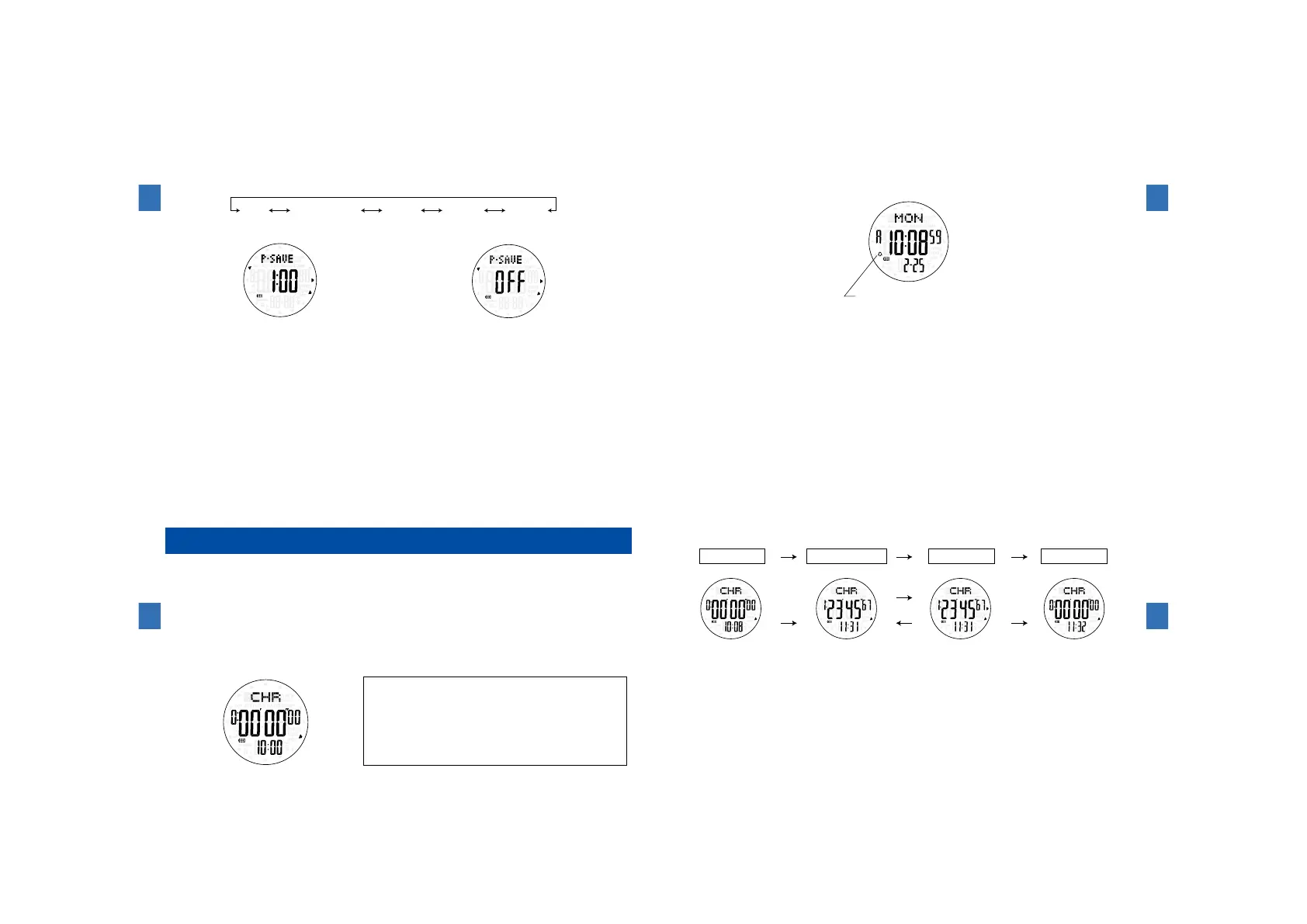
②PressButtonⒸrepeatedlyuntilthepowersavesetting(P-SAVE)isselected.
③PressButtonⒺorButtonⒻtoselectthepreferredtransitiontimeorOFF.
Displaywhenthetransitiontimeissetto1hour
Ⓔ
Ⓕ
Ⓒ
DisplaywhenthepowersavemodeisturnedOFF.
OFF 30minutes 1hour 2hour 4hour
Ⓔ
Ⓕ
Ⓒ
Watchfunctions
3
102
(5)Howtotestthealarmsoundandhowtoengage/disengagethe
hourlytimesignalandconfirmationsoundforbuttonoperations
・WitheachpressofButtonⒻinthetime/calendarmode,the hourlytimesignal and
confirmationsoundforbuttonoperationscanbeengagedordisengaged.
・ThealarmsoundcanbeheardbykeepingpressingdownbothButtonⒹandButtonⒻat
thesametime.
ThemarkappearswhenthehourlytimesignalisturnedON.
ThemarkdisappearswhenthehourlytimesignalisturnedOFF.
Ⓓ
Ⓕ
Watchfunctions
3
103
Howtousethestopwatchmode
Thestopwatchcanmeasureupto99hours59minutes59seconds99in
1/100secondincrements.
Thecurrenttimeisdisplayedatthebottomrowofthedisplay.
(1)Namesofthebuttonsandtheirfunctions
・PressButtonⒸtoswitchtotheSTOPWATCHmode."CHR"appearsatthetoprowof
thedisplay.
ButtonⒸ
ButtonⒷ
ButtonⒶ
ButtonⒹ
ButtonⒺ
ButtonⒻ
ButtonⒶ:Toswitchtothesensorfunction
ButtonⒷ:Nofunction
ButtonⒸ:Toswitchtothealarmmode
ButtonⒹ:Toturnonthebuilt-inilluminatinglight
ButtonⒺ:Reset
ButtonⒻ:Start/Stop
Watchfunctions
3
104
(2)Howtousethestopwatch
①Afterthestopwatchisreset,pressButtonⒻtostartameasurement.
②Afterthemeasurementisstarted,pressButtonⒻtostopthemeasurement.
③Afterthemeasurementisstopped,pressButtonⒺtoresetthestopwatch.
※"Stop"and"Restart"canberepeatedasmanytimesasnecessarybypressingButtonⒻ.
※Evenifthedisplayischangedtoadifferentdisplay(mode)whilethestopwatchismeasuring,the
measurementiscontinued.
※Whenthemeasuredtimereaches99 hours59minutes59 seconds99,thestopwatch
automaticallystops.
Start
Ⓕ
ⒻⒻⒻ
Restart
Stop
Ⓕ
Reset
Reset Measurement Stopped Reset
Ⓔ
Ⓔ
Ⓕ
Watchfunctions
3
105



 To Next Page