Aboutcorrectionofaltitude
Thealtimeter ofthisproduct calculatesbased ontheatmospheric pressure.Some errors
mayoccur bychangein atmosphericpressure andtemperaturechange dueto atmosphere
anddifferenceinelevation.Forthisreason,makeadjustmentsofaltitudeatpointswherethe
correctaltitudeisknownsuchasastartingpointofatrailorduringaclimb.
InformationonaltitudecanalsobesearchedonamaporthroughtheInternet.
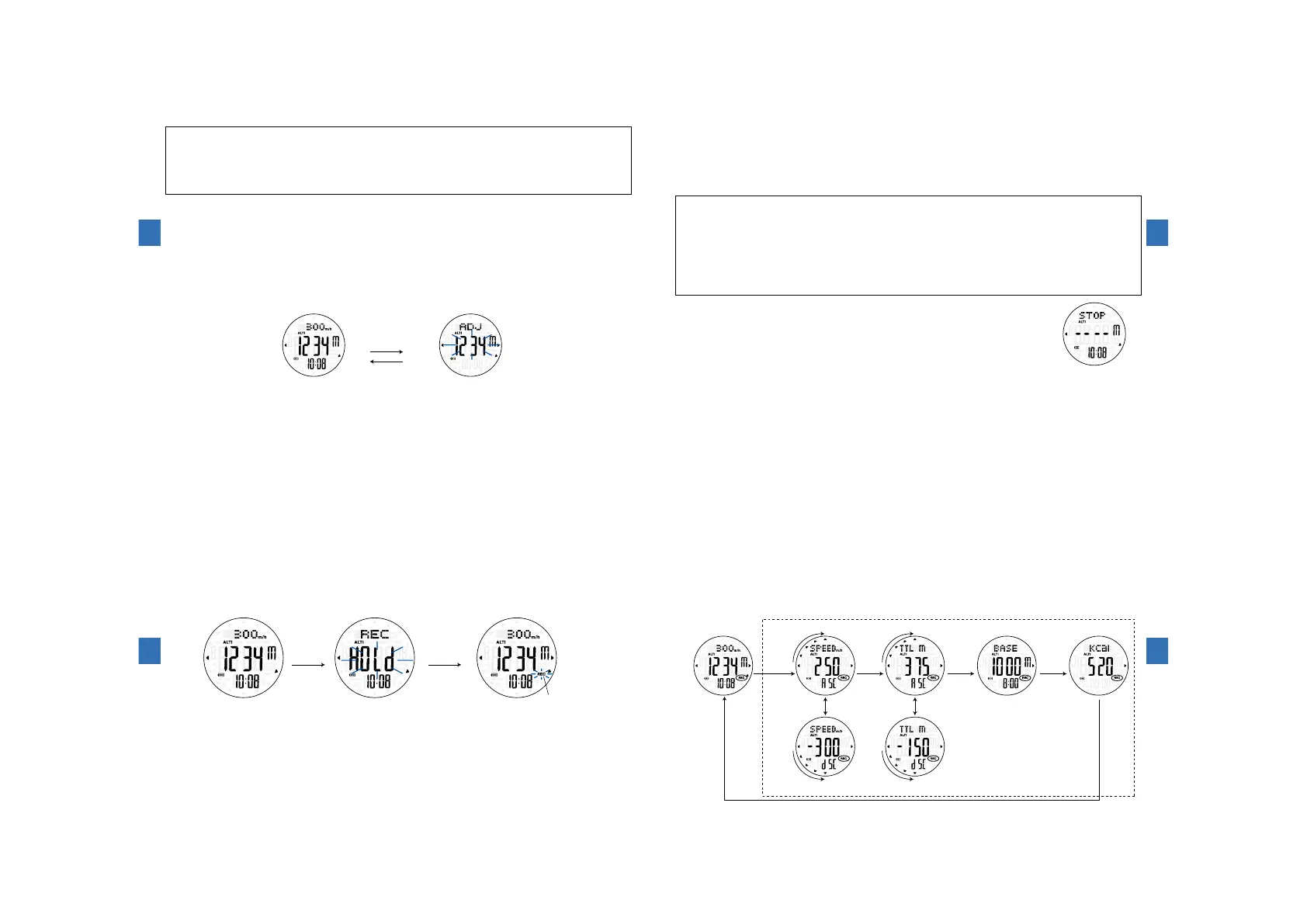
①PressandholdButtonⒷtoswitchtothealtitudecorrection(ADJ) mode.Atthistime,
thealtitudeindicationblinks.
②PressButtonⒺorButtonⒻtocorrectthealtitude.
Whentheunitissetto[m](Thevaluecanbesetin1-mincrements.)
・PressButtonⒺtoincreasethevaluebyone,andpressButtonⒻtodecreasethevaluebyone.
・PressandholdButtonⒺorButtonⒻtoquicklyincreaseordecreasethevalueby10meters.
Whentheunitissetto[ft](Thevaluecanbesetin5-ftincrements.)
・PressButtonⒺtoincreasethevaluebyfive,andpressButtonⒻtodecreasethevaluebyfive.
・LongpresstheButtonⒺorButtonⒻtoquicklyincreaseordecreasethevalueby50feet.
③PressButtonⒷtoreturntothealtitudemode.
(3)Howtocorrectaltitude
Altitudecorrectionmode
ButtonⒷ
ⒷⒷⒺ
Ⓕ
Pressandhold
ButtonⒷ
Sensorfunctions
4
114
(4)Aboutclimbingspeed
・Climbing speedrepresentsthedifferenceinaltitude bymoving perone hourinunitsof
m/h.
・The immediateprecedingascending altitudeor descendingaltitude isconvertedinto
amountofchangeinaltitudeperonehour.
・Theindicationisupdatedevery10seconds.
・Itisdisplayedatthetoprowofthealtimeterdisplay.
※Whyisclimbingspeedrequired?
Itisextremelyimportanttoknowyourpaceduringclimbing.
Confirmationofclimbingspeed isanimportantindexto estimatewhetheritis possibletoclimb
uptoatargetpointwithinascheduledtime.
Ingeneral, thetimerequired tocompletea trailisbased onclimbing speedof300 m/hasa
standard,however,climbingspeedwidelyvariesdependingonmountainprofile,weather,age,body
strengthandexperience.
Knowingyour averageclimbing speedishelpful tocalculate thetimerequired tocomplete the
route.Makesuretosetupareasonableandsafeplansformountainclimbing.
(5)Howtomeasurealtitudeagain
・Altitude isnormallymeasuredevery10 secondsin altimetermode.
Whenyou wantto immediatelymeasure thealtitude again,press
ButtonⒻ.
・Altitude measurementautomaticallystopsafter12 hourshave
elapsedsince measurementstarts,however,youcan restartthe
altitudemeasurementbypressingButtonⒻ.
Measurement
automatic
stopstate
Ⓕ
Sensorfunctions
4
115
RECON
RECmark
(blinks)
ButtonⒻ
Pressand
hold
Continue
tohold
ButtonⒻ
ⒻⒻ
(6)Howtostartdatarecording(RECON)
・PressButtonⒻinaltimetermode."HOLd"appearsonthedisplay.Holditdownthatway
forapproximately3secondstoentertheRECONmode.The"REC"markblinks.
・Altitudeismeasuredevery10secondsevenintheRECONmode.
・AltitudecanbecorrectedevenintheRECONmode.→Page114
※Maximum15timesofmountaineeringdata,ofwhichonetimeis24hours,canberecorded.
【CAUTION】
EvenifaltitudeiscorrectedduringRECON,thereisnoinfluenceontherecorded
valuesof averageclimbingspeed, accumulatedaltitude andconsumedenergy.
Minuscorrectionofaoncemeasuredmaximumaltitudeandpluscorrectionofa
oncemeasuredminimumaltitudearenotreflectedinanaltituderecordedvalue.
【CAUTION】
Whenyoumovebyropewayorautomobile,etc.,itisrecommendedtosettoRECOFF.
EvenwhenRECONisset,thedatamaynotbereflectedinaverageclimbing
speed,accumulated altitudeand consumedcalorieswhenacertainspeedis
exceeded.
Sensorfunctions
4
116
(7)Howtodisplayrecordingclimbingdata
・PressButtonⒺintheRECONmode.
Theaverageclimbingspeedandaccumulatedaltitudeuptothepresent,thealtitude
whenRECisturnedONandtheenergyconsumeduptothepresentaredisplayed.
※Whentheclimbingspeedoraccumulatedaltitudeisdisplayed,guidance(▲)ontheleftside
indicateswhethertheyareascendingordescendingdatainanimation.
ⒺⒺⒺⒺ
Ⓔ
Ⓔ
ASC:ascent(Ascending)
dSC:descent(Descending)
Averageclimbingspeed(descending) Accumulateddescendingaltitude
Averageclimbingspeed(ascending)
Currentinformation
display
Accumulatedascendingaltitude Altitudeandtimewhenrecordingstarts Consumedenergy
Animation
Alternatedisplay Alternatedisplay
Recordingclimbingdatadisplay
※
Ifthebuttonisnotoperatedfor
12 seconds with the climbing
datadisplayed,thedisplayauto-
maticallyreturnstothecurrent
informationdisplay.
Sensorfunctions
4
117



 To Next Page