Howtousethealarmmode
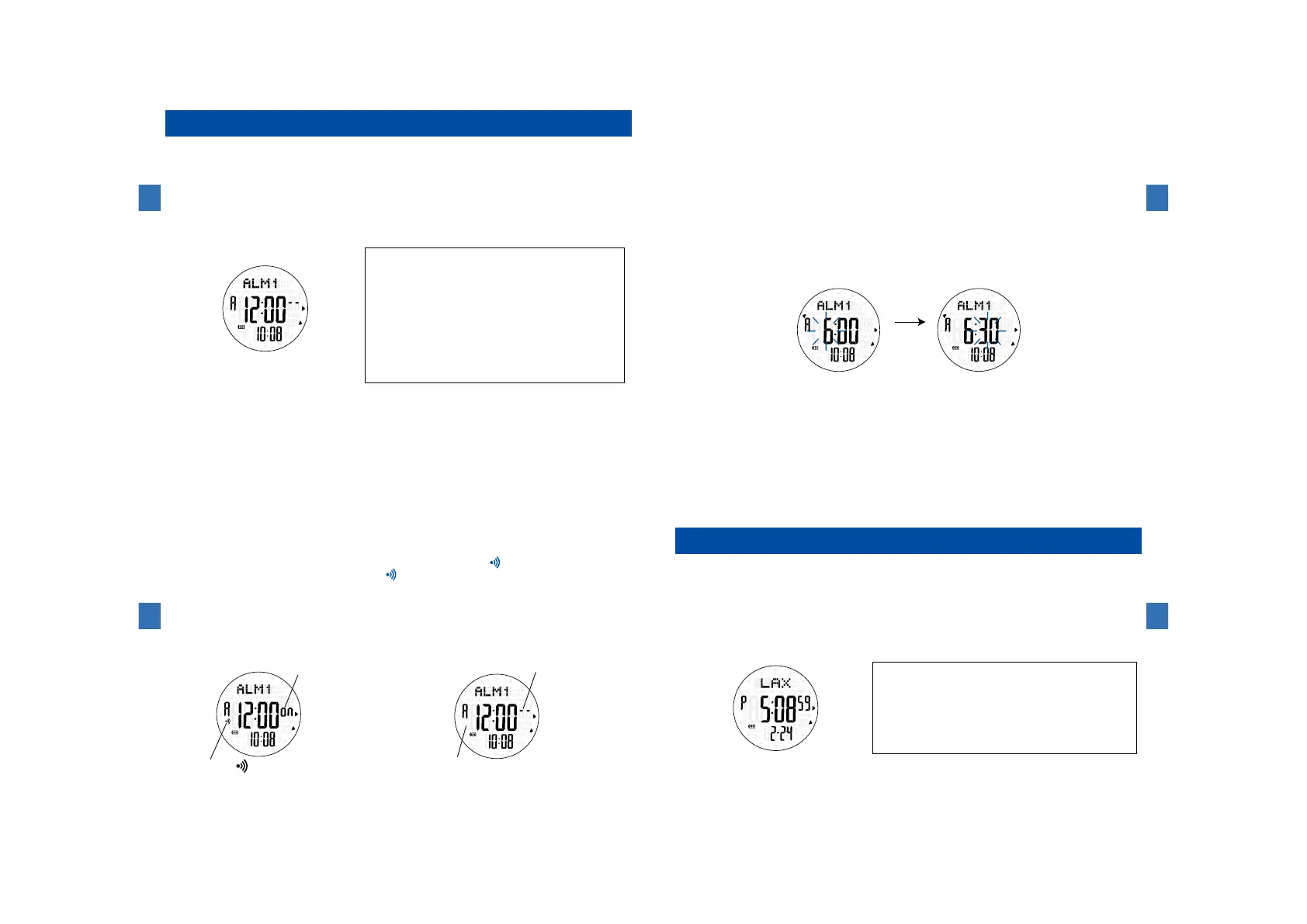
Thethree-channeldailyalarmsoundsat adesignatedtime (hourandminute)
every24hours.
Eachalarmchannelcanbeengaged("on")ordisengaged("--")independently.
(1)Buttonsandfunctions
・Press Button Ⓒtoswitchto theALARMmode. Thenameof thealarm channel
"ALM1","ALM2"or"ALM3"appearsatthetoprowofthedisplay.
ButtonⒸ
ButtonⒷ
ButtonⒶ
ButtonⒹ
ButtonⒺ
ButtonⒻ
ButtonⒶ:Toswitchtothesensorfunction
ButtonⒷ(Pressandhold):
Tochangetothealarmsettingmode
ButtonⒸ:Toswitchtotheworldtimemode
/Toselecttheitemtobeadjusted
ButtonⒹ:
Toturnonthebuilt-inilluminatinglight
ButtonⒺ:Toswitchthealarmchannel
/Toincreasethevalue(advance)
ButtonⒻ:Toengageordisengagethealarm
/Todecreasethevalue(moveback)
Watchfunctions
3
106
(2)Howtousethealarm
・T hewayofusingthealarmisthesameforeveryalarmchannel.
Example:Selectingalarm1andsettingthealarmtimeto"6:30a.m."
①PressButtonⒺtoshowthe"ALM1."
LongpressButtonⒷtoshowthealarmtimesettingmode.Thehourstartsflashing.
②WitheachpressofButtonⒸ,thehourandminuteflashalternately.PressButtonⒸto
selecttheitemtobeadjusted.
③WitheachpressofButtonⒺ,theflashingvalueincreasesonebyone,andwitheach
pressofButtonⒻ,theflashingvaluedecreasesonebyone.
※LongpressButtonⒺorButtonⒻtoquicklyincreaseordecreasethevalue.
④Afteralladjustmentsare completed,pressButtonⒷto exitthealarmtimesetting
mode.EvenifButtonⒷisnotpressed,thedisplayautomaticallyreturnstothetime/
calendarmodewithin2to3minutes.
※Whenthewatchexitsthealarmtimesettingdisplay,thealarmisautomaticallyengaged(ON).
(hour:6:00a.m.)
Ⓒ
Ⓒ
Ⓒ
Ⓔ
Ⓕ
Ⓔ
Ⓕ
(minute:30minutes)
Watchfunctions
3
107
(3)Engagementanddisengagementofthealarm
・I nthealarmmode,pressButtonⒻtoengage(on)ordisengage(--)thealarm.
※Whenanyalarmofthethreechannelsisengaged,thealarmmark appearsonthedisplay.
※Whenthealarmisengaged,thealarmmark
appearsonthedisplayregardlessofthemode.
(4)Howtostopthealarmwhileitissounding
・Thealarmsoundsforapproximately20secondsatthedesignatedtime.
・Pressanybuttontostopthealarmwhileitissounding.
※Doingthiscanstopthealarmregardlessofthemode.
(Hourlytimesignalsounds.) (Hourlytimesignaldoesnotsound.)
Alarmisdisengaged(OFF).
Alarmmarkdoesnotappear.
Alarmisengaged(ON).
Ⓕ
Ⓕ
Alarmmark appears.
【CAUTION】Thealarm soundswhen thetimeinthetime/calendarmodereachesthe designated
alarmtime.Thealarmdoesnotsoundwhenthetimeintheworldtimemodereaches
thedesignatedalarmtime.
Watchfunctions
3
108
Howtousetheworldtimemode
Thetimeof35cities(includingGMT)indifferenttimezonesthroughouttheworldand
localtimeattheWorld'sSevenSummitsandMountFujicanbedisplayed.
DSTcanalsobesetforeachcityandmountain(exceptGMT).
(1)Buttonsandfunctions
・PressButtonⒸtoswitchtotheworldtimemode.After"WT"appearsatthe
toprowofthedisplay,thecitynameisshown.
ButtonⒸ
ButtonⒷ
ButtonⒶ
ButtonⒹ
ButtonⒺ
ButtonⒻ
ButtonⒶ:Toswitchtothesensorfunction
ButtonⒷ:Toturnonoroffthesummertime
ButtonⒸ:Toswitchtothetime/calendarmode
ButtonⒹ:Toturnonthebuilt-inilluminatinglight
ButtonⒺ:Toselectthecity(advance)
ButtonⒻ:Toselectthecity(moveback)
(2)Howtoselectthecity
・PressButtonⒺorButtonⒻtoselectthecityname.
※PressandholdButtonⒺorButtonⒻtoquicklymovethecitynames.
Watchfunctions
3
109



 To Next Page