Putting the Flex 5000 into operation
14 | Flex 5000
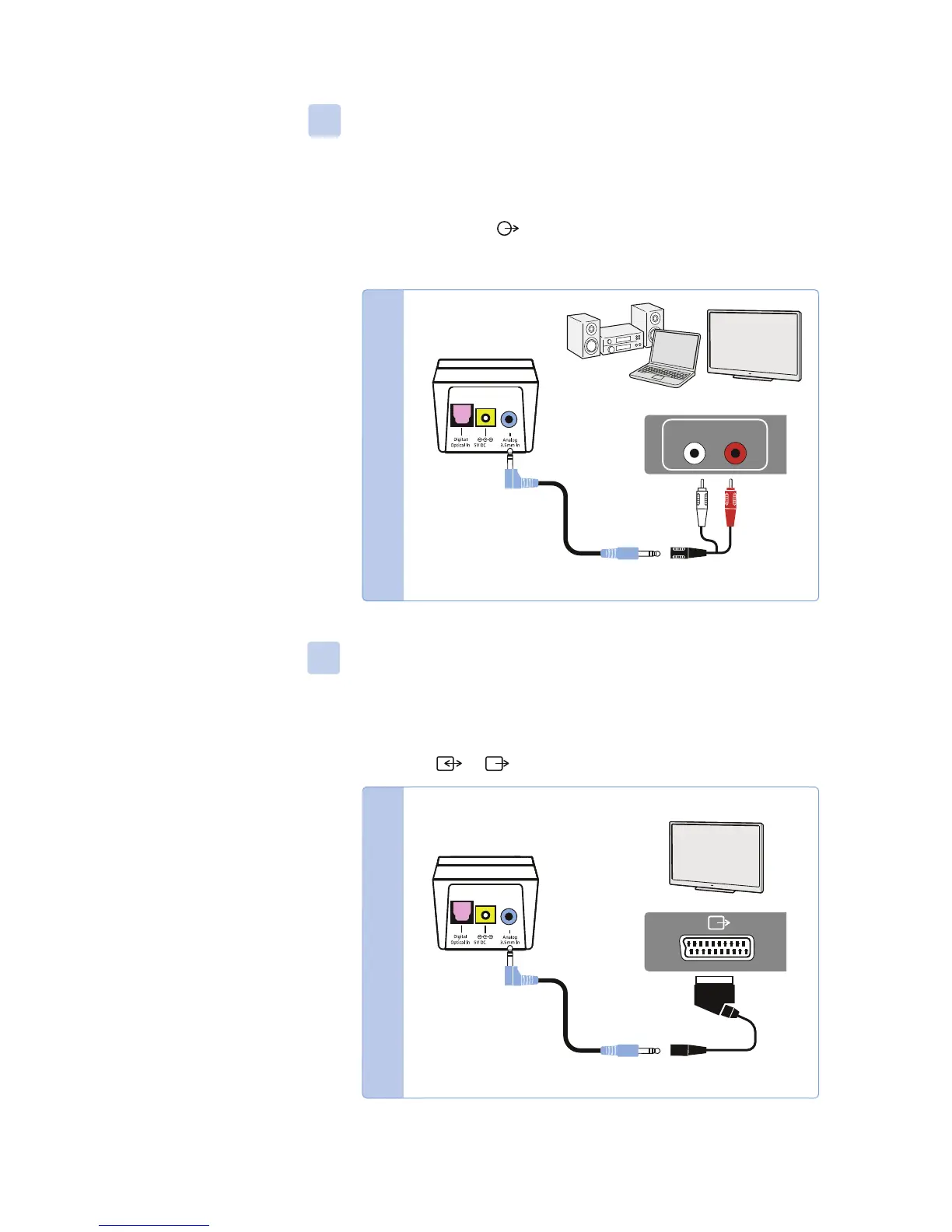
Connection possibility C: RCA sockets (analog)
왘 Plug the RCA adapter* onto the stereo audio cable.
왘 Connect the stereo audio cable to the blue 3.5 mm jack socket of
the transmitter.
왘 Connect the RCA connectors to the RCA sockets (mostly labeled
“AUDIO OUT” or ) of your audio source. Connect the red con-
nector to the red RCA socket and the white connector to the
white or black RCA socket.
* optional accessory
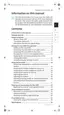
Connection possibility D: SC
ART socket (analog)
왘 Plug the SCART adapter* onto the stereo audio cable.
왘 Connect the stereo audio cable to the blue 3.5 mm jack socket of
the transmitter.
왘 Connect the SCART connector to the SCART socket (mostly
labeled or ) of your audio source.
* optional accessory
AUDIO OUT
LR
*
1A
*
1A











 To Next Page