Chapter 6: Acknowledgment, Status Report & Remote Access
93
%DWWHU\&RQGLWLRQ
$URINGA3TATUS2EPORTYOUMAYHEARONEOFTHREEPOSSIBLE
MESSAGESREGARDINGBATTERYPOWER4HE-ODELDETERMINESTHE
appropriate message by measuring battery voltage. Depending
upon the remaining voltage, it may respond:
s “The batteries are OK,” if over 8.2 Volts.
s “The batteries are low,”IFBETWEENAND6OLTS
s “Replace batteries,” IFBELOW6OLTS
5HPRWH$FFHVVE\7RXFK7RQHj7HOHSKRQH
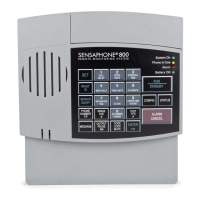
You can issue a number of commands to the 800 remotely using
A4OUCH4ONE
TELEPHONE4HISCOMMANDMODECANBEENTERED
ATANYTIMEDURINGTHESTATUSREPORT3IMPLYPRESSA4OUCH4ONE
ANDTHEUNITWILLHALTTHEREPORTANDRESPONDWITHh/+v9OUARE
NOWIN4OUCH4ONE
command mode. Commands are available
to perform the following functions:
s%NABLEANDDISABLEZONESPOWERMONITORINGANDSOUND
monitoring
s2ECITE3ET(IGHAND,OWALARMLIMITS
s2ECITE3ETTELEPHONENUMBERS
s2ECORD0LAYCUSTOMVOICEMESSAGES
s2ECITE3ETTHERELAYOUTPUT
s!CTIVATETHEMICROPHONEFORLISTENIN
s2ECITESTATUSREPORT
NOTE: If a security code is enabled, the 800
will prompt you with “Enter security code.”
%NTERTHEFOURDIGITKEYPADSECURITYCODEPLUS
“#vTOENTERTOUCHTONECOMMANDMODE)F
entered correctly, the 800 will respond with
h/+vANDYOUCANPROCEEDTOENTERTHECOM
mands. If entered incorrectly, the unit will give
you one more chance. If it is incorrect a second
time, the unit will say “Error, goodbye” and
hang up.


 To Next Page