MT3401E.doc rev.0 21/05/13 Pagina 75 di 86
4.5.6) Relay Outpus
Via the menu “Relay”, the characteristics of the outputs on the remote output modules
STG/OUT16 S being part of the system are enabled and programmed.
Relay overview
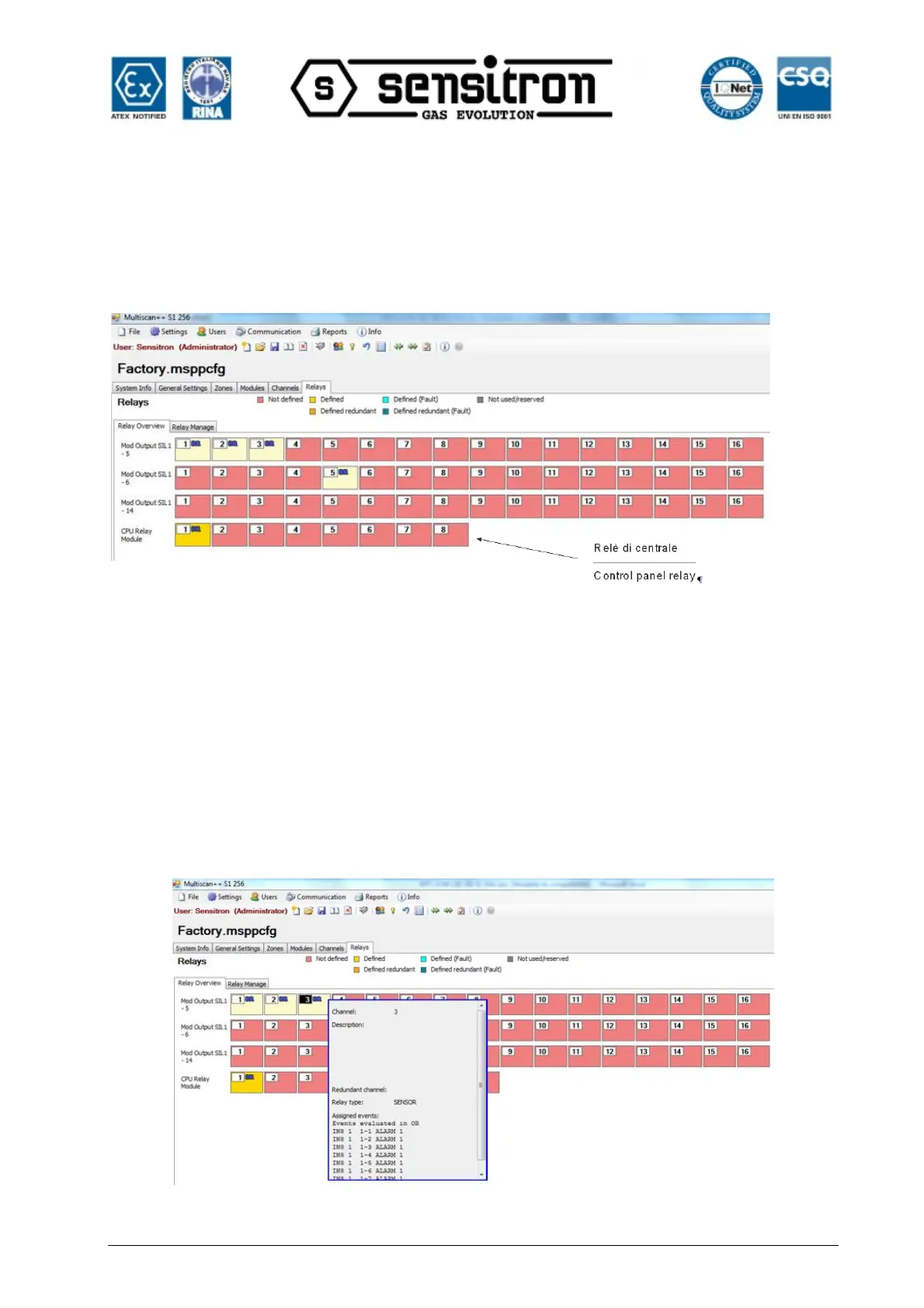
Fig. 4.5.6 a) Relay output overview screen
The Relay overview gives a quick overview of how many output modules (RIO Out
STG/OUT16 modules with or without extension relay board) are presently used in the
MULTISCAN++S1 and how many Outputs are defined. Different colours represent
different characteristics like redundant or non redundant, defined or not defined
Outputs.
To choose a Relay Output to view its data, simply pass the mouse over the Output
block and the data for this Output will be shown by a popup window. Otherwise, for the
modification of the Relay Output parameters with a mouse click on the Output block and
the data will be shown in the “RIO Output Manage” window.
Fig. 4.5.6 b) Output popup window with the parameters



 To Next Page