26
DIN Mount Kit
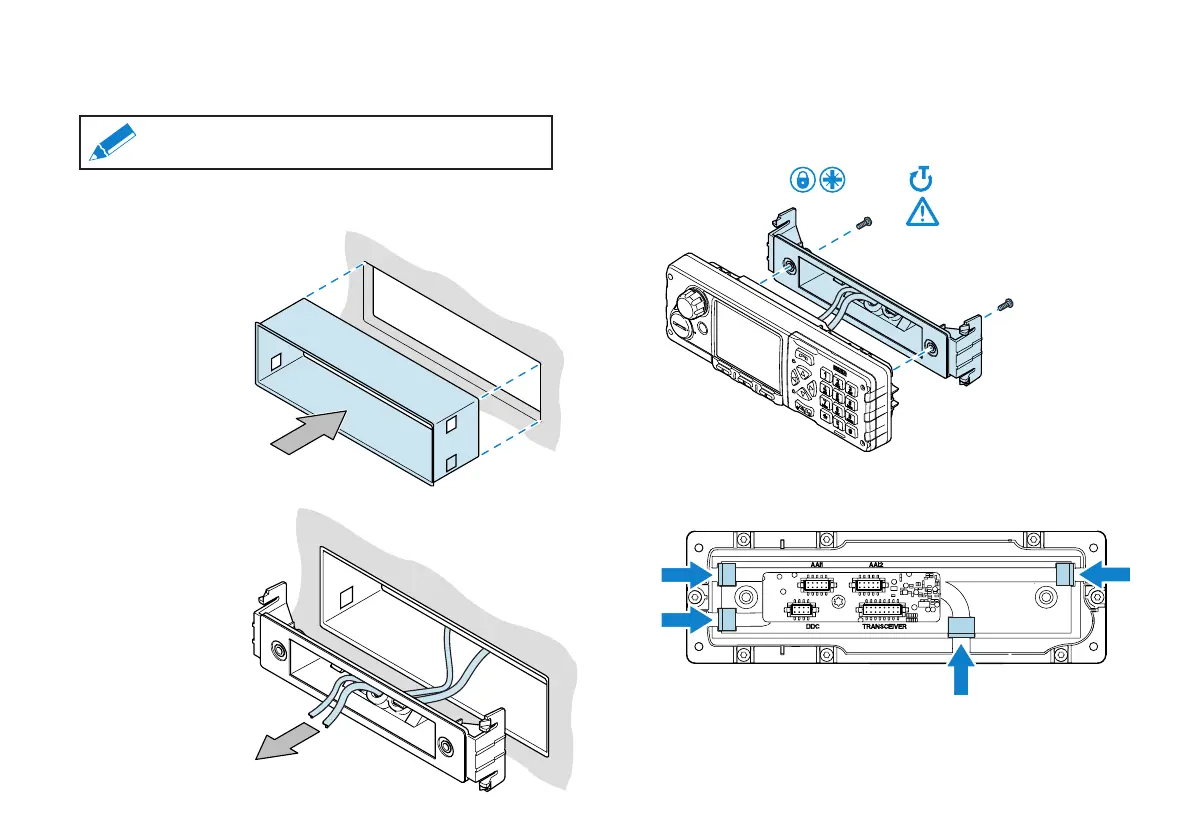
The SCC3 can be tted into the vehicle using a DIN mount kit and
DIN cage.
Note: Ensure that the cabling to the SCC3 is made to
the SCG22 before DIN mount installation.
Cabling to the SCC3 is completed when the cables are fed through the
DIN cage and secured in the DIN mount.
2. Feed the cables for the
SCC3 through the DIN cage
and DIN mount kit.
1. Fit the DIN cage into the slot
within the vehicle.
3. Feed the cables through the DIN mount and make the cable
connections to the SCC3. See the section "Cabling the SCC3" on
page 23.
4. Using the screws provided secure the DIN adapter to the SCC3
(maximum tightening torque = 0.8 Nm).
MAX 0.8 Nm
PZ-2
5. Fit the bungs provided into all cable channels in the SCC3 rear cover,
as indicated.



 To Next Page
 Loading...