Switched PRO2 – User Guide
Using the Web Interface • 26
Chapter 4: Using the Web Interface
This chapter shows how to work with the firmware GUI (version 8.0x or later) for the PRO2.
Logging In
Logging into the Web interface directs the Web client to the configured IP address of the Switched unit.
To login by Web interface
In the firmware login window, provide a valid username and password, and click OK.
If you enter an invalid username or password, you will be prompted again.
You are given three attempts for a valid username/password combination, after which the session ends and a
protected page will be displayed
Note: The default firmware username/password is admn/admn. There is no “i” in admn.
Quick Tour of the GUI
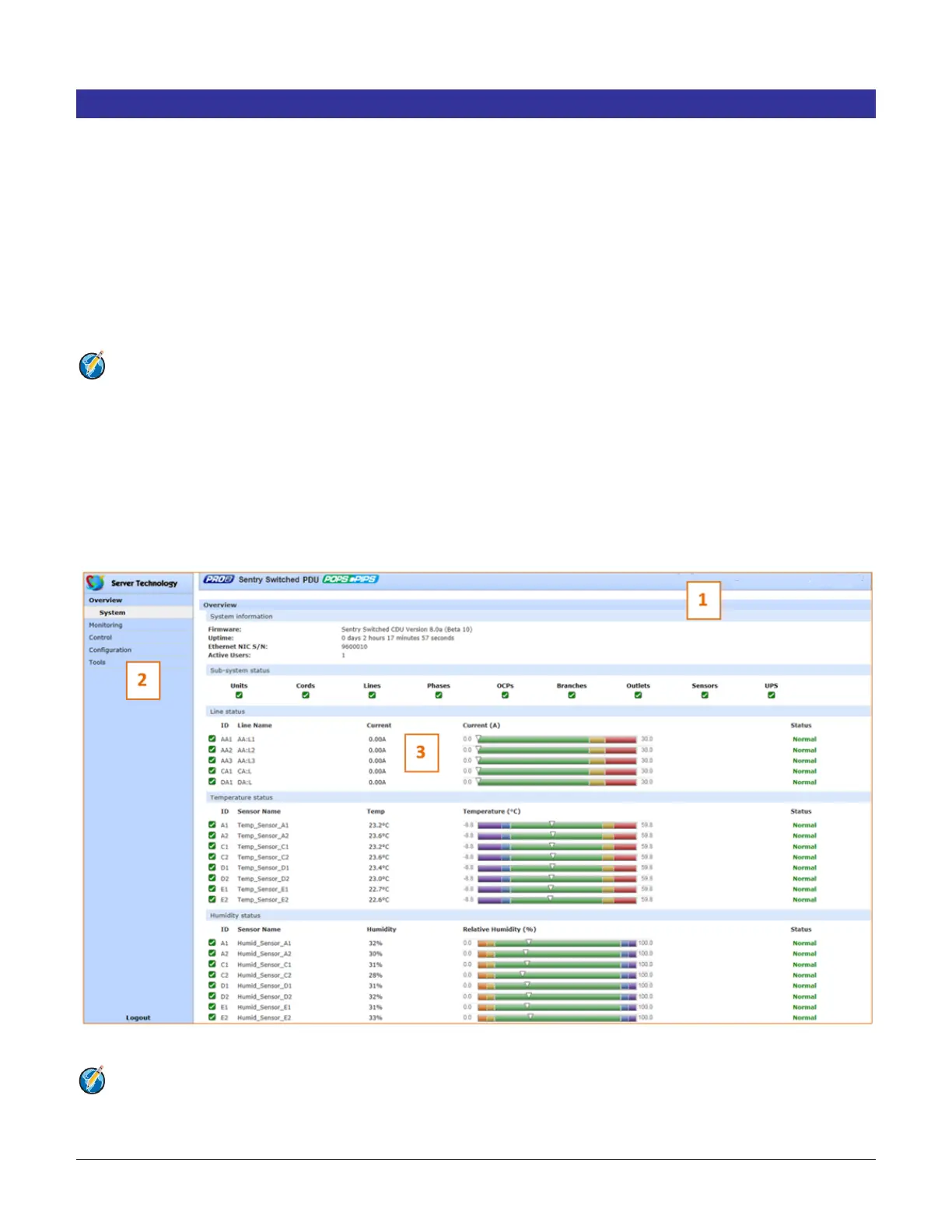
The web interface provides web-based access to the firmware for the Switched unit. The interface is designed with
three major screen sections shown in the following screen example:
1. System Header: Displays PRO2 description/location, IP address, and user/access level.
2. Navigation Bar: Provides access to PRO2 power monitoring, control actions, and configuration.
3. Details Window: Shows control/status information based on option selected in navigation bar.
Example of PRO2 Firmware Web Interface: Overview > System Page
Note: The optional blinking PRO2 location string (IP address) in the System Header may not work with all web
browsers.



 To Next Page