Switched PRO2 – User Guide
Using the Web Interface • 69
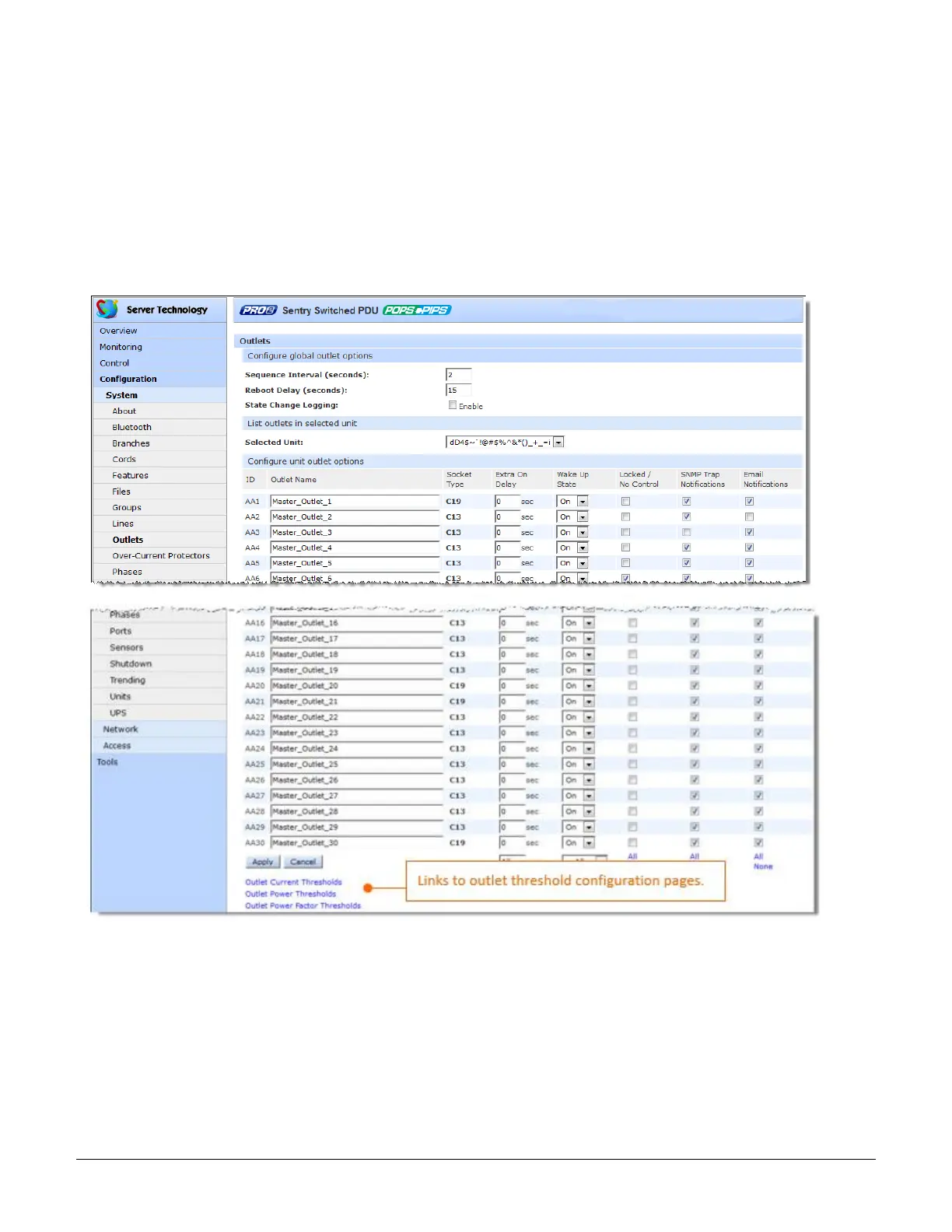
System > Outlets
The Outlets page allows configuration of global outlet parameters and outlet shutdown options, including the
setting of multiple threshold levels for outlet current, outlet power, and outlet power factor, plus the threshold
hysteresis. The page also sets sets SNMP Trap and Email notifications for outlet events.
For outlet management: the issuing of On, Off, and Reboot commands on individual outlets and all outlets globally,
see the separate Control > Outlets page and Control > Groups page.
For dynamic monitoring of outlet status, see the separate Monitoring > Outlets page.
For configuring and the assignment of outlets to user-defined outlet groups, see the separate Configuration >
Groups page.
To configure outlet options:
1. Set the Sequence Delay (in seconds) to determine the delay between turning on the outlets. Range is 0-15
seconds.
2. Set the Reboot Delay (in seconds) to set an extra on delay when rebooting an outlet.
3. Check to enable the State Change Logging feature. This option shows outlet state change as a reported
event in all system/debug logs.
4. In the Outlet Name field, provide a descriptive text name, from 0-32 characters. The ID is a system-
assigned internal name and cannot be changed



 To Next Page