Switched PRO2 – User Guide
Using the Web Interface • 87
About the Trending Report
• The report (and the data sets the report is generated from) are all stored separately.
• The report is created at midnight.
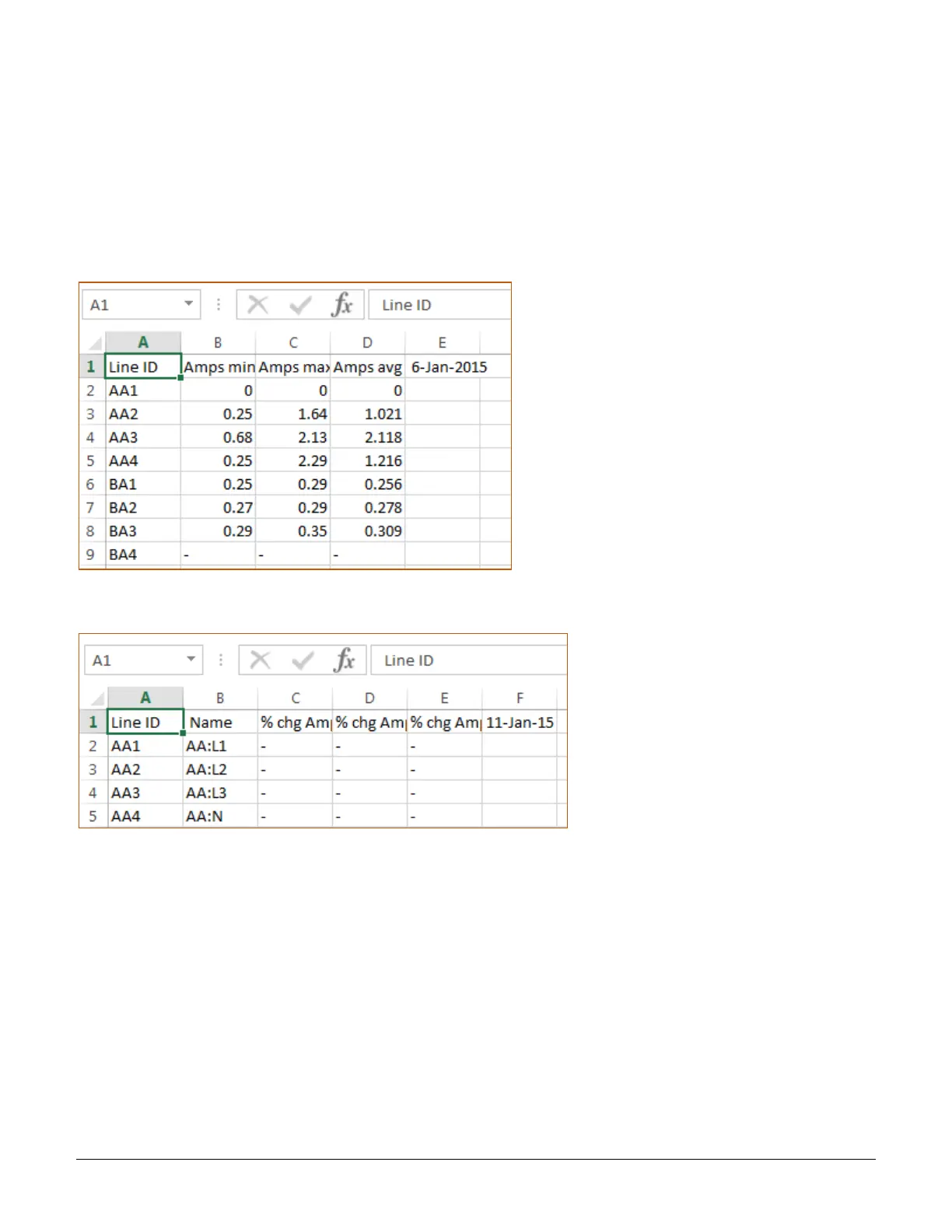
• The report contains the percent change of the average, maximum, and minimum measurements of the day
compared to the daily metrics from the same day on the previous week (7 days ago).
• The data set contains the actual values that the report was generated from: the average, maximum, and
minimum for the day
Example of Line source data set
Example of Line trend report
Accessing and Distributing the Trend Report and Data Sets
The report (and the individual data sets the report is generated from) are available at all times at Configuration >
System > Trending as comma delimited text files (HTTP, HTTPS, FTP, SFTP interfaces).
The file format name of the report and data sets is “STI-trend-(object)-yymmdd-macaddress.csv”.
Optionally, after the report is generated, the report (and the most recent 24-hour period of data in a data set file)
can be sent as an attachment to the primary and secondary “send to” email addresses.



 To Next Page