Switched PRO2 – User Guide
Using the Web Interface • 98
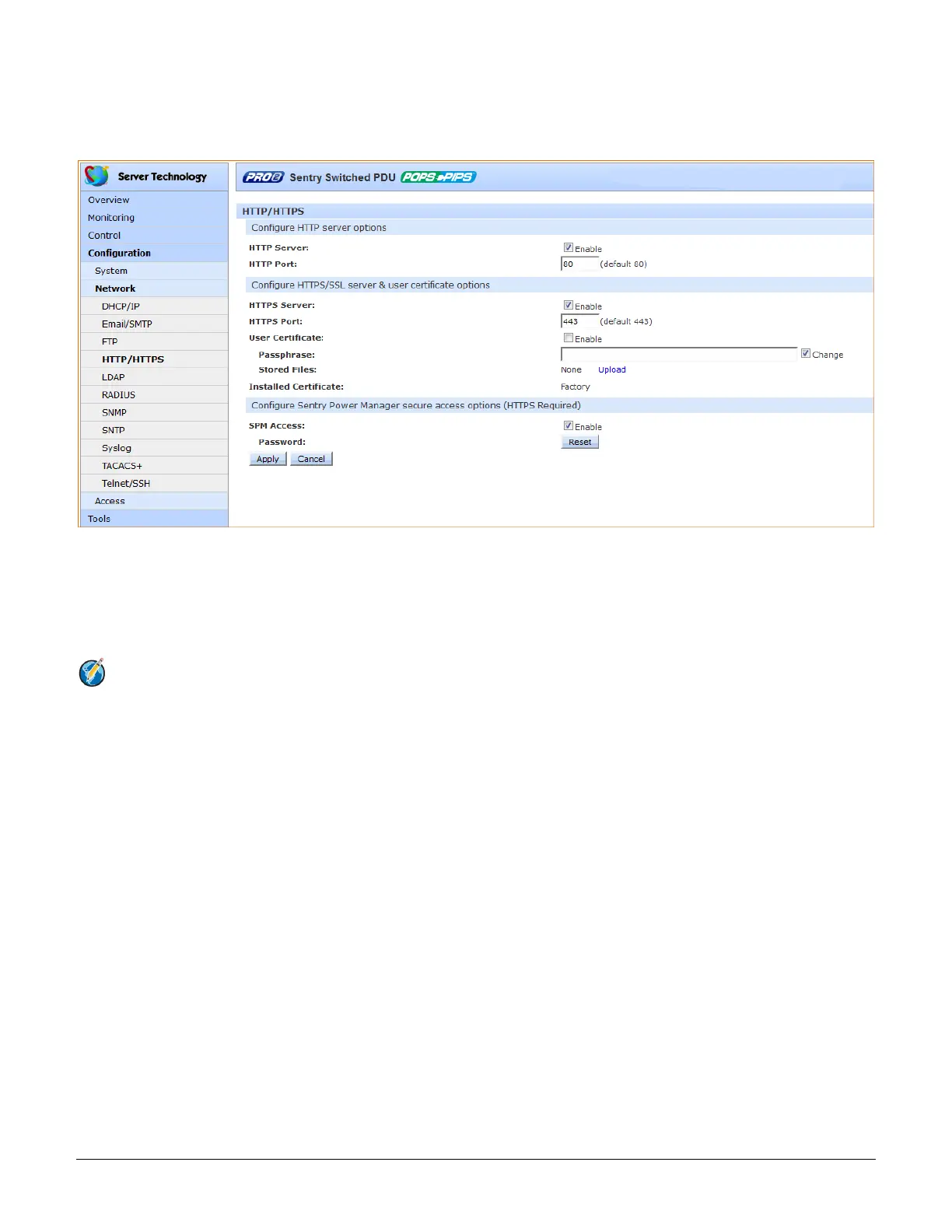
Network > HTTP/HTTPS
The HTTP/HTTPS page configures server options for HTTP, HTTPS, and SSL, including user-defined certificates.
The page also determines settings for the Sentry Power Manager (SPM) enterprise software product.
To configure HTTP and HTTPS/SSL:
1. Server: Check (or uncheck) the Enable checkboxes to enable/disable support for the HTTP and/or
HTTPS/SSL server options.
2. Port: Type a port number or accept the default HTTP/HTTPS/SSL port numbers as displayed. The HTTP
default port number is 80; the SSL default port number is 443.
Notes:
• SSL-encrypted (HTTPS) must be used for secure website connections.
• The number of concurrent HTTP/S sessions supported depends on the web browser in use.
To configure HTTPS/SSL only:
1. User Certificate: Check (or uncheck) the Enable checkbox to enable/disable support for custom user
certificates.
2. Passphrase: Provide a passphrase (0-63 characters) for the new user certificate. To change the
passphrase, type a new passphrase and check the Change checkbox
3. Stored Files: This section displays a message (described in the following table) to confirm the upload status
of the user certificate and its related public key.



 To Next Page