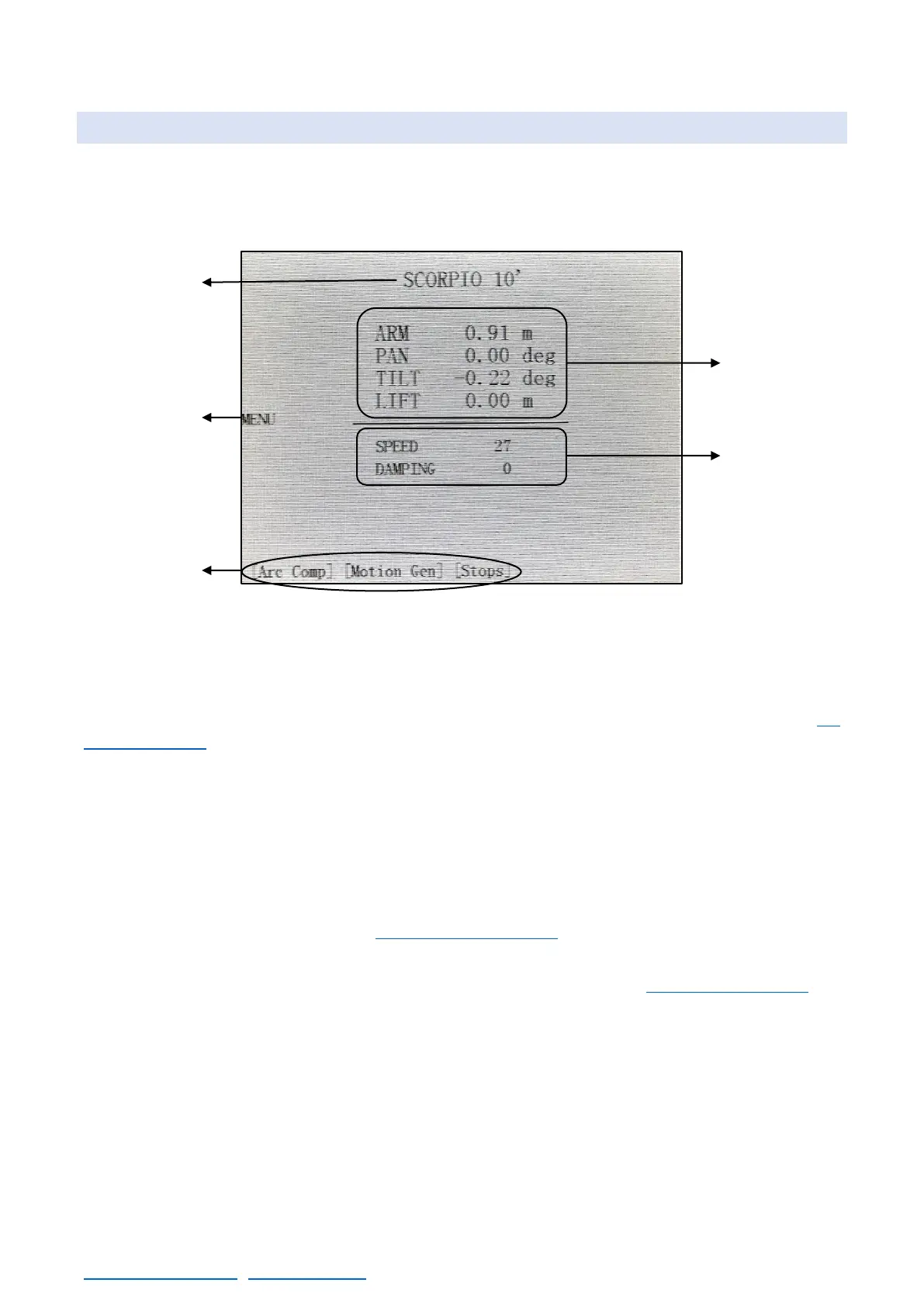
SCORPIO LIGHT SERIES 10’/17’/23’L - CONTROL DISPLAY INFORMATION - Main screen
Version 1.04 May 26, 2022
SERVICEVISION BIS SL
Ríos Rosas, 20 · 08940 CORNELLA DE LLOBREGAT (Barcelona) Spain · Tel. 34 93 223 86 30 · Fax 34 93 223 86 31 41
comercial@servicevision.es · www.servicevision.es
4.1 MAIN SCREEN
This is the Principal Menu screen. The different features buttons and system information appear in
this screen. The following system information appears:
A: The model on crane being used, SCORPIO 10´ in this case.
B: Opens a dropdown tab with different functions and configurations for the head (chapter 4.2
Operation menu)
C: These are shortcuts to the main functions of the crane (see each menu independently). If any of
these functions is activated, they will be flashing green.
D: This is the information of the position of the crane such as:
• The length of the crane arm in meters or feet (from the center of rotation).
• The PAN axis angle respect to where the Crane Arm was switched on or from the Zero Position
when a Pan Reset is done (see 4.2.3.3 Reset pan menu)
• The TILT axis angle respect to the horizon.
• The LIFT is the height of the camera lens and can be adjusted (see 4.2.3.2 Lift calibration).
E: Displays the Arm Movement Speed from 0% –100%. If the Speed setting is below 5, “Very Slow
Speed” is displayed.
The Damping level goes from 0, very hard to 100, very soft. This is how soft or hard the Crane Arm
slows down when stopping. This setting affects the Programmable Limits, the final Arm Limit ramps
and the stop at any point where the operator stops telescoping.



 To Next Page