Description of the appliance
15
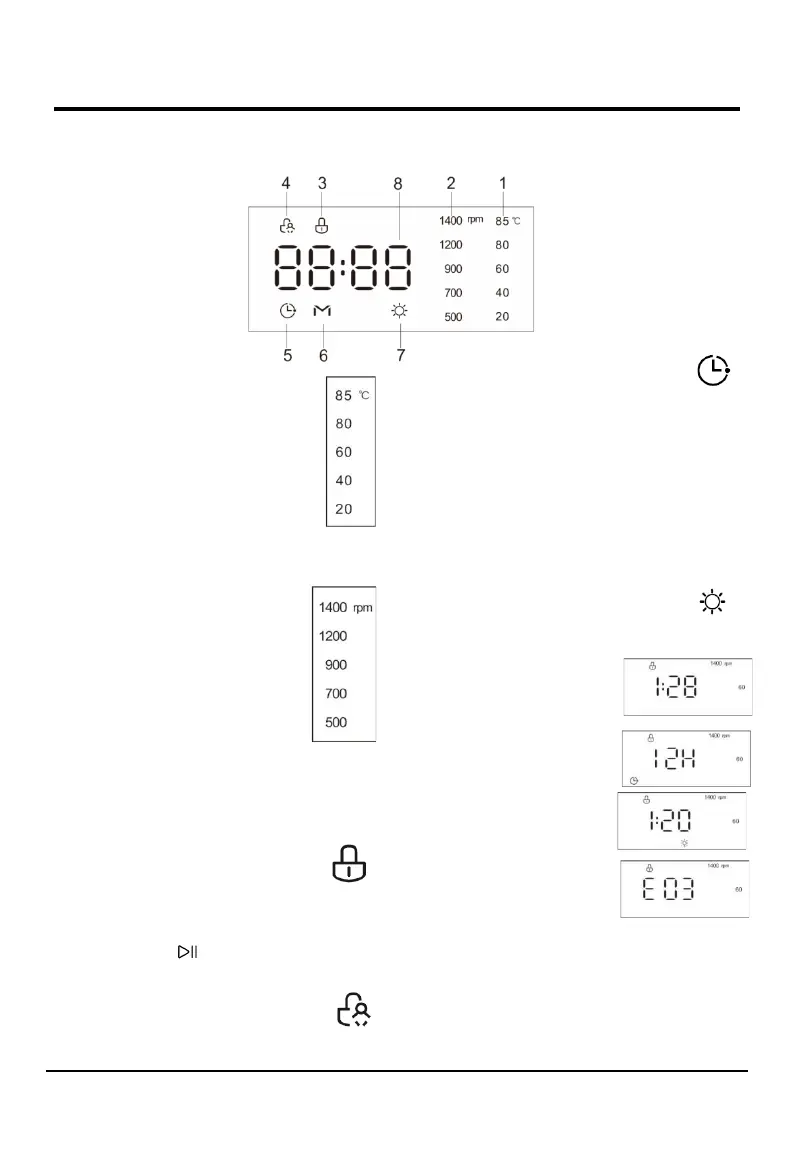
The display is useful when programming the machine and provides a great deal of information
.
M---Display
1---Temperature indicator
When a program is selected, the default
temperature value indicator light of this
program will be lit on the display.
You can change the temperature value by
pressing the TEMP. button. There are five
temperature values indicator lights on the
display. When a temperature value is
selected, the corresponding temperature
value indicator light will be lit on the
display. If all temperature value indicator lights are
off, it indicates the appliance using only cold water
without utilized the heater in this program.
2---SPINNING SPEED indicator
When a program is selected, the
default spinning speed value indicator
light of this program will be lit on the
display.
You can change the spinning speed
value by pressing the SPEED button.
There are five spinning speed values
indicator lights on the display. When a
spinning speed value is selected, the corresponding
spinning speed value indicator light will be lit on the
display. If all spinning speed value indicator lights are
off, it indicates the appliance does not spin after the
final drain process in this program.
3---DOOR LOCK indicator
The lit indicator light indicates that the
door is locked. To prevent any damage,
wait until the indicator light turns off
before opening the door.
To open the door while a cycle is in progress, press
the START/PAUSE button, if the DOOR LOCK
indicator light is off, the door may be opened.
4---CHILD LOCK indicator
The lit indicator light indicates the CHILD
LOCK function is activated, the control
panel is locked.
5---DELAY END indicator
The lit indicator light indicates the DELAY
END function is activated. The countdown
to the end of the selected wash cycle will appear on
the digital display.
6---ONE TOUCH indicator
The lit indicator light indicates the One Touch wash
program is selected. There are three ways to set the
One Touch wash program.
7---DRYING FUNCTION indicator
When the indicator light is lit, it means that
drying function has been set or carrying the
drying cycle.
8---DIGITAL DISPLAY
1) Remaining time of
the wash cycle
2) Delay end time
3) Drying time
4) Fault code


 To Next Page