19
Temperature
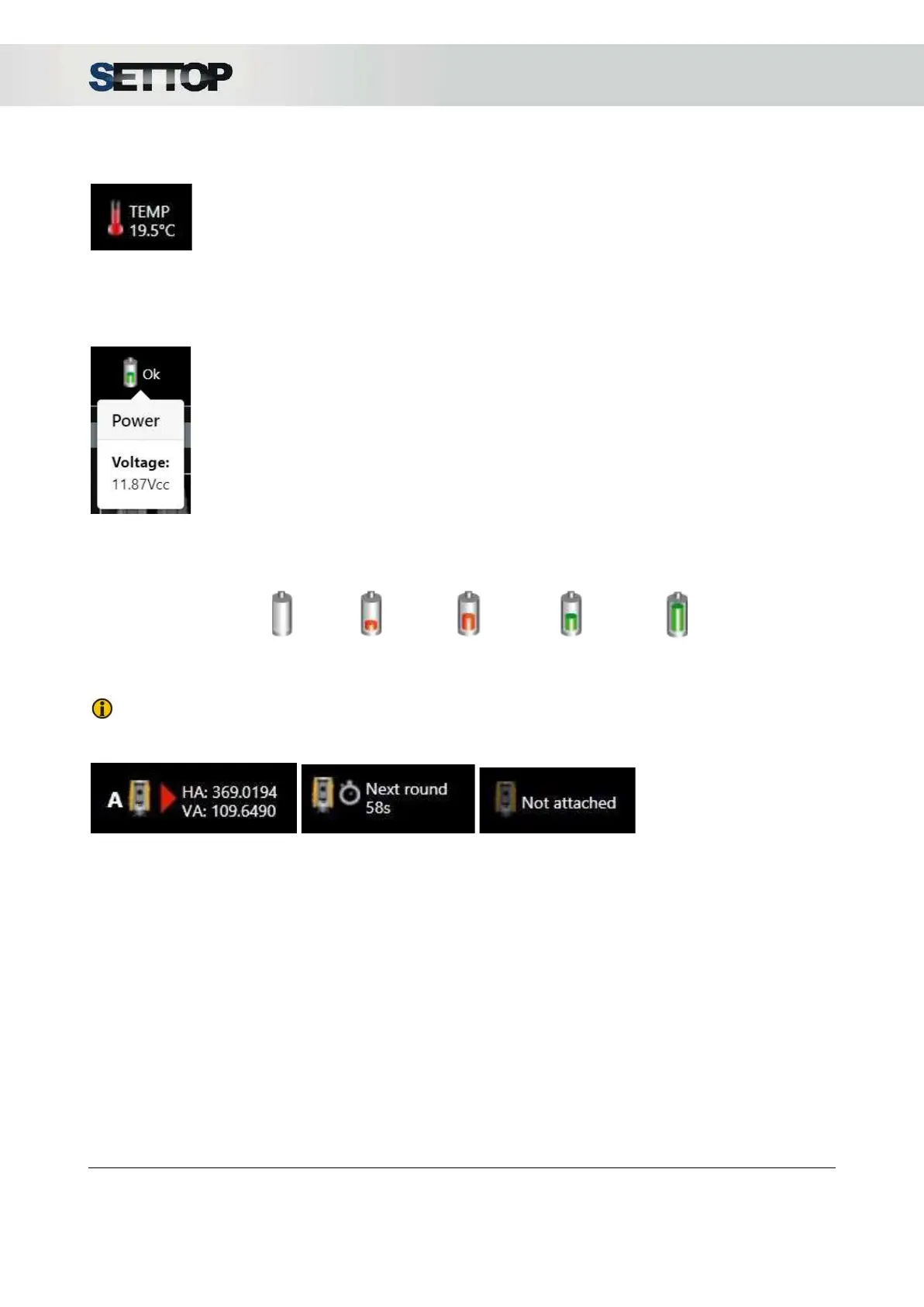
The thermometer icon indicates the temperature read by the sensor in degrees Centigrade. Pressing on the
icon a drop-down appears
Power
The battery symbol indicates voltage level received for the receiver. Pressing on the icon a drop-down
appears.
The battery levels are divided into 5 states ranging from 0% to 100%
NOTE: In a state of continuous power, the voltage will remain stable.
Total Station
The last icon corresponds
to the Total Station (TS) and indicates the status in which the TS is located. The states can be 3:
● Connected and measuring:
the angles are shown in Centesimal degrees (there is no option to
change the units) and the measurement method:
○ A:
Autolock
○ FL:
FineLock
○ LR
: FineLock Long Range
○ DR:
Direct Reflex
○ M:
Manual
● Waiting
for the next round and the remaining time to start the next one
● Not attached
In all of them, clicking on the icon shows us information about the device
SETTOPSURVEY, S.L. Bofarull 14, 08027 Barcelona (Spain) Phone: (+34) 93 340 05 73 Fax: (+34) 93 351 95 18 www.settopsurvey.com info@settopsurvey.com


 To Next Page