38
Project bar
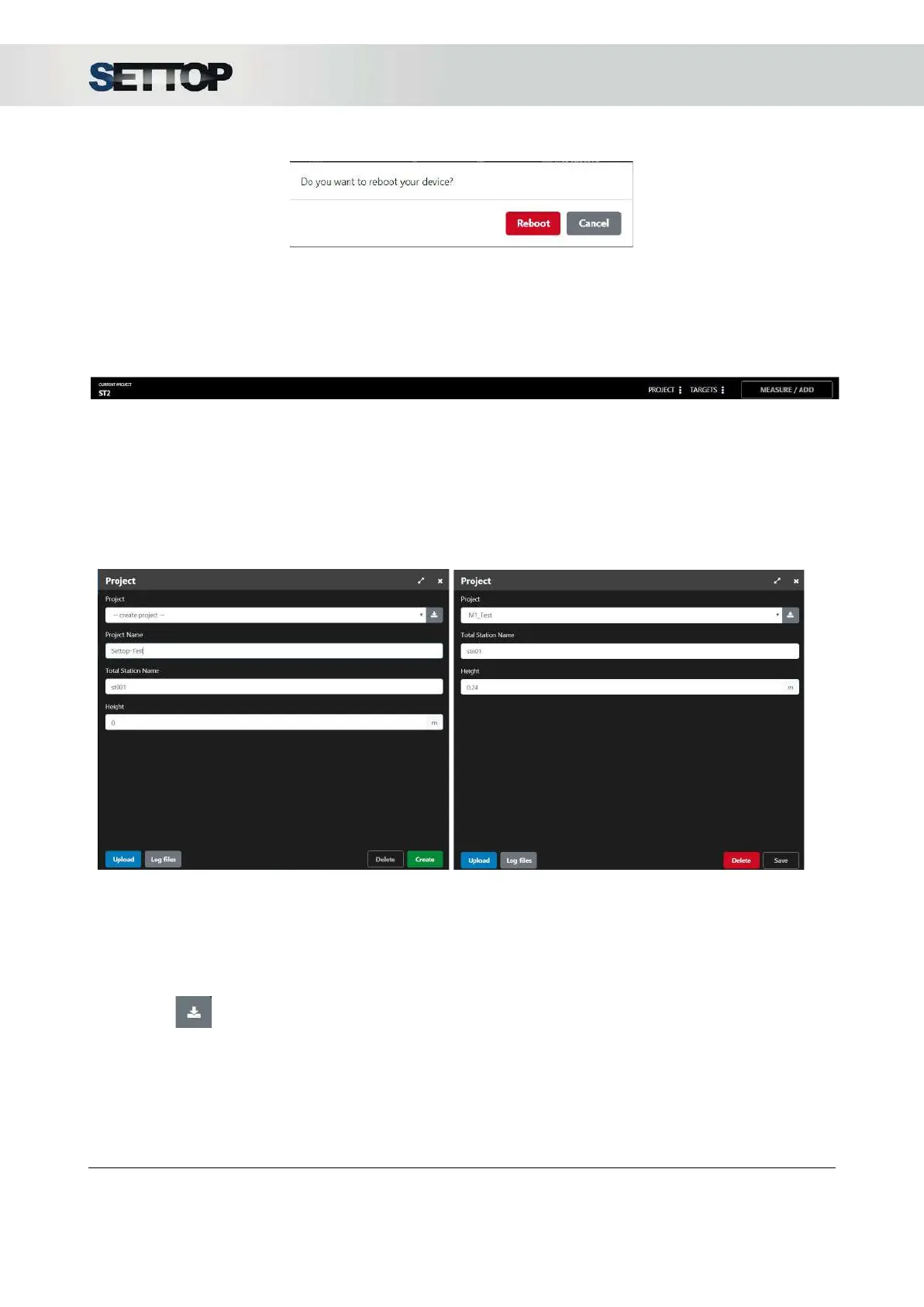
In the project bar located at the bottom, the information of the current project appears, the buttons to add /
edit references, to create and manage the projects and to give the action of measuring the total station.
Project
Pressing the project button, a menu opens with a dropdown list where all stored projects appear and the
possibility of creating a new one
When New Project
is selected, a bar appears with the possibility of entering the name of the project, the
name of the reference station and the height of the instrument. The Create
button is enabled.
In the case of selecting a project from the list, the name and height of the station is displayed. The Delete
project button is enabled.
By pressing is possible to download the project file (*.TS)
By pressing the Upload
button, a project file can be loaded. The supported formats are * .TS (own Settop
M1 format) and * .JXL format (the Trimble Job XML format). If one project already exists, it show a
message asking what do you want to do: Overwrite
or Cancel
SETTOPSURVEY, S.L. Bofarull 14, 08027 Barcelona (Spain) Phone: (+34) 93 340 05 73 Fax: (+34) 93 351 95 18 www.settopsurvey.com info@settopsurvey.com


 To Next Page