22
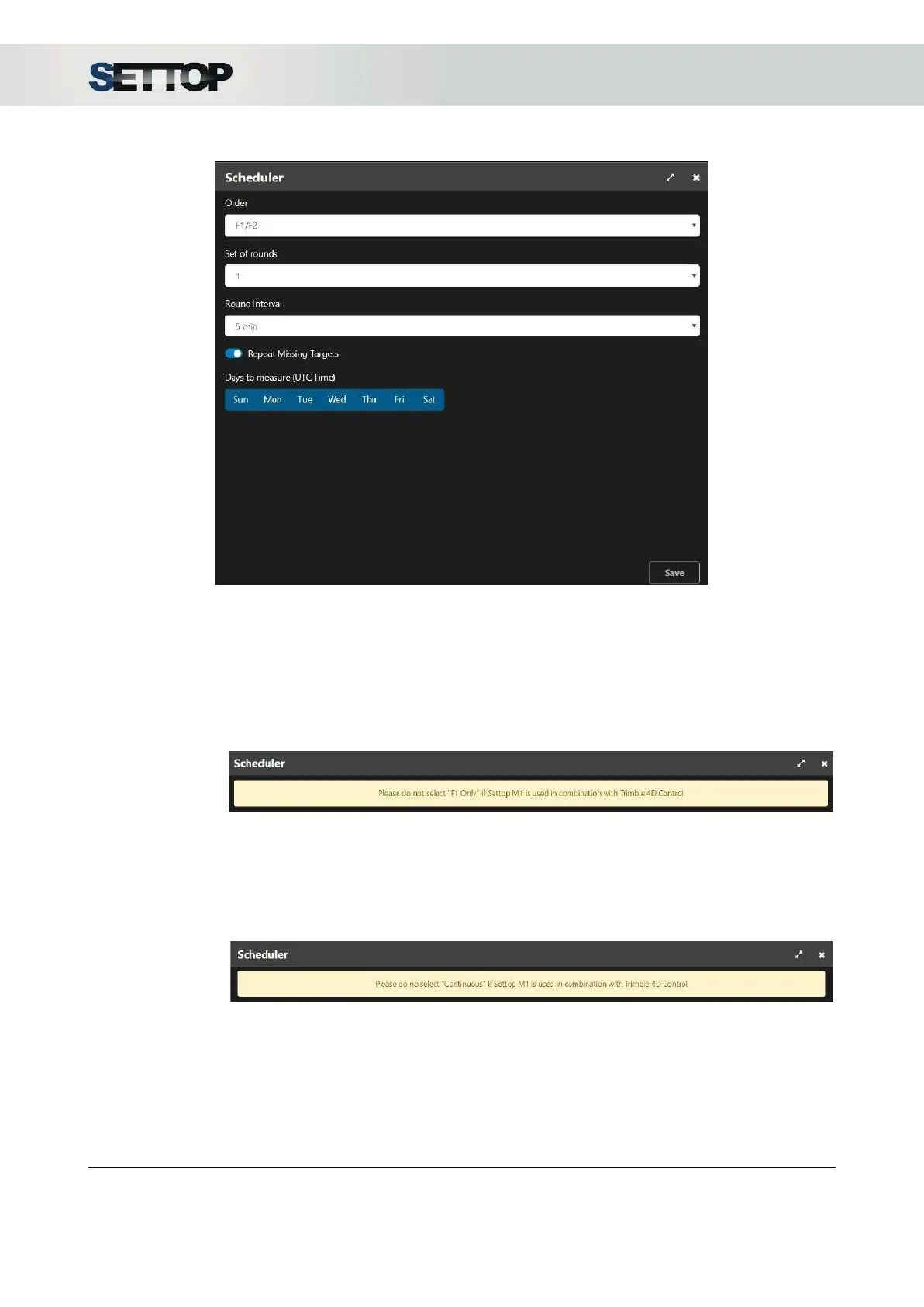
○ Order
: Decide how a point is to be measured, whether on 2 faces or 1 face and in what
order.
■ F1 / F2: Measure Face 1 and Face 2 at the same time
■ F1 ... F2: First, measures all the points in Face 1 and then repeat the procedure with
Face 2
■ F1 only: Only measures in Face 1. It will show a message inform to you that it is not
possible to select this option in combination with Trimble T4D
○ Set of Rounds: Select the number of rounds to perform before entering standby mode to
start the next round.
■ Continuous: Measure continuously without stopping. The round interval option
disappears. It will show a message inform to you that it is not possible to select this
option in combination with Trimble T4D
■ 1,2,3,4,5 or 10: Number of rounds to be performed
○ Round Interval: It is the waiting time between the beginning of a round and another round
(it is not the rest time), if a time interval is selected that is less than the measurement time of
the whole round of points, the round that you want to start at Half would be lost and the next
is expected. Interval options:
■ 5, 10, 15, 20, 30, 45, 90 min
SETTOPSURVEY, S.L. Bofarull 14, 08027 Barcelona (Spain) Phone: (+34) 93 340 05 73 Fax: (+34) 93 351 95 18 www.settopsurvey.com info@settopsurvey.com


 To Next Page