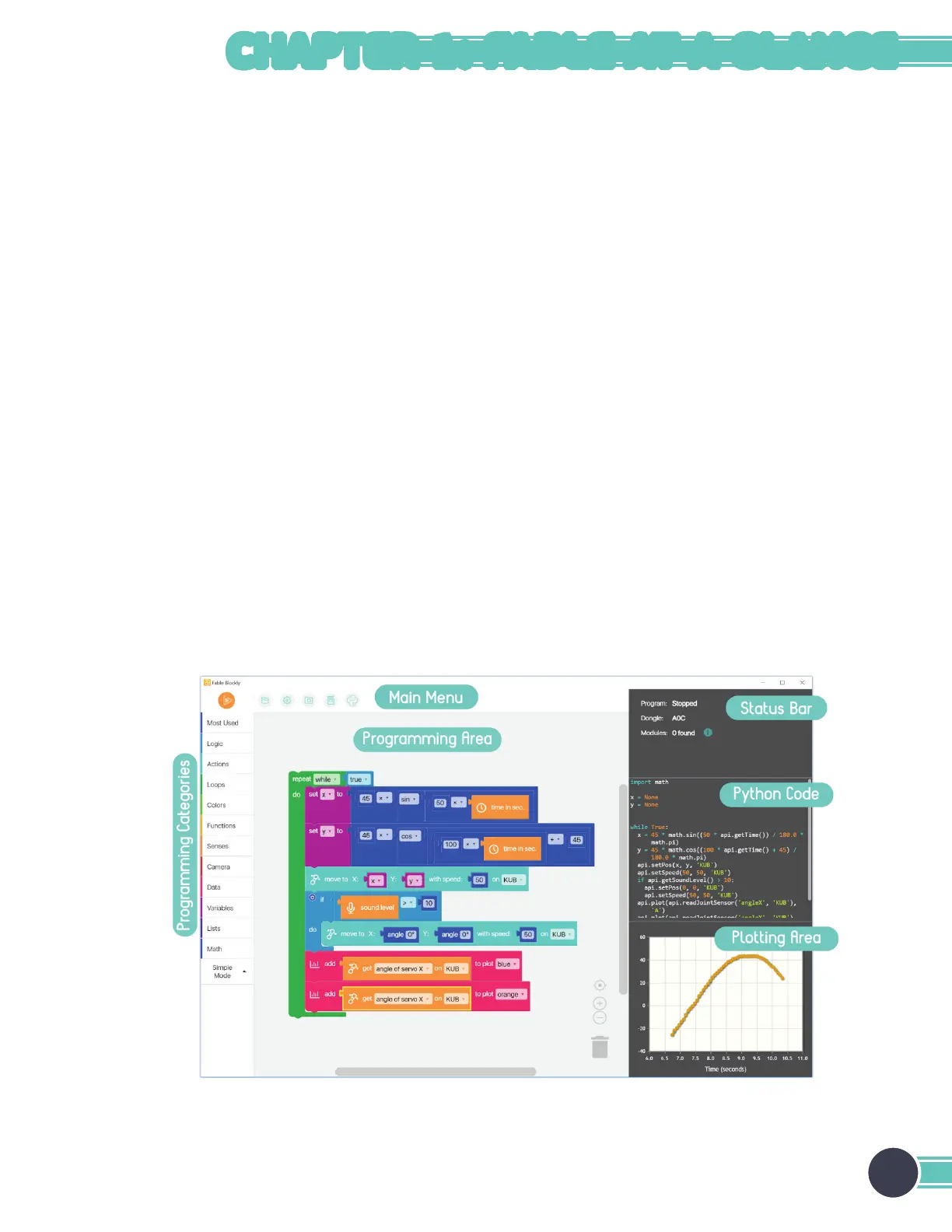
Interface of the PC Software
The interface contains the following sections:
The main menu contains buttons for:
• Running or stopping a program.
• Setting up a project – starting a new project and loading, saving, or opening an example.
• Opening the settings menu.
• Turning on the camera, which can be used for some programs.
• Reading the getting-started guide.
• Switching between block-based (Blockly) and text-based programming (Python).
Programming categories are visible when you use block-based programming. All available blocks are sorted and placed in
a category based on their function (for example, all available arithmetic operations are placed in the Math category).
Drag blocks from the programming categories to the programming area. These blocks will now be a part of the program
that will be executed when the user presses the Run button in the main menu. The application uses vertical order to
determine which block gets executed first. If the program is in Python mode, this area is replaced by a big space that allows
code editing.
The status bar shows the connected hub and all active modules that are paired with it. If a program is executed and has
errors, those errors will be shown in the status bar.
All available blocks correspond directly to Python code, which makes the transition to text-based programming a bit easier.
The Python code section visualizes how the constructed program in the programming area will look like if it were written
in Python.
Some blocks allow users to plot data, such as the data read from a sensor. The result is shown in the plotting area of the
app.
11
CHAPTER 1: FABLE AT A GLANCE


 To Next Page