10
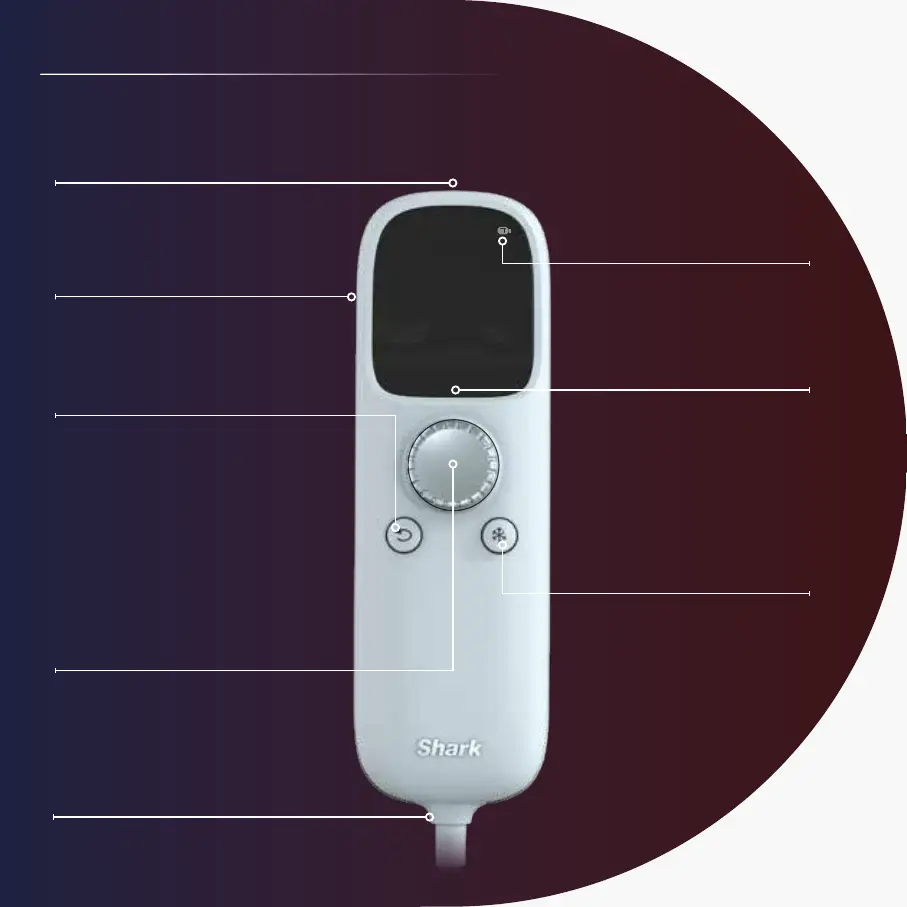
USB-Charging Port
Battery Life
Appears on the main menu
and active routine screen.
Dial (Power/Select)
Long-press center of dial
to turn the mask on or off.
Rotate dial left or right
to navigate the screen.
A quick press selects menu
items or goes to the next screen.
Mask Connection Cord
Back Button
Press to go to
previous screen.
Belt Clip
Use to attach to clothing
for a hands-free experience.
LCD Display
Main menu is
displayed currently.
Chill Button
Turn on/off/adjust cooling
anytime during routines.
GET TO KNOW THE REMOTE REMOTE SETTINGS



 To Next Page