9
Demo video will run upon first use of the remote, please watch for further fit
and comfort instructions. You can also rewatch this video by heading to settings.
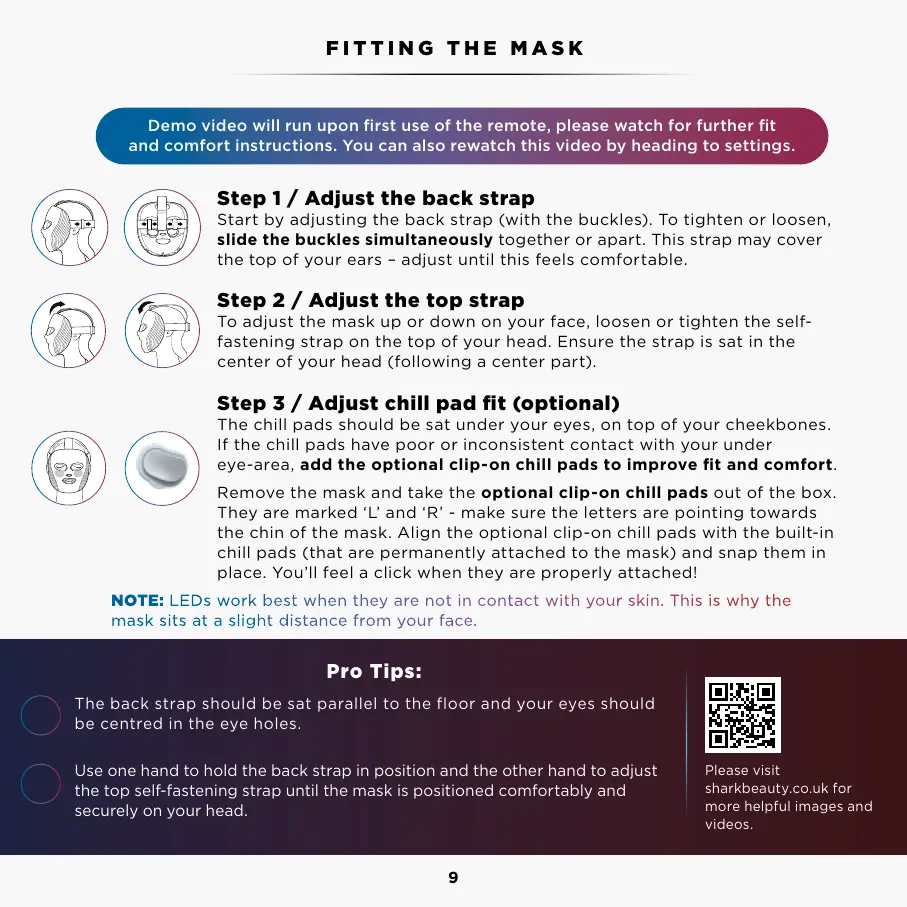
Step 1 / Adjust the back strap
Start by adjusting the back strap (with the buckles). To tighten or loosen,
slide the buckles simultaneously together or apart. This strap may cover
the top of your ears – adjust until this feels comfortable.
Step 2 / Adjust the top strap
To adjust the mask up or down on your face, loosen or tighten the self-
fastening strap on the top of your head. Ensure the strap is sat in the
center of your head (following a center part).
Step 3 / Adjust chill pad fit (optional)
The chill pads should be sat under your eyes, on top of your cheekbones.
If the chill pads have poor or inconsistent contact with your under
eye-area, add the optional clip-on chill pads to improve fit and comfort.
Remove the mask and take the optional clip-on chill pads out of the box.
They are marked ‘L’ and ‘R’ - make sure the letters are pointing towards
the chin of the mask. Align the optional clip-on chill pads with the built-in
chill pads (that are permanently attached to the mask) and snap them in
place. You’ll feel a click when they are properly attached!
Pro Tips:
The back strap should be sat parallel to the floor and your eyes should
be centred in the eye holes.
Use one hand to hold the back strap in position and the other hand to adjust
the top self-fastening strap until the mask is positioned comfortably and
securely on your head.
FITTING THE MASK
Please visit
sharkbeauty.co.uk for
more helpful images and
videos.
Please read the Warnings, Instructions, and Countraindications before first use.
1
2
Tighten Loosen
NOTE: LEDs work best when they are not in contact with your skin. This is why the
mask sits at a slight distance from your face.



 To Next Page