8
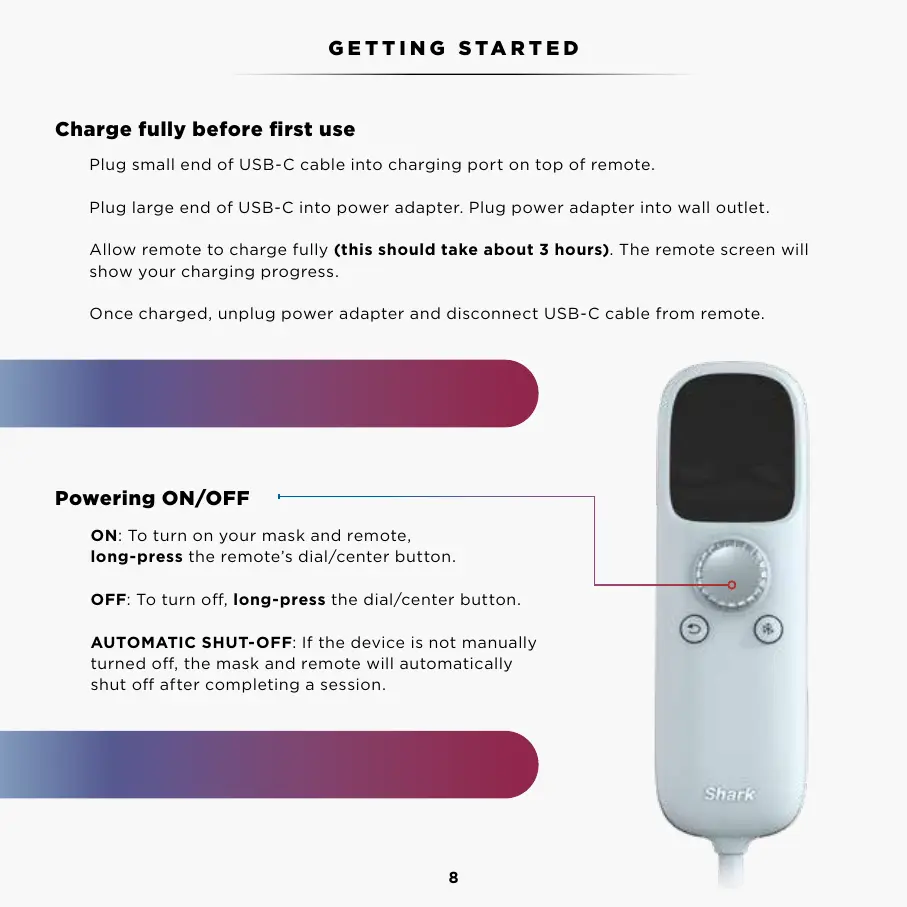
Plug small end of USB-C cable into charging port on top of remote.
Plug large end of USB-C into power adapter. Plug power adapter into wall outlet.
Allow remote to charge fully (this should take about 3 hours). The remote screen will
show your charging progress.
Once charged, unplug power adapter and disconnect USB-C cable from remote.
ON: To turn on your mask and remote,
long-press the remote’s dial/center button.
OFF: To turn o, long-press the dial/center button.
AUTOMATIC SHUT-OFF: If the device is not manually
turned o, the mask and remote will automatically
shut o after completing a session.
Charge fully before first use
Powering ON/OFF
GETTING STARTED
NOTE: Unplug before using face mask. Mask
will not work when plugged into wall outlet.
The mask fans will continue to run for 60 seconds
while the mask is powering down after a session.
Please read the Warnings, Instructions, and Countraindications before first use.



 To Next Page