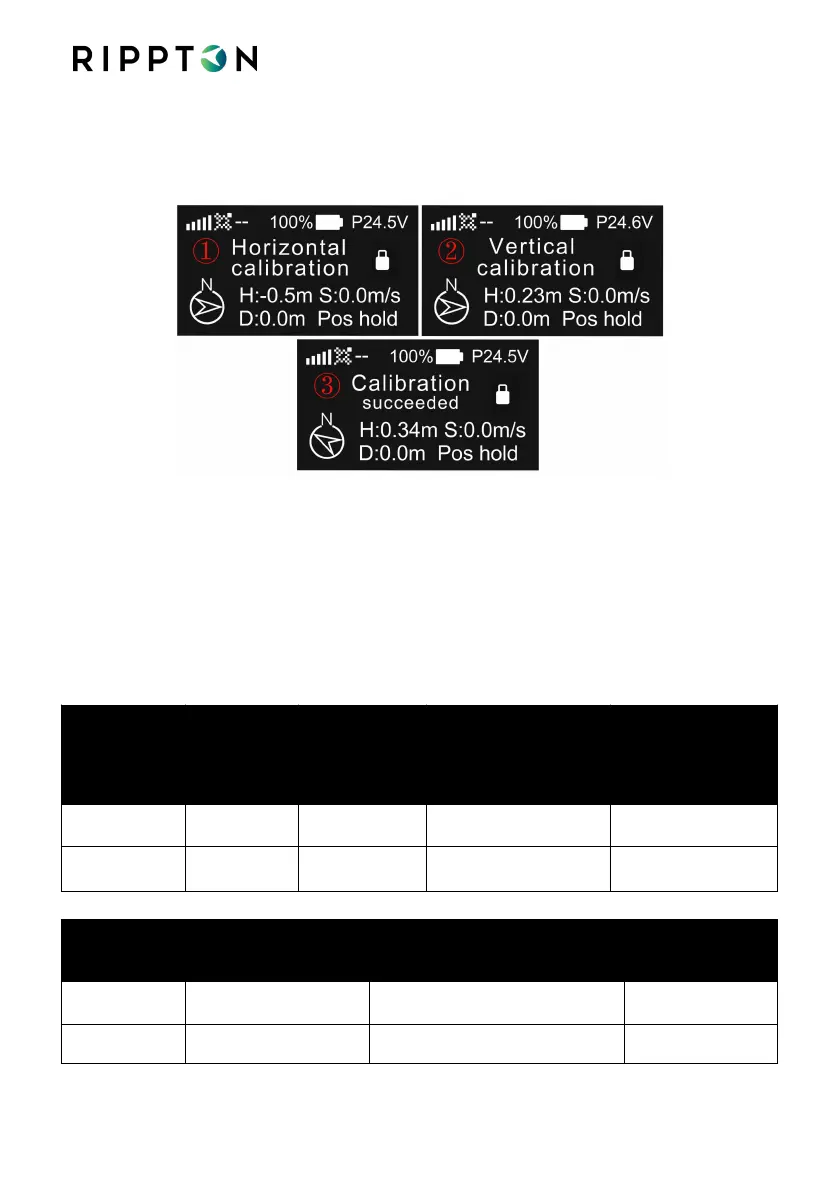
Step 2: When the screen shows “Horizontal calibration”, hold the drone horizontally
with its nose outwards and start rotating. The RC will emit a long beep indicating the
horizontal calibration has succeeded.
Step 3: When the screen shows “Vertical calibration”, hold the drone vertically with its
nose downwards and start rotating. The RC will emit a short beep indicating the
horizontal calibration has succeeded. Then the screen will show “Calibration
succeeded”.
Notice please refer to step 2&3 in 4.5.2 on how to hold the drone during calibration
After successful calibration please place Shark X on a flat surface and switch the drone
OFF and then Back ON to “save” the calibration.
SharkX Indicator Status of Horizontal Calibration:
Horizontal
Calibration
Completed
Front- yellow & blue
Rear- yellow & blue
Front- red & blue
Rear- red & blue
SharkX Indicator Status of Vertical Calibration:
Vertical Calibration
Completed
Front- yellow & blue
Rear- yellow & blue


 To Next Page