SharkRack Enclosure Installation Guide
ID-00210-000 REV D, ECO2773 Page 27 of 46
Installing a Grounding Kit
Step Detail
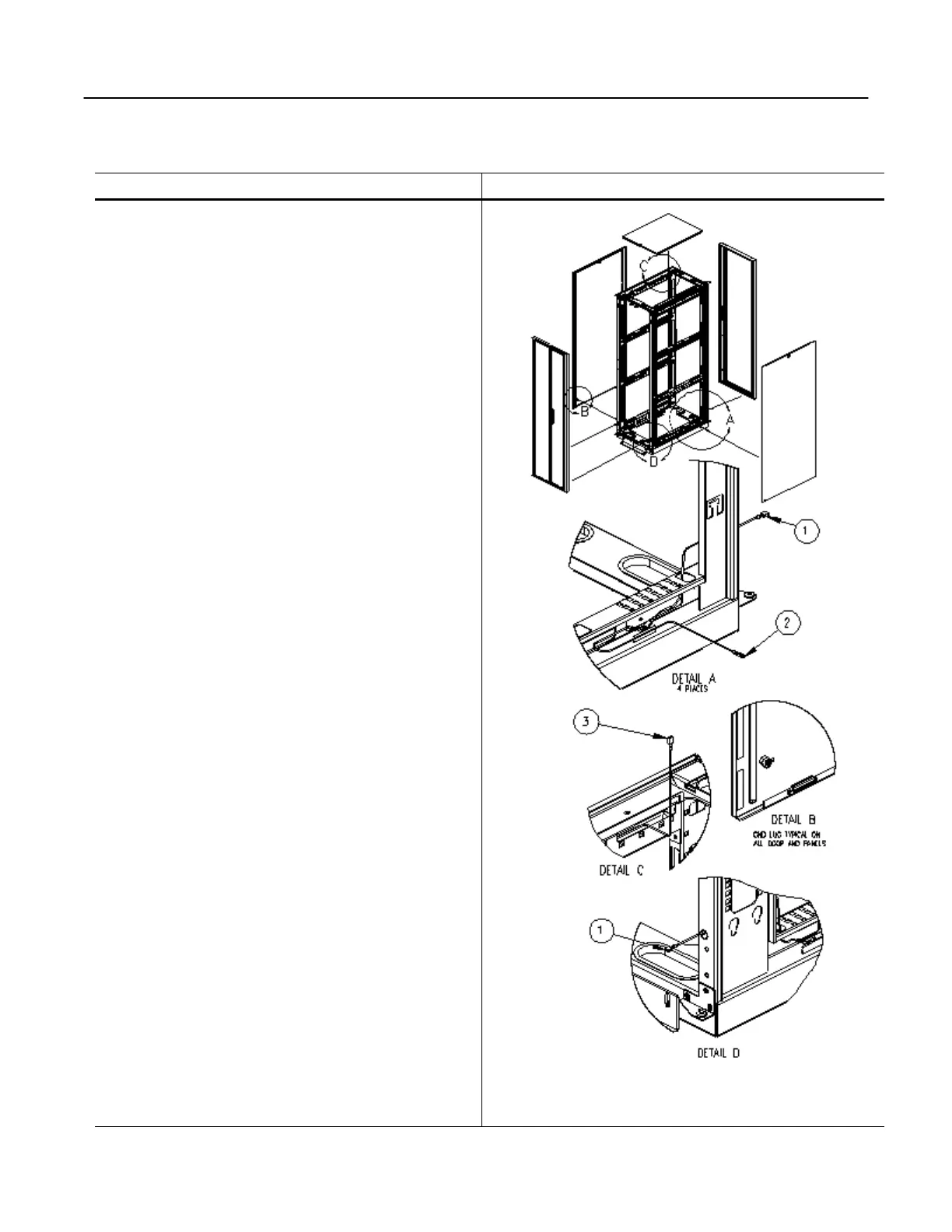
Grounding points are provided on the various cabinet
components so that each component can be electrically
bonded to the frame.
Detail A:
Shows how to route the grounding cables through the
frame of the cabinet. Connection (1) attaches to either of
the door assemblies. Connection (2) attaches to the side
panel
Detail B:
Shows where connection (2) attaches to the corner of the
Side Panel
Detail C:
Shows how to route the grounding cable to the top panel.
Detail D:
Shows the door grounding cable being routed through the
face of the corner post (reverse side of Detail A).
Figure 27
Grounding Points
42U X 37DP Cabinet Shown


 To Next Page