SharkRack Enclosure Installation Guide
ID-00210-000 REV D, ECO2773 Page 28 of 46
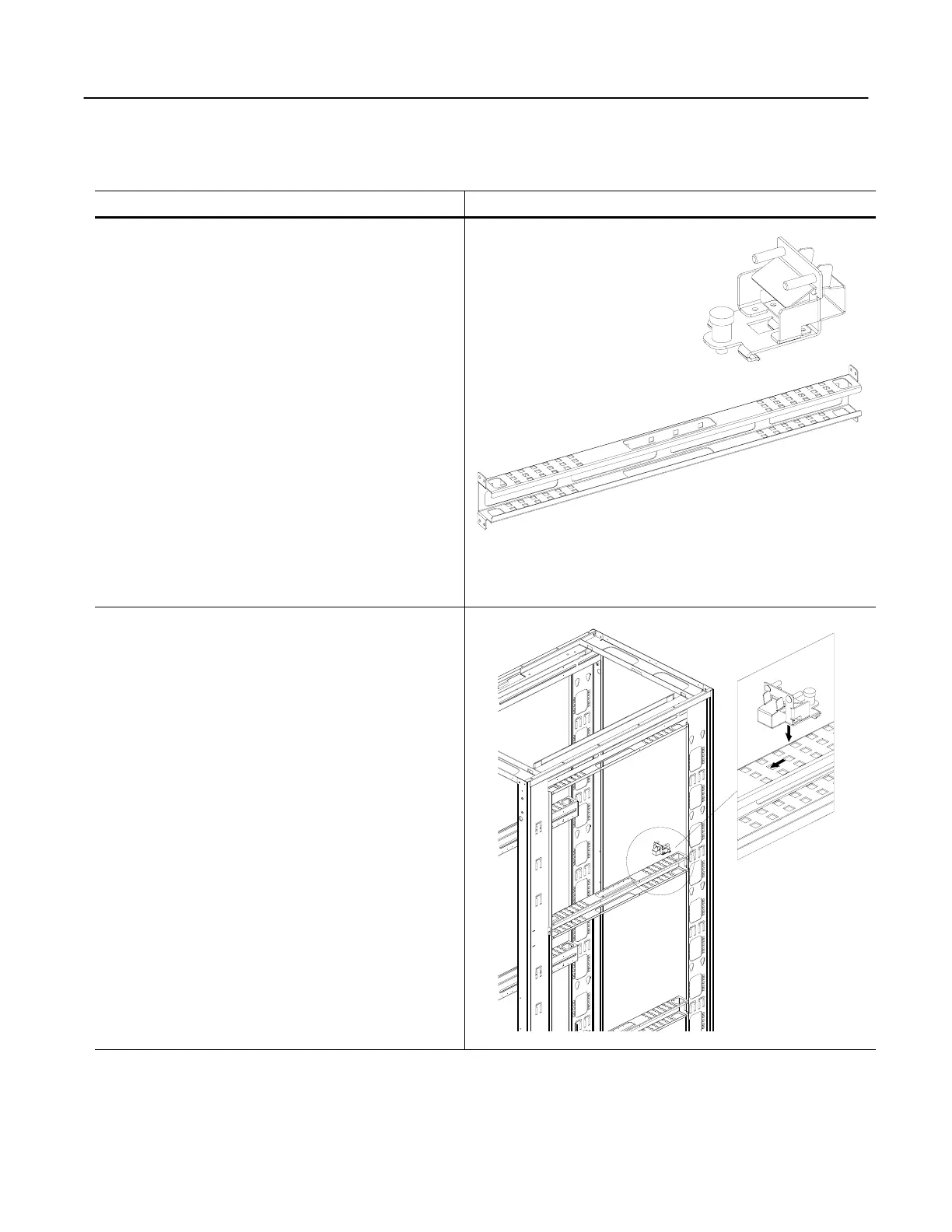
Using the SharkTRAC™ and SharkSNAP™
Step Detail
The SharkTRAC™ is a patent pending platform
consisting of a series of holes, which allows attachment
of various devices.
We have also developed a family of SharkSNAP™ tool–
less clip-in devices that attach directly to the
SharkTRAC™. SharkSNAP™ devices reduce time and
hassle when installing things such as power strips, patch
panels, routers, and environmental monitoring products.
Figure 28
1. To install a SharkSNAP™, align the small metal
fingers over the holes of the SharkTRAC™. Drop the
fingers through the holes and slide the SharkSNAP™
into the track until the retention pin snaps into place.
2. To remove a SharkSNAP™, pull up on the retention
pin and slide the SharkSNAP™ back and away from the
SharkTRAC™.
SharkTRAC™
SharkSNAP™
Figure 29


 To Next Page