16
2
Installation
POWER ON
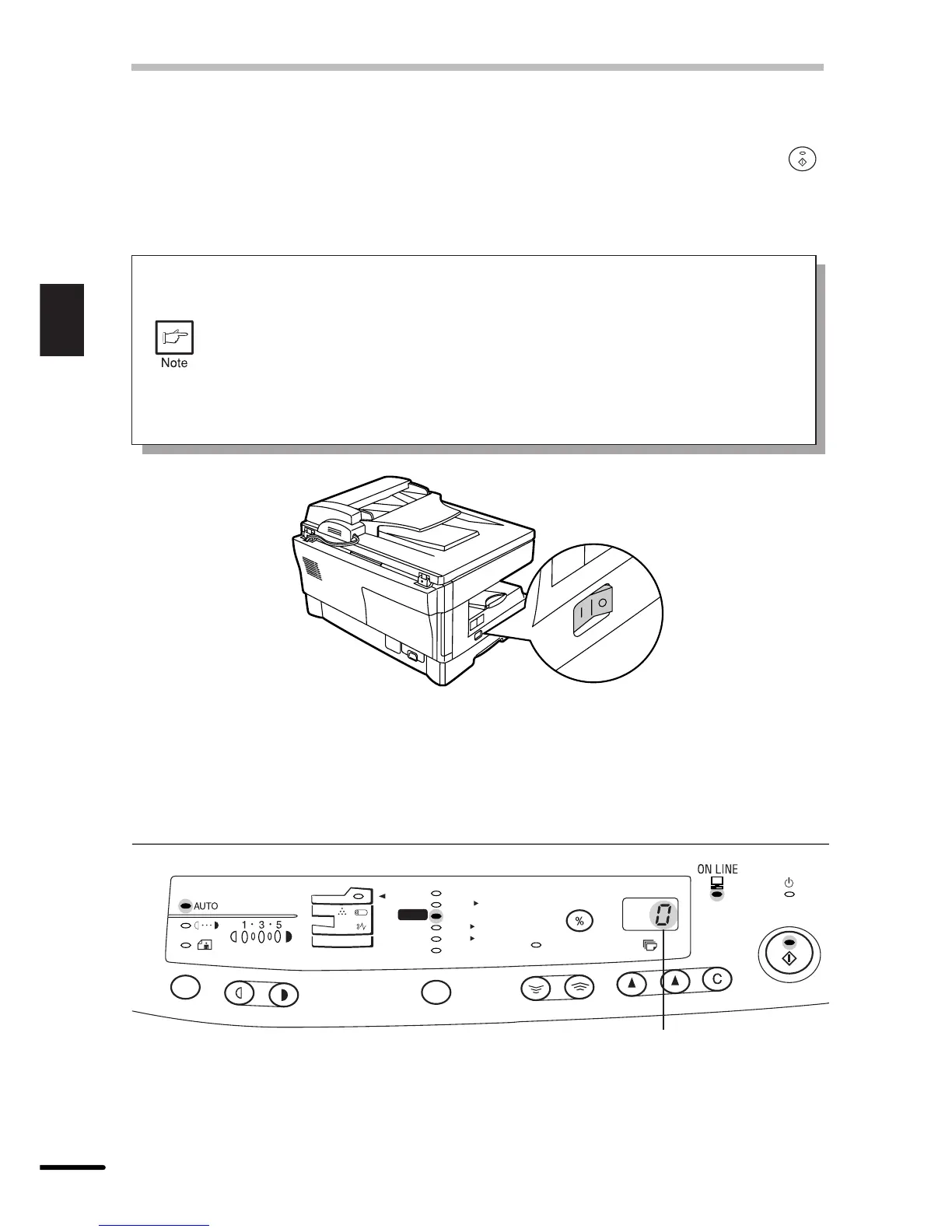
Turn the power switch on the left side of the copier to the “ON” position. The ready ( )
indicator will light up and other indicators which show the initial settings of the operation panel
will also light up to indicate the ready condition. For the initial settings, see the “Initial settings
of operation panel” described below.
●
The copier will enter a power save mode once the set time has elapsed
without any copier operation after the last copy of a run is made or power is
turned on.
The settings of the power save modes can be modified. See page 25, USER
PROGRAMS.
●
The copier will return to the initial settings a preset amount of time after the
last copy is made. The preset amount of time (auto clear time) can be changed.
See page 25, USER PROGRAMS.
Initial settings of operation panel
The copier assumes the initial settings when the copier is turned on or a preset time (auto
clear time) elapses after the last copy is made. The initial settings of the operation panel are
shown below.
ZOOM
100%
5
1
/
2
8
1
/
2
x
5
1
/
2
8
1
/
2
x
8
1
/
2
11
x
8
1
/
2
11
x
8
1
/
2
14
x
8
1
/
2
11
x
50%
64%
78%
100%
129%
200%
MAX.
MIN.
“0” is displayed in the
display.



 To Next Page