63
8
MISFEED REMOVAL
When the misfeed ( ) indicator blinks or blinks in the display, the unit will
stop because of a misfeed. If a misfeed occurs when using the SPF, a number may
appear in the display after a minus sign. This indicates the number of the originals
that must be returned to the document feeder tray after a misfeed. Return the
required number of originals. Then this number will disappear when copying is
resumed or the clear ( ) key is pressed. When the SPF misfeeds an original
sheet, the unit will stop and the SPF misfeed ( ) indicator will blink, while the
misfeed ( ) indicator will remain off. For a misfeed of originals in the SPF, see "E:
Misfeed in the SPF" (p.67).
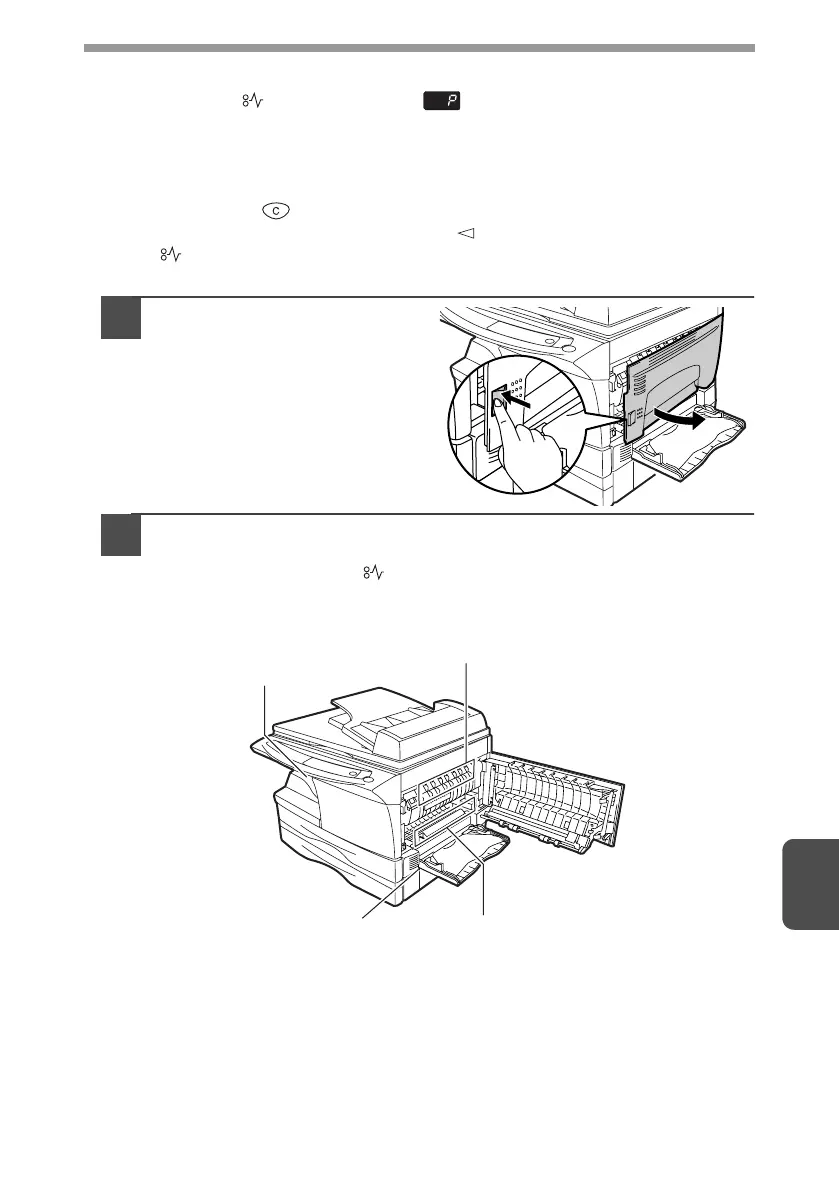
1
Open the multi-bypass tray,
and then open the side
cover.
2
Check the misfeed location. Remove the misfed paper
following the instructions for each location in the illustration
below. If the misfeed ( ) indicator blinks, proceed to "A:
Misfeed in the paper feed area" (p.64).
If paper is misfed here, proceed to "A:
Misfeed in the paper feed area". (p.64)
If paper is misfed here, proceed to "B:
Misfeed in the fusing area". (p.65)
If the misfed paper is seen from
this side, proceed to "C: Misfeed
in the transport area". (p.66)
If paper is misfed here, proceed
to "D: Misfeed in the lower
paper feed area". (p.66)
AL-1642CS_Manual.book 63 ページ 2005年3月3日 木曜日 午後5時34分



 To Next Page