136
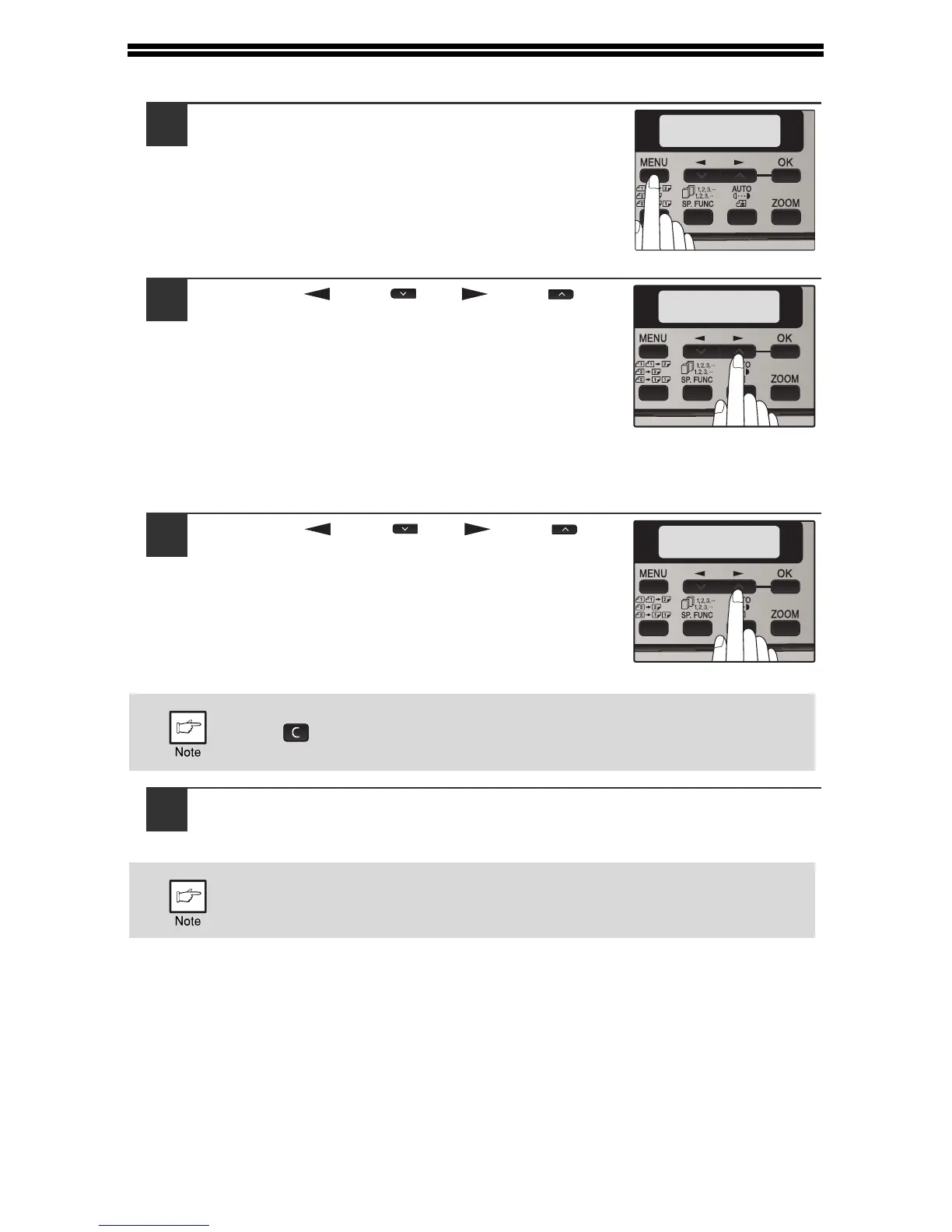
SELECTING A SETTING FOR A USER PROGRAM
1
Press the [MENU] key and then press the
[OK] key.
In printer mode, the user programs are accessed
by simply pressing the [MENU] key.
2
Press the [ ] key ( ) or [ ] key ( ) to
select the item that you wish to configure
in the USER PROGRAM items, and then
press the [OK] key.
• See "USER PROGRAM" (p.131 to
p.135) for the program name and
program code.
• You can also select a program by
directly entering the program number
with the numeric keys.
3
Press the [ ] key ( ) or [ ] key ( ) to
change the setting of the selected item.
See "USER PROGRAM" (p.131 to p.135) for the
program code.
4
Press the [OK] key.
Your selection appears briefly and then the previous screen appears.
• If you mistakenly select the wrong item, press the [CLEAR] key
( ) and repeat the procedure from step 2.
• To cancel a setting for a user program, press the [MENU] key.
When "AE LEVEL ADJUST" is selected in the user programs and the
[OK] key is pressed, the automatic exposure adjustment screen
appears. Adjust the exposure and press the [OK] key.



 To Next Page