133
Handset Settings
AQUOS CRYSTAL 2
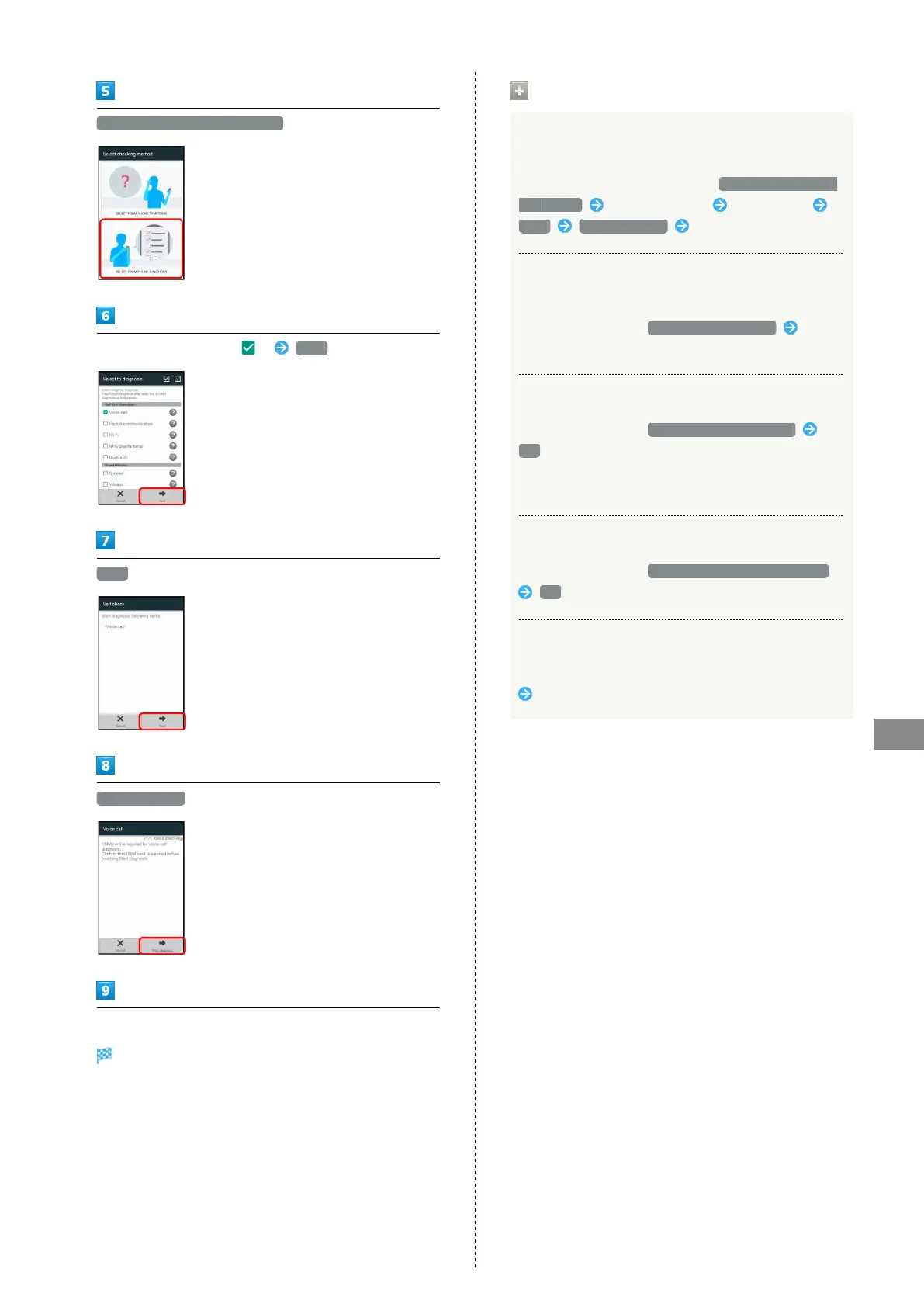
SELECT FROM PHONE FUNCTIONS
Tap item(s) to diagnose ( ) Next
Next
Start diagnosis
Follow onscreen prompts
Diagnosis results appear.
・Tap diagnosis result for detailed result screen.
Self Check Operations
Diagnosing Handset by Selecting Items to
Diagnose from Symptoms
In Select checking method window, SELECT FROM PHONE
SYMPTOMS Tap problem type Tap symptom
Next Start diagnosis Follow onscreen prompts
Viewing Advice Related to Temperature Rise in
Handset
In Self check window, TEMPERATURE ADVICE Follow
onscreen prompts
Restarting Handset in Safe Mode
In Self check window, REBOOT WITH SAFE MODE
OK
・Handset restarts in a state near to its state at time of
purchase.
Exiting Safe Mode and Restarting Handset
In Self check window, REBOOT TO CANCEL SAFE MODE
OK
Viewing Self Check Diagnostic History
In Self check window, Tap the diagnostic history to view
Follow onscreen prompts


 To Next Page