159
Handset Settings
AQUOS CRYSTAL 2
Backup & Reset
Back up application data and handset settings including Wi-Fi
password to Google server, or delete all handset memory files.
・Reset all deletes all handset memory files irreversibly. Back
up important data before performing Reset all.
・Deleted content cannot be restored. Reset with caution.
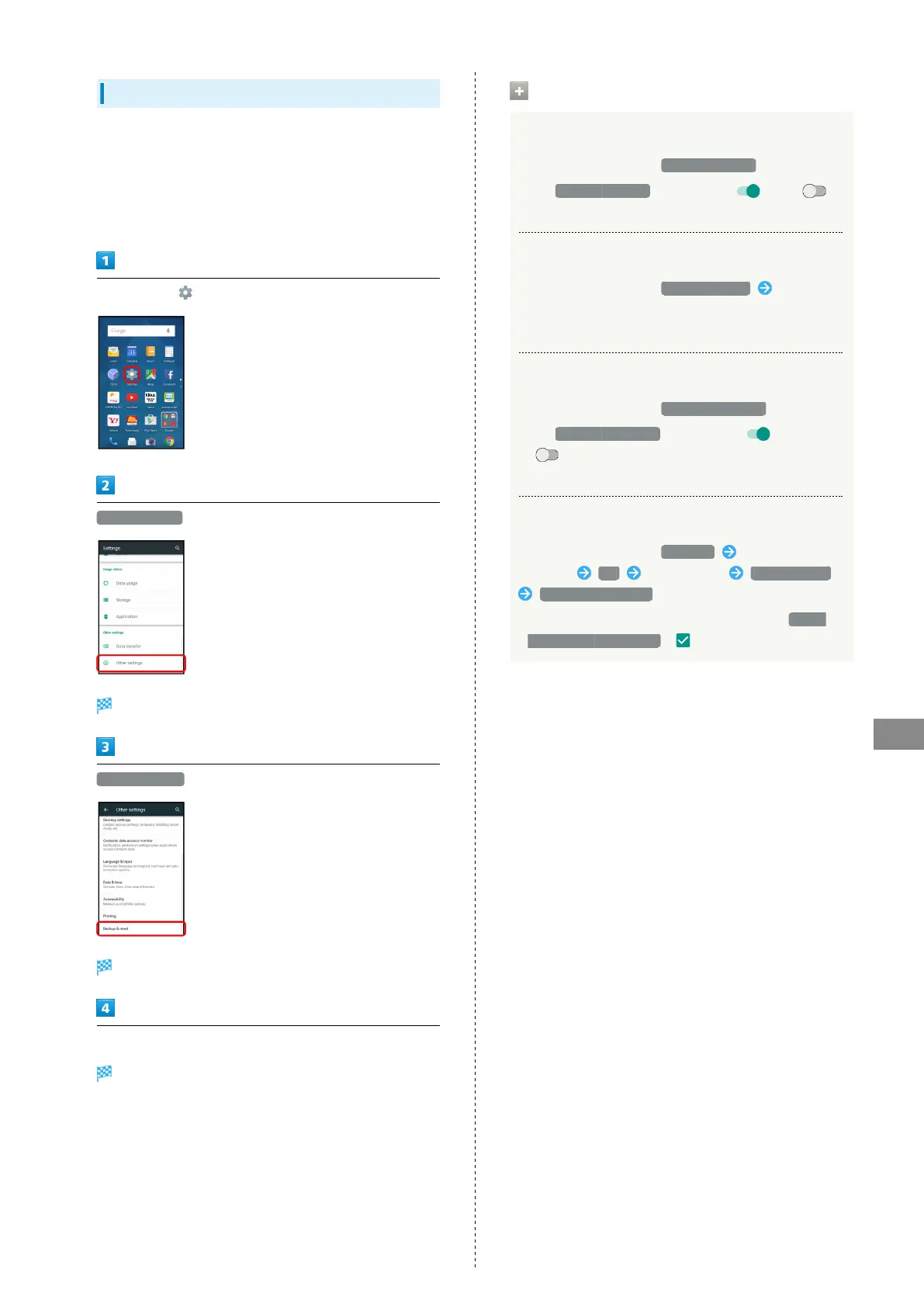
In app sheet, (Settings)
Other settings
Other settings appear.
Backup & reset
Backup & reset menu opens.
Set each item
Setting is complete.
Backup & Reset Operations
Backing Up Data
In Backup & reset menu, Back up my data
・
Tap Back up my data to toggle on ( )/off ( ).
・If confirmation appears, follow onscreen prompts.
Setting Account for Backup
In Backup & reset menu, Backup account Select
account
・Available when Back up my data is enabled.
Enabling/Disabling Automatic Restore
In Backup & reset menu, Automatic restore
・
Tap Automatic restore to toggle on ( )/off
( ).
・Available when Back up my data is enabled.
Performing Reset All
In Backup & reset menu, Reset all Enter Operation
Password OK Read message RESET PHONE
ERASE EVERYTHING
・
To delete all SD Card files simultaneously, Tap Delete
data in microSD as well. ( ).



 To Next Page