AR-M236/M276/M237/M277 SPECIFICATIONS 3 - 6
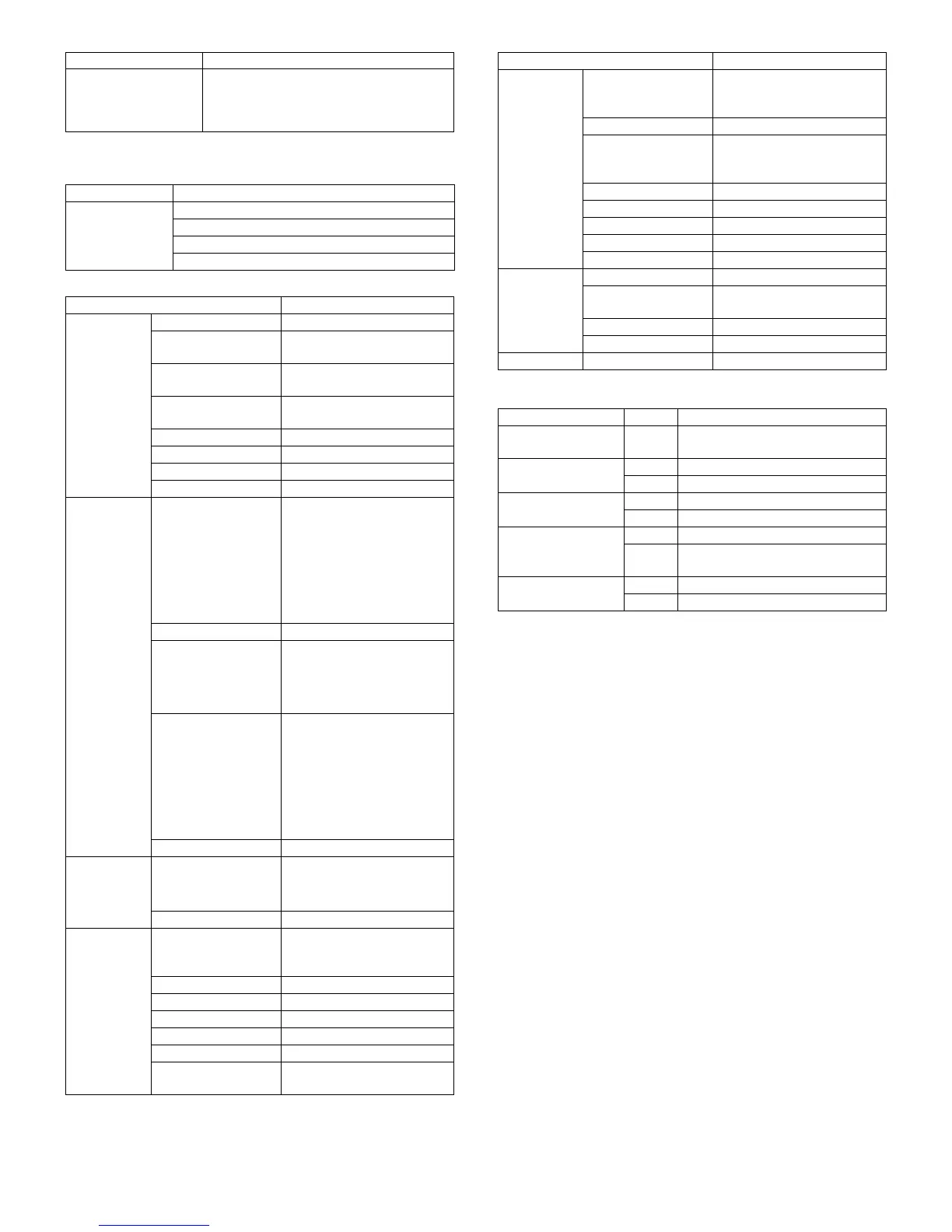
B. Printer driver specification
(1) System
(2) Printing function specification
(3) Print quality
* Default
Support OS (Printer
Driver)
Windows 95/98/Me
Windows NT 4.0 Workstation (SP5 or later)
Windows 2000 Professional
Windows XP Home/Professional Edition
Machine OS
IBM PC/AT
(Include
compatible
machine)
Windows 95/98/Me
Windows NT 4.0 Workstation (SP5 or later)
Windows 2000 Professional
Windows XP Home/Professional Edition
Function Content
General Copies 1-999
Orientation Portrait
Landscape
Collate Collate
Uncollate
Document Style 1-Sided, 2-Sided (Book),
2-Sided (Tablet)
N-up printing 2/4
N-up Order Z
N-up Border Yes/No
User Setting Yes
Paper Input Paper Size A3 / B4 / A4 / B5 / A5 / B6 /
A6 / Ledger (11x17) /
Legal (8.5 x 14) /
Foolscap (8.5 x 13) /
Letter (8.5 x 11) /
Invoice (5.5 x 8.5) / Folio /
Executive / COM-10 /
DL / C5 / 8K / 16K
Custom Paper Size 1 size
Source Selection • Auto
• Bypass (Auto)
• Bypass (Manual)
• Tray 1/2/3/4
Paper Type Tray: Normal paper, letter
head paper, recycle paper,
colored paper
Bypass: Normal paper, letter
head paper, recycle paper,
colored paper, thick paper,
thin paper, label paper, OHP,
postcard, envelope
Transparency print Yes / No
Paper Output
Output Tray Selection • Center Tray
• Upper Tray
• Finisher Offset tray
Staple Yes / No
Graphic Print Quality Normal
Draft
Photo
Smoothing Yes / No
Toner save Yes / No
Photo Enhancement Yes / No
Fit to Page Yes / No
2 Gradation print Yes / No
Image Adjustment Brightness : 0 to 100
Contrast : 0 to 100
Item Detail
Watermark Watermark (None) / TOP SECRET /
CONFIDENTIAL / DRAFT /
ORIGINAL / COPY
User setting Add / Update / Delete
Position Center
X: ±50
Y : ±50
Size 6 to 300
Angle ±90
Gray Scale 0 to 255
Edit Font Yes
On first page only Yes / No
Configuration
Setting
Input Trays Two / Three / Four trays
Output Tray Options None / Upper Tray / Staple
Finisher
Set Tray Status Yes
Version Information Yes
Others
ROPM Yes / No
Mode Control Content
Resolution/Print
quality
600dpi
(Fixed)
Print quality is selected from
Normal*/Draft/Photo.
Smoothing On* Smoothing function is ON.
Off Smoothing function is OFF.
Toner Save Mode On Toner save function is ON.
Off* Toner save function is OFF.
Photo Enhancement On Photo enhancement function is ON.
Off* Photo enhancement function is
OFF.
2 Gradation print On 2-Gradation print function is ON.
Off* 2-Gradation print function is OFF.
Function Content












 To Next Page