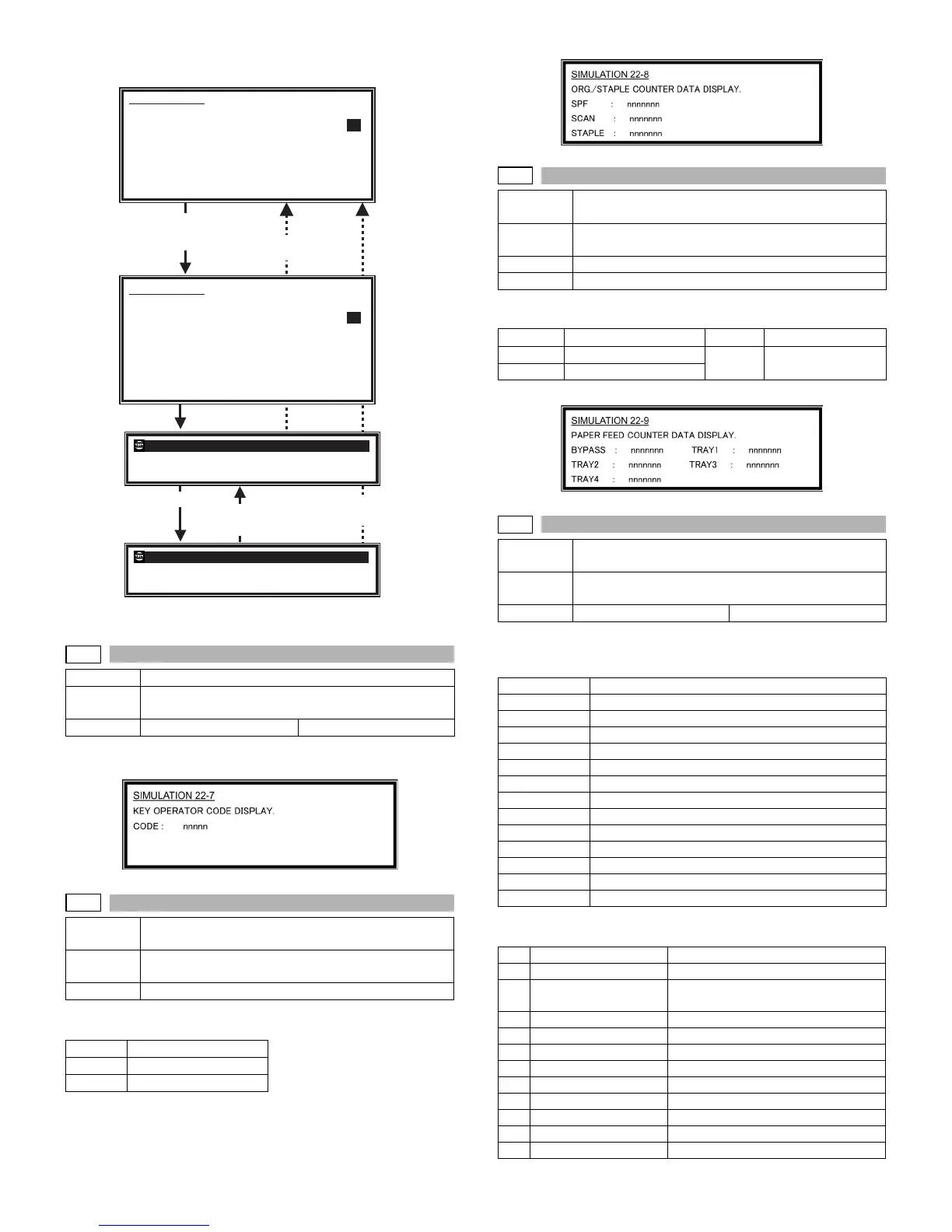
AR-M236/M276/M237/M277 SIMULATION 8 - 18
Note: When the simulation is canceled, the display returns to the origi-
nal state but the machine is not reset.
Operation/procedure
Used to display the key operator code.
Operation/procedure
Each counter is displayed.
The counter display is in 7 digits.
Operation/procedure
Used to display each paper feed counter.
The counter display is in 7 digits.
Operation/procedure
The detected machine composition is displayed.
(The job separator cannot be detected. Based on SIM 26-1 setting.)
NONE: When it is not installed, "- - - - - - - - - -" is displayed.
[ ]: Shows the product code in the list below.
*1: The number of installed units is displayed beside the model code.
22-7
Purpose User data output/Check (Display/Print)
Function
(Purpose)
Used to display the key operator code. (Use when the
customer key operator code is forgotten.)
Item Data User data
22-8
Purpose Adjustment/setting/operation data output/check
(display/print)
Function
(Purpose)
Used to display the original, staple counter.
Item Counter
SPF
SPF/RSPF counter
SCAN
Scan counter
STAPLE
Stapler counter
SIMULATION 22-6
DATA PRINT MODE. SELECT 1-6, AND PRESS START.
1:ALL
2:KEY OPE
3:ALL COUNTERS
4:AUDITOR NO.
5:MACHINE SIM SETTING
6:FAX SIM SETTING
READY TO COPY 1
1:KEY OPE
Select the adjustment
item with the 10-key
Press the [START] key
Press the [START] key
COPIES IN PROGRESS. 1
1:KEY OPE
SIMULATION 22-6
DATA PRINT MODE. EXECUTING
...
1:ALL
2:KEY OPE
3:ALL COUNTERS
4:AUDITOR NO.
5:MACHINE SIM SETTING
6:FAX SIM SETTING
1
1
After canceling JAM
(After pick-up, the
[C] key is disabled.)
During execution of copying the [CUSTOM SETTING] key
and the [INTERRUPT] key are disabled.
Press the
[CUSTOM SETTINGS] key
Press the [CA] key.
Or after completion
of operation.
22-9
Purpose Adjustment/setting/operation data output/check
(display/print)
Function
(Purpose)
Used to check the number of use of each paper feed
section. (the number of prints)
Section Paper feed
Item Counter
BYPASS
Manual feed counter
TRAY3
Tray 3 counter
TRAY1
Tray 1 counter
TRAY4
Tray 4 counter
TRAY2
Tray 2 counter
22-10
Purpose Adjustment/setting/operation data output/check
(display/print)
Function
(Purpose)
Used to check the system configulation.
Item Specifications Option
Item Display items
SPEED
23CPM/27CPM/26CPM
DF
NONE/[1: SPF]/[2: RSPF]
OUTPUT
NONE/[3: Finisher]/[4: Job separator]
CASETTE1
NONE/[5: One-step paper feed unit]
CASETTE2
NONE/[6: Two-step paper feed unit]
IMC MEM
NONE/Expansion memory capacity (MB)
PRINTER
NONE/[7: PRINTER]
PS3
NONE/[8: PS3]
NIC
NONE/[9: NIC]
SCANNER
NONE/[10: SCANNER]
FAX
NONE/[11: FAX]
FAX MEM
NONE/Memory capacity (MB)
HAND SET
NONE/[12: Handset]
No. Item Model code
1 RSPF AR-RP7
2 Finisher AR-FN5N
AR-F14 (Saddle finisher)
3 Job separator AR-TR3
4 1 tray paper feed unit AR-D21 (*1)
5 2 tray paper feed unit AR-D22 (*1)
6 PRINTER AR-P17
7 PS3 AR-PK1
8 NIC AR-NC5J
9 SCANNER AR-NS2
10 FAX AR-FX7
11 Handset AR-HN4












 To Next Page