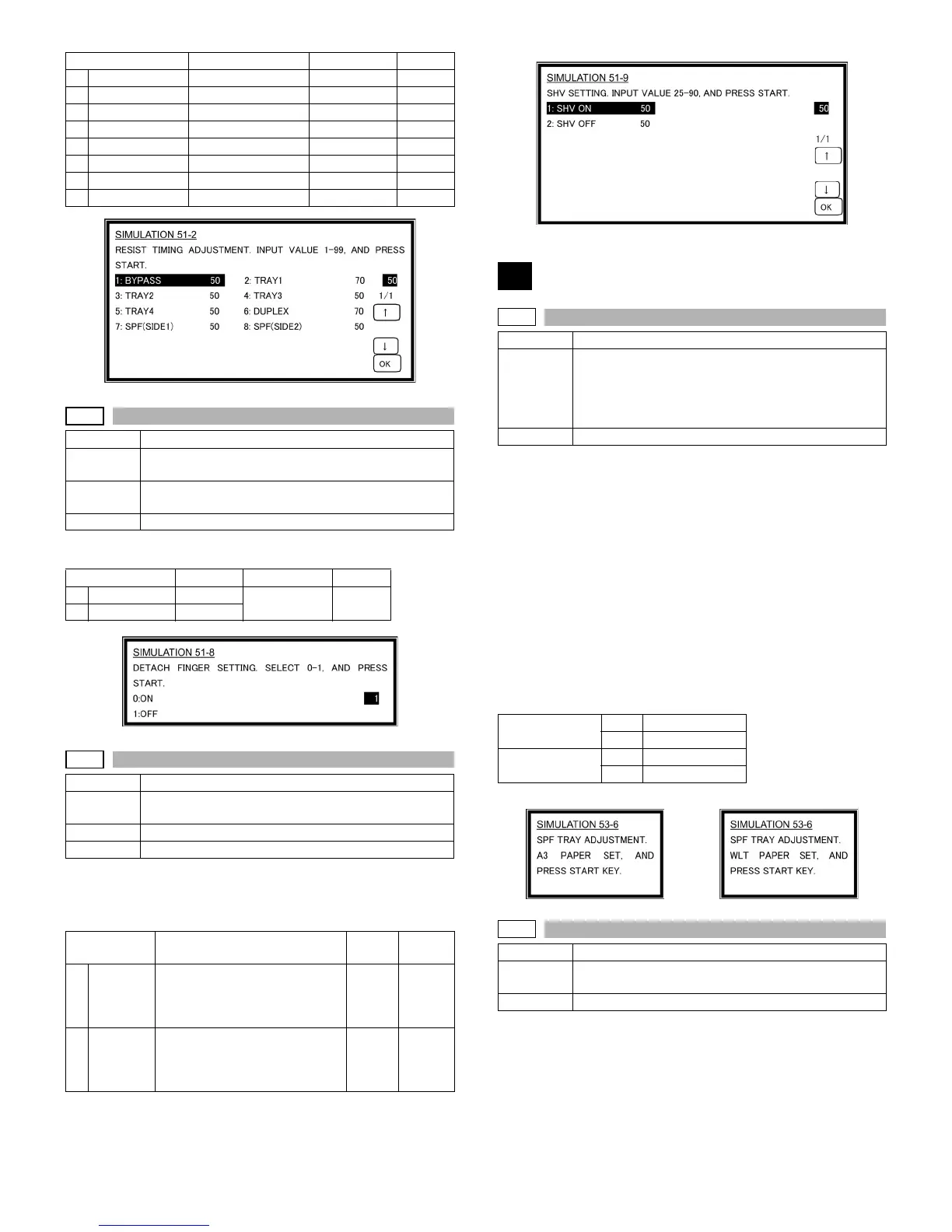
AR-M236/M276/M237/M277 SIMULATION 8 - 41
Operation/procedure
Select the set value with the 10-key.
Operation/Procedure
1. Touch the item to be adjusted.
The item and the currently set value are highlighted.
2. Enter the set value with the 10-key.
Operation/Procedure
(Max. position setting)
1. Set the guide to the maximum position, and press the [START]
key.
Set WLetter and fit the guide, and press the [START] key.
2. Set A4R/Letter R and fit the guide, and press the [START] key.
3. Set A5R/Invoice R and fit the guide, and press the [START] key.
4. Set the guide to the minimum position, and press the [START] key.
5. Set the paper recognition width (+), and press the [START] key.
6. Set the paper recognition width (-),and press the [START] key.
If "FAILED" is displayed in the above procedure 1, 2, 3, or 4, repeat the
adjustment.
(Middle position L/S setting)
If the middle position adjustment is not required, press the [START]
key without changing the guide position.
Operation/Procedure
1. Touch the item to be adjusted.
The item and the currently set value are highlighted.
2. Enter the SPF/RSPF original tray size adjustment value (specified
on the back of the SPF/RSPF) with the 10-key.
Item Content Setting range Default
1 BYPASS
Manual feed 1-99 50
2TRAY1
1st cassette 1-99 70
3TRAY2
2nd cassette 1-99 50
4TRAY3
3rd cassette 1-99 50
5TRAY4
4th cassette 1-99 50
6DUPLEX
Back print 1-99 70
7 SPF(SIDE1)
SPF front surface 1-99 50
8 SPF(SIDE2)
SPF back surface 1-99 50
51-8
Purpose Setting
Function
(Purpose)
Used to set the OPC drum separation pawl operation
inhibit. (ON/OFF)
Section Image process (Photoconductor/Developing/Transfer/
Cleaning)
Item Operation
Item Content Setting range Default
0
ON
Enable 0-1 0
1
OFF
Disable
51-9
Purpose Setting
Function
(Purpose)
Used to adjust the OPC drum separation voltage ON/
OFF timing.
Section Process (OPC drum, developing, transfer, cleaning)
Item Operation
Item Content
Setting
range
Default
1 SHV ON Separation voltage ON timing
* Transfer V2ON reference
(Synchronized with the
adjustment value of 50.)
25-90 50
2 SHV OFF Separation voltage OFF timing
* Transfer V2OFF reference
(Synchronized with the
adjustment value of 50.)
50-90 75
53
53-6
Purpose Adjustment
Function
(Purpose)
Used to adjust the detection level of the SPF/RSPF
width. The adjustment method is the 4-point system.
Set the guide to Max. (A3/WLetter) position, A4R/
Letter R position, A5R/Invoice R position, and Min.
position for adjustment.
Section SPF/RSPF
Middle position
adjustment L
YES MID-L ADJ.ON
NO MID-L ADJ.OFF
Middle position
adjustment S
YES MID-S ADJ.ON
NO MID-S ADJ.OFF
AB series Inch series
53-7
Purpose Adjustment
Function
(Purpose)
Used to enter the SPF/RSPF width detection
adjustment value.
Section SPF/RSPF












 To Next Page