ES-4
2
CONEXIÓN DEL PURIFICADOR DE AIRE Y UN ROUTER
AJUSTES DE CONEXIÓN INICIAL
1.
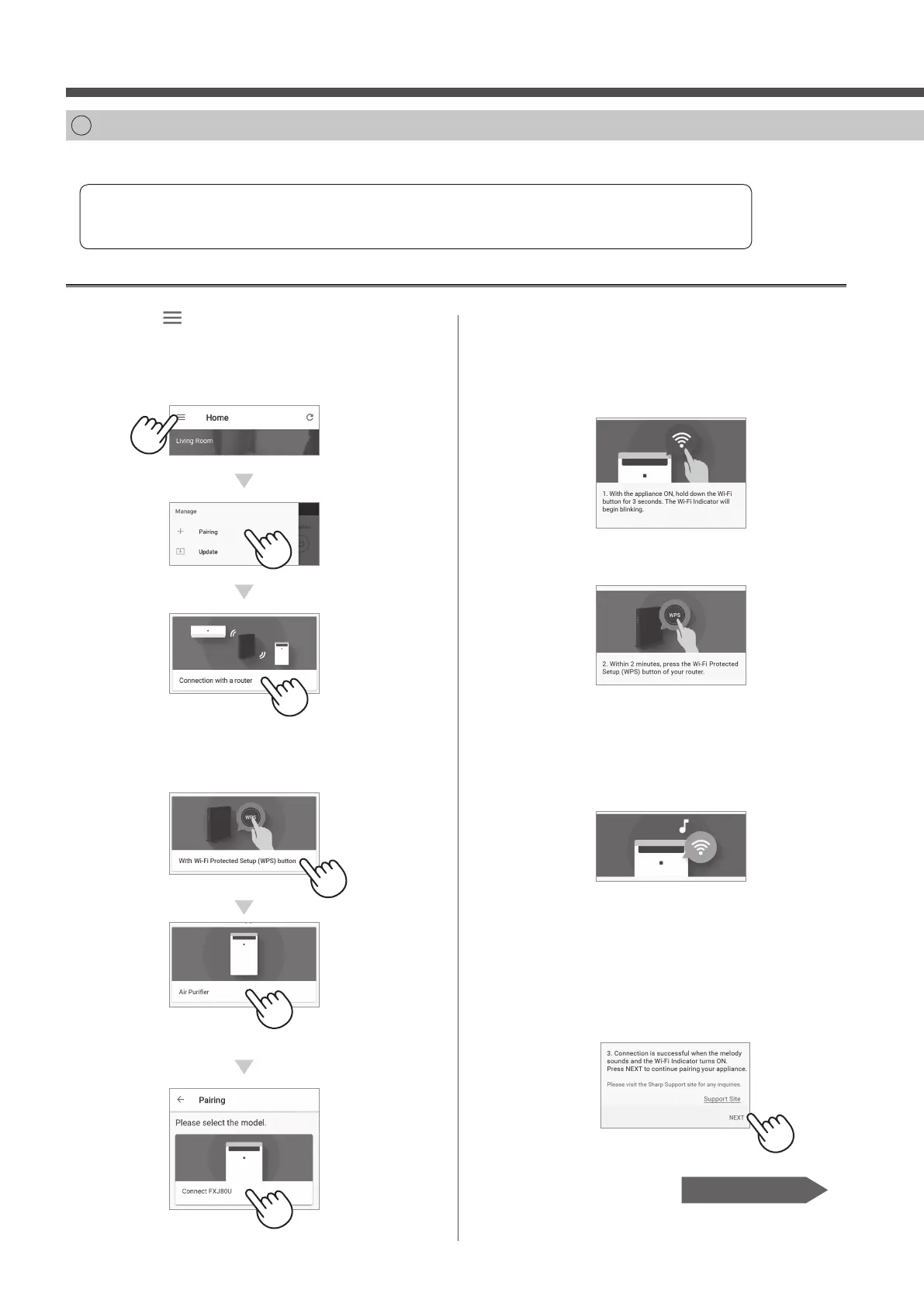
Pulse “ ” en la parte superior
izquierda de la pantalla “Home”, y
seleccione “Pairing” → “Connection
with a router”.
2.
Seleccione “With Wi-Fi Protected
Setup (WPS) button” → “Air Puri er”
→ Seleccione “FXJ80U”.
Compruebe si la función de botón Wi-Fi Protected Setup (WPS) está disponible en el router.
Si el botón Wi-Fi Protected Setup (WPS) está disponible: Proceda a (A)
Si el botón Wi-Fi Protected Setup (WPS) no está disponible: Proceda a (B)
(A)
La función de botón Wi-Fi Protected Setup (WPS) está disponible en el router.
3.
Siga las instrucciones en la
aplicación.
i.
Mantenga pulsado el botón Wi-Fi
durante 3 segundos con el
producto ENCENDIDO.
ii.
En 2 minutos, pulse el botón Wi-Fi
Protected Setup (WPS) del router.
• Consulte el funcionamiento del router en el
manual del método para manejar el botón
Wi-Fi Protected Setup (WPS).
iii.
Sonará una melodía, y el indicador
Wi-Fi se iluminará.
• La con guración de la conexión puede
tardar unos minutos en completarse.
• Si los ajustes de conexión no se pueden
completar, pitará 4 veces y la luz del
indicador Wi-Fi estará apagada. En ese
caso, inténtelo de nuevo desde el paso 1.
iv.
Pulse “NEXT”.
Página 8, Paso 3
FX-J80U_Wi-Fi_SP.indd 4 2019/10/25 15:01:33



 To Next Page