LC-32AX3H/M/X
LC-37AX3H/M/X
12
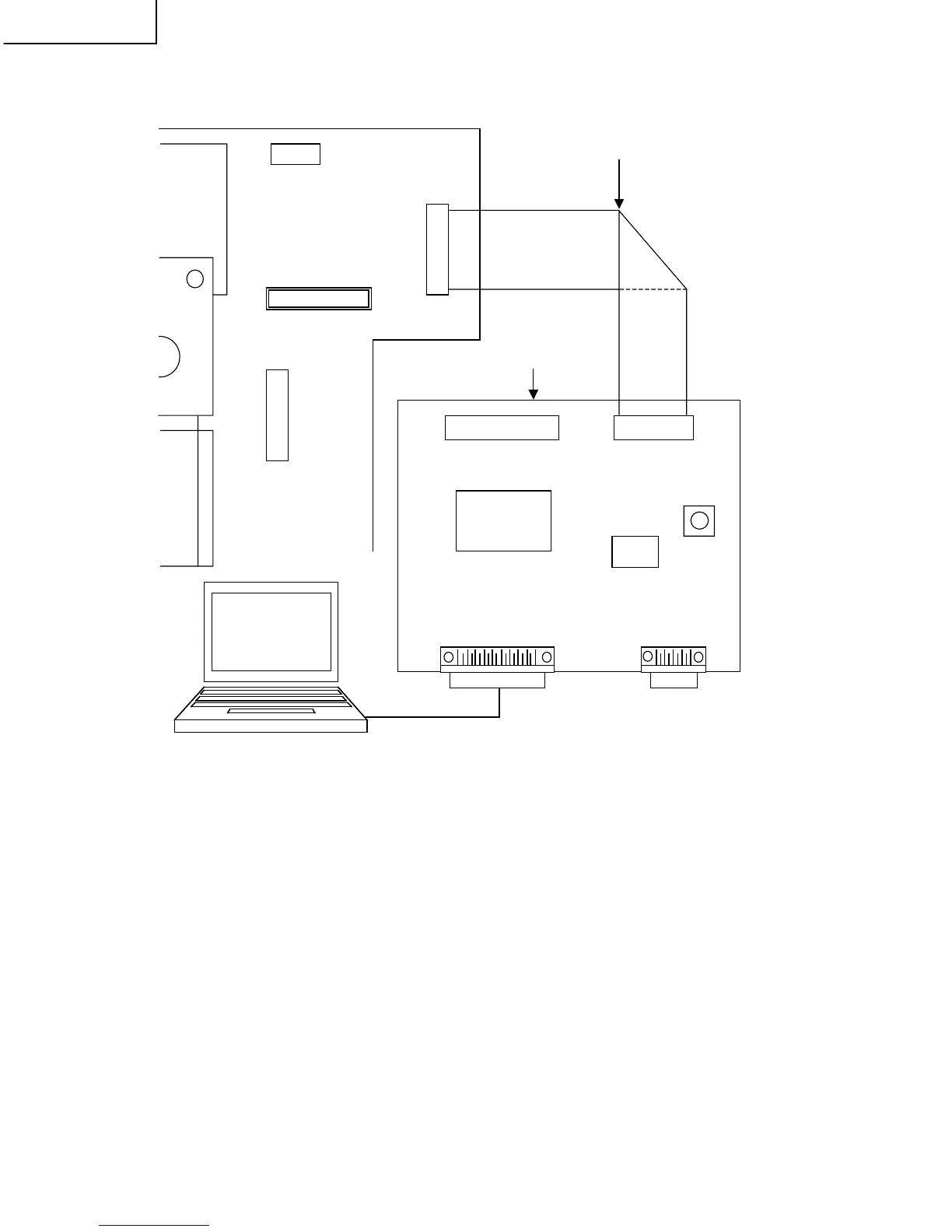
Ë Connecting the jig PWB and the unit
Ë Rewriting procedure
<Step 1>
Unplug the AC cord during power up.
<Step 2>
Connect the jig PWB and the AV PWB with the cable (20-pin).
(Connect P5601 of the jig PWB and FD of the AV PWB.)
<Step 3>
Start the application software for the REWRITING program (IAP Writer).
(If start-up is impossible, recheck the procedure.)
<Step 4>
While holding down the "SYSTEM RESET" button, plug in the AC cord to turn on the power.
` LED on the jig PWB lights up.
` Jig PWB connection is automatically detected and the system is shifted to the program rewriting mode.
FD
2 1
20 1 9
KM
1 5
P1200
TO
13 1
AV UNIT
P5601SC5601
IC5603
IC5601
S5610
20-pin cable 1
Jig PWB (PAL JIGUIF-001)
SC5602
PC






 To Next Page