Check supply voltages of VDD_AUDIO, 5V_VCC and 3V3_VCC with a voltage-meter.
There may be a problem in headphone connector or headphone detect circuit (when
headphone is connected, speakers are automatically muted). Measure voltage at
HP_DETECT pin, it should be 3.3v.
21.8. No Sound Problem at Headphone
Problem: No audio at headphone output.
Check HP detect pin, when headphone is. Check 5V_VCC and 3V3_VCC with a voltage-
meter.
21.9. Standby On/Off Problem
Problem:
Device cannot boot, TV hangs in standby mode.
There may be a problem about power supply. Check 12V_VCC, 5V_VCC and 3V3_VCC
with a voltage-meter. Also there may be a problem about SW. Try to update TV with latest
SW. Additionally it is goood to check SW printouts via hyper-terminal (or Teraterm).
These printouts may give a clue about the problem.
DVD Problems
Problem: DVD is not working.
Check that DVD source is selected in Service menu. Check supply voltage of DVD
namely 12V_VCC.
21.10. No Signal Problem
Problem: No signal in TV mode.
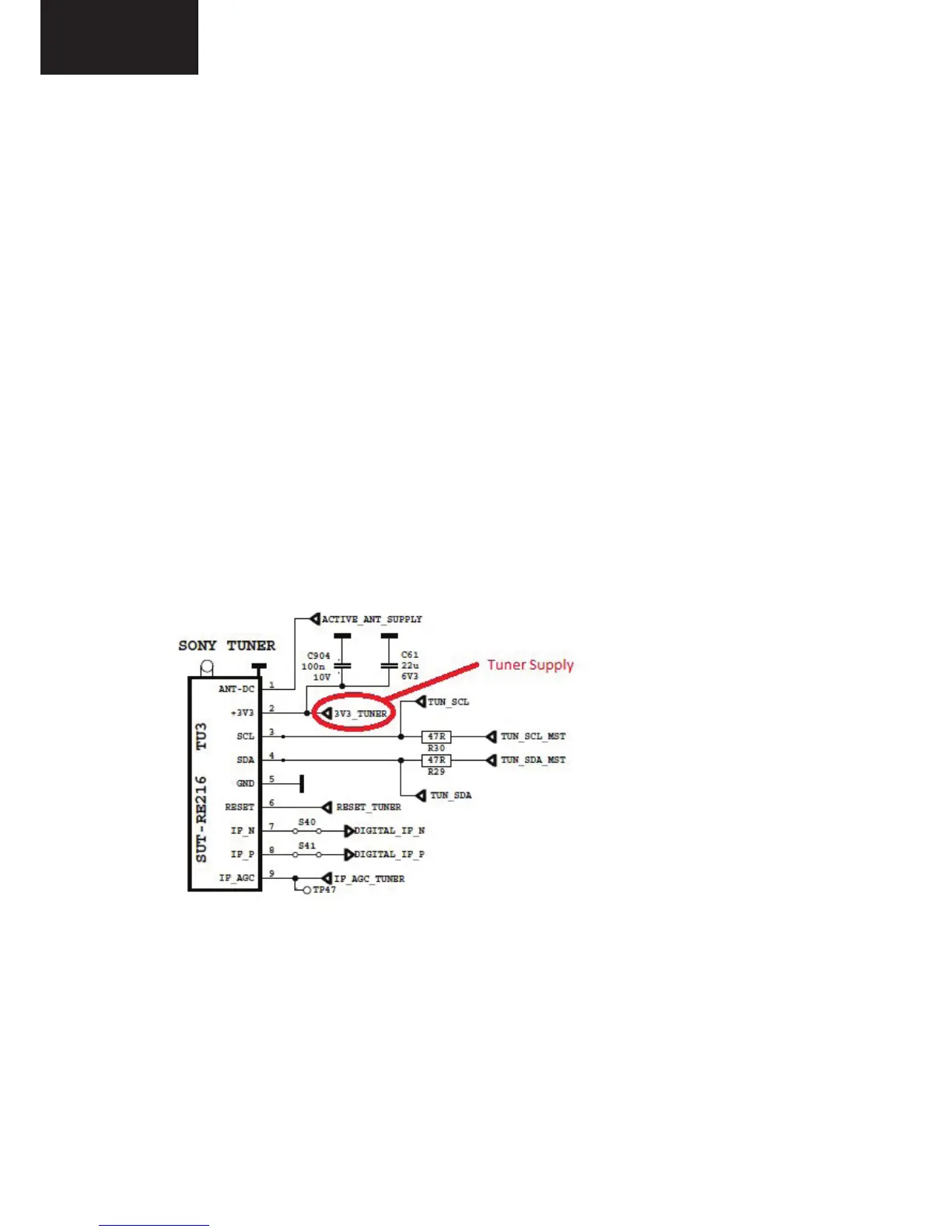
Check tuner supply voltage; 3V3_TUN. Check tuner options are correctly set in Service
menu. Check AGC voltage at IF_AGC pin of tuner.
There may be a problem about power supply. Check 12V_VCC, 5V_VCC and 3V3_VCC
with a voltage-meter. Also there may be a problem about SW. Try to update TV with latest SW.
Additionally it is good to check SW printouts via hyper-terminal (or Teraterm).
These printouts may give a clue about the problem.



 To Next Page