Connecting to E×ternal Equipment
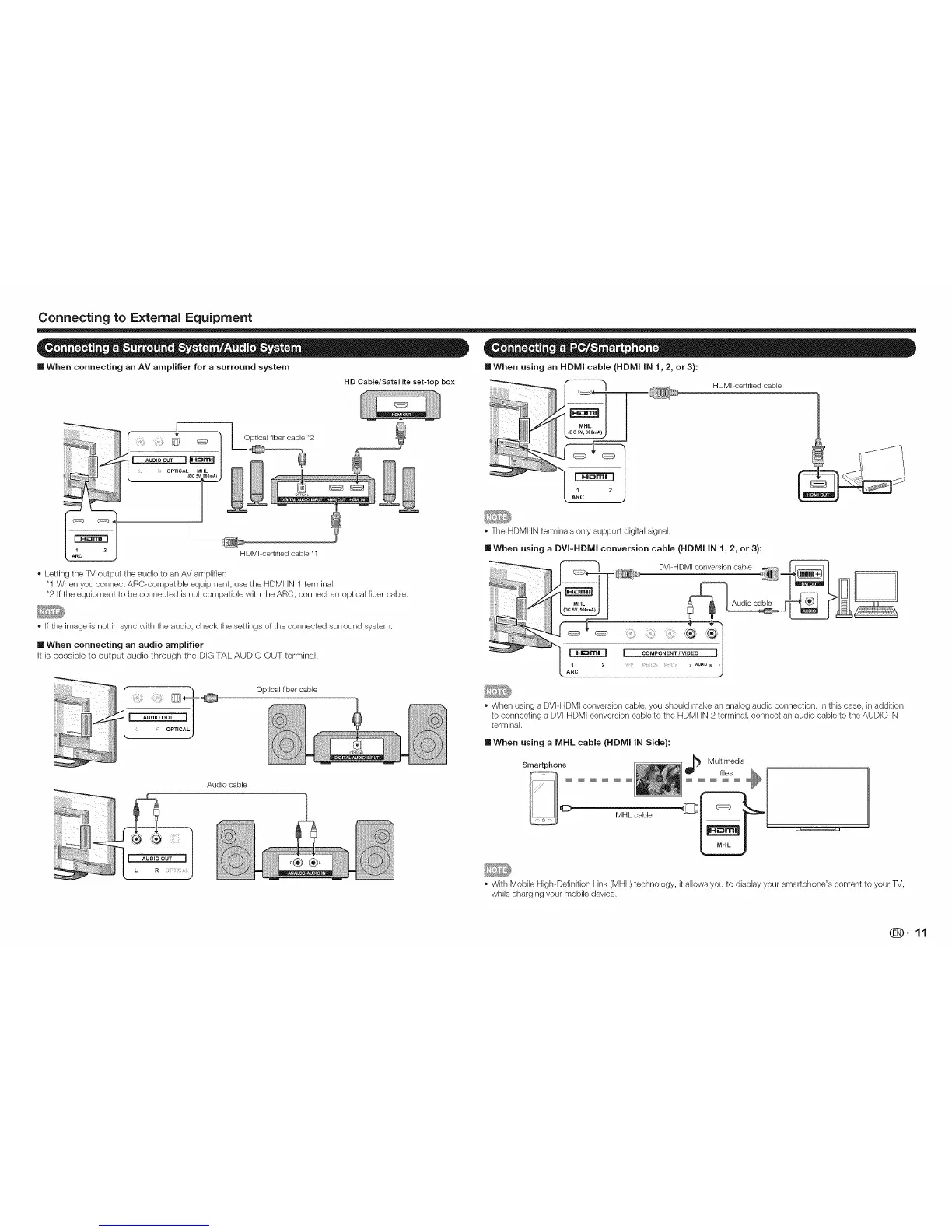
•When using an HDMI cable (HDNll iN 1,2, or3):
HDMI-certifiedcable
[] When connecting an AV amplifier for a surround system
HD Cable/Satellite set-top box
::::::::::::::::::::::::::::::::::::::::::::::::
HDMI-certified cable *t
Letting the TV output the audio to an AV amplifier:
"1 When you connect ARC-compatible equipment, use the HDMI iN 1 terminal.
*2 If the equipment to be connected is not compatible with the ARC, connect an optical fiber cable.
The HDMI INterminals only support digkal signal.
[] When using a DVI-HDMI conversion cable (HDNII IN 1, 2, or 3):
Ifthe image is not in sync with the audio, check the settings of the connected surround system.
[] When connecting an audio amplifier
It is possible to output audio through the DIGITAL AUDIO OUT terminal,
_ OPT CAL
J
Audio cable
Optical fiber cable
When using a DVI-HDMI conversion cable, you should make an analog audio connection, in this case, in addkion
to connecting a DVI-HDMI conversion cable to the HDMI iN 2 terminal, connect an audio cable to the AUDIO IN
terminal.
mWhen using a MHL cable (HDNll IN Side):
Smartphone
Mill_ cable
Multimedia
t,es _ I 1
t
With Mobile High-Definition Link (MHL) technology, it allows you to display your smartphone's content to your TV,
while charging your mobile device.
@9-11



 To Next Page