16
LC-37DB5U
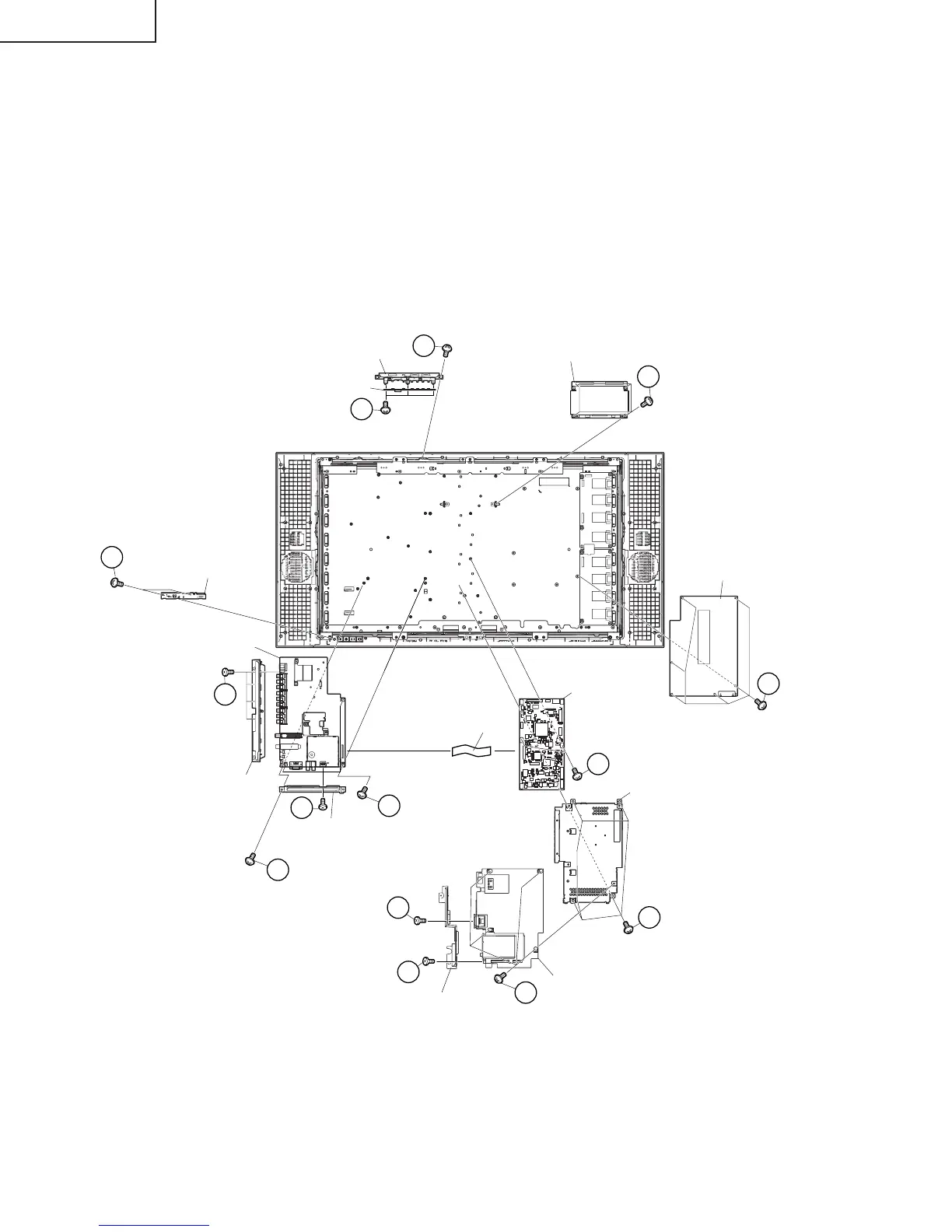
10. Remove the 4 lock screws w and FFC. Detach the Main Shield B and Digital PWB.
11. Remove the 4 lock screws e and detach the Digital PWB.
12. Remove the 2 lock screws r and detach the Jack Cover C.
13. Remove the 2 lock screws t and detach the Main PWB.
14. Remove the 3 lock screws y and the 1 lock screw u, and detach the AV PWB. Remove 1 lock screw i and
detach the Jack Cover B. Remove the 4 lock screws o and detach the Jack Cover A.
15. Remove the 6 lock screws p and detach the Power PWB.
16. Remove the 4 lock screws a and detach the LCD Control PWB.
17. Remove the 2 lock screws s and detach the R/C, LED PWB.
18. Remove the KEY PWB.
18-1. Remove the 2 lock screws d from the Top Control Cover.
18-2. Remove the 3 lock screws f from the KEY PWB.
24
23
21
20
15
22
R/C, LED PWB
Main PWB
Main Shield B
POWER PWB
LCD Control PWB
AV PWB
FFC
Jack Cover A
Jack Cover C
Jack Cover B
12
13
16
17
18
19
KEY PWB
Top Control Cover
Digital PWB
14
14




 To Next Page