64
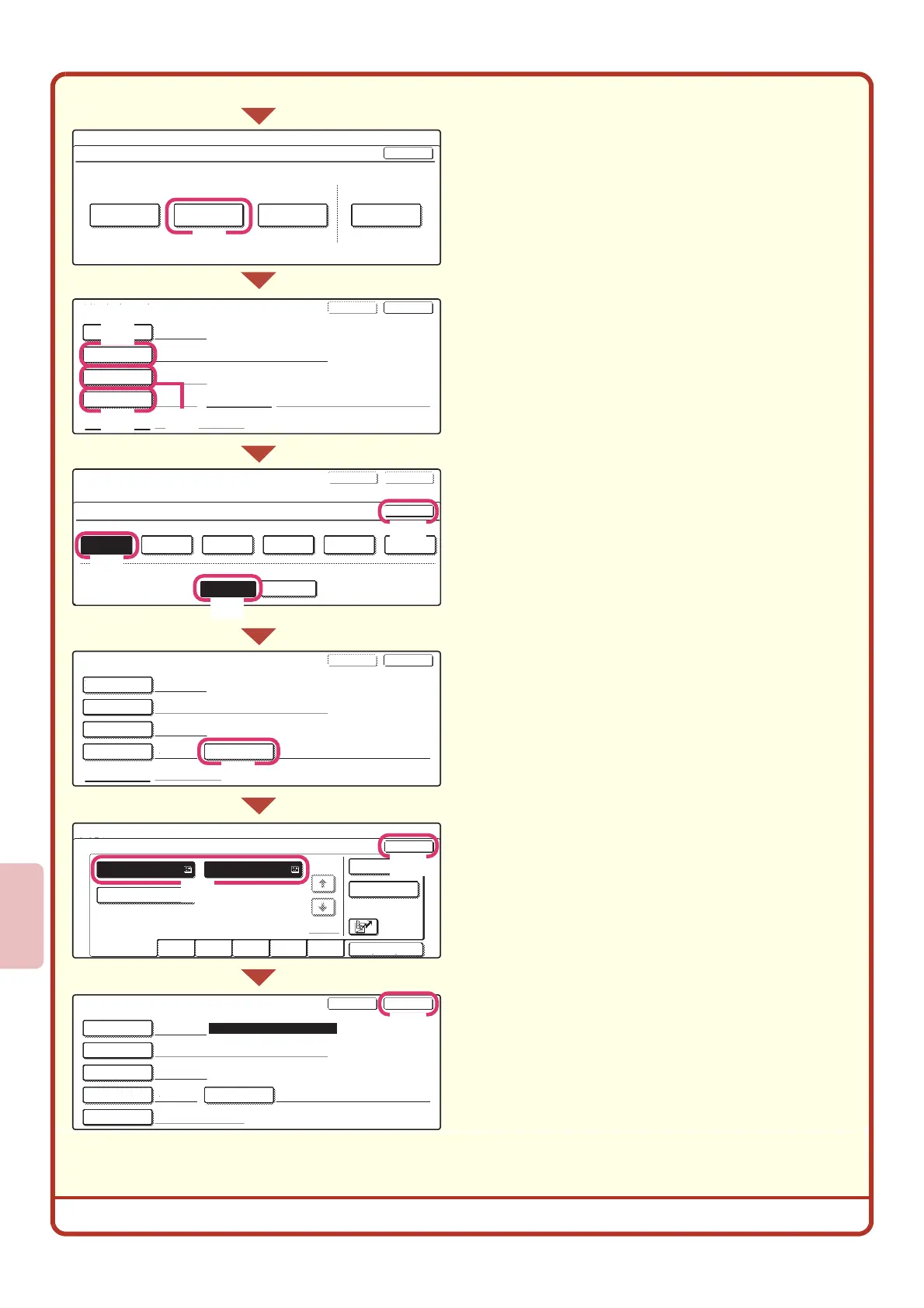
Store the group in the touch panel.
(Continued)
(3) Touch the [Group] key.
(4) Touch the [Group Name] key.
A text entry screen appears. Enter the name of
the group (max. of 36 characters). To enter text,
see "6. ENTERING TEXT" in the User's Guide.
(5) Touch the [Initial] key.
A text entry screen appears. Enter initials for the
destination (max. of 10 characters).
(6) Touch the [Index] key.
(7) Touch the [User 1] key.
The user index selected here can be used in the
address book screen.
(8) Touch the [Yes] key.
Touch the [Yes] key if you wish to have the
stored destination appear on the frequent use
tab of the address book. Otherwise, touch the
[No] key.
(9) Touch the [OK] key.
(10)
Touch the [Address] key.
(11)
Touch the destination key that you want
to store next.
The selected key is highlighted.
To store a destination that is not stored in a
one-touch key, touch the [Direct Entry] key and
enter the e-mail address.
(12)
Touch the [OK] key.
(13)
Touch the [Exit] key.
System Settings
Direct Address / Program
Individual Group
Store
Program Modify/Delete
OK
Direct Address / Group
Search Number
DDD DDD
004
D
Initial
Group Name
Key Name
Index Address
Exit
Next
Direct Address / Group
Select address.
OK
Direct Address / Group
Search Number
004
DDD DDD
2 Addresses
D
User 1
DDD DDD
Registration is completed.
Address
Group Name
Key Name
Initial
Index
ExitNext
Direct Address / Group
Search Number
Initial
DDD DDD
004
D
User 1
Group Name
Key Name
Index
Address
ExitNext
Address Review
Direct Entry
1/1
* 2
UVWXYZ
OPQRST
JKLMNEFGHI
ABCD
Frequent Use
Sort Address
AAA AAA
CCC CCC
BBB BBB
Direct Address / Group
Index
No.004
Select the custom index where you register this address.
Do you register this address at the [Frequent Use], too?
User 6User 5User 4User 3User 2User 1
OK
ExitNext
Yes
No
(3)
(4)
(6)
(11)
(12)
(13)
(9)
(7)
(10)
(8)
(5)



 To Next Page