4-15
FACSIMILE►ENTERING DESTINATIONS
USING A SEARCH NUMBER TO RETRIEVE A
DESTINATION
The search number can be used to specify a destination stored in an address book.
1
Tap the [Detail] key to change to normal mode.
► Changing mode from each mode (page 4-8)
2
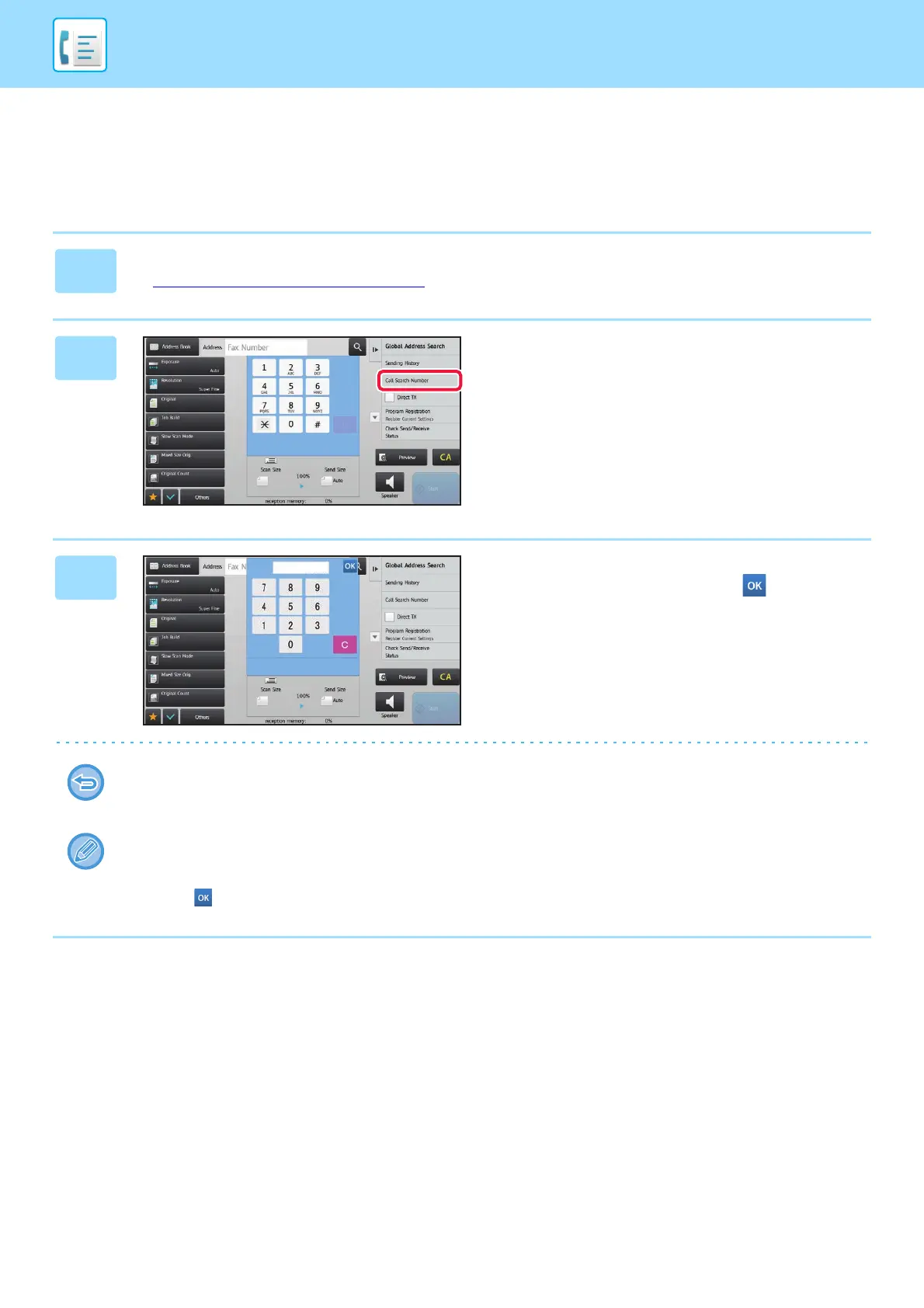
Tap [Call Search Number] on the
action panel.
3
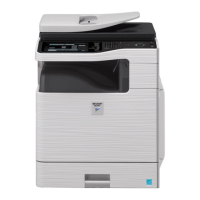
Enter a search number (4 digits) using
the numeric keys and tap .
When the search number is entered, the stored address is
retrieved and specified as a destination.
If an incorrect search number is entered:
Tap the [C] key to clear the number and enter the correct number.
• The search number is programmed when the destination is stored in the address book.
• If you do not know the search number, tap [Print Individual List] on the action panel to print and check the address list.
• When entering search numbers such as "0001" and "0011", "0" can be omitted. For example to enter "0001", enter "1"
and tap .


 To Next Page