EasyManua.ls Logo

Sharp PA-3000 - Page 20

Sharp PA-3000
28 pages
Print Icon
To Next Page IconTo Next Page
To Previous Page IconTo Previous Page
Loading...
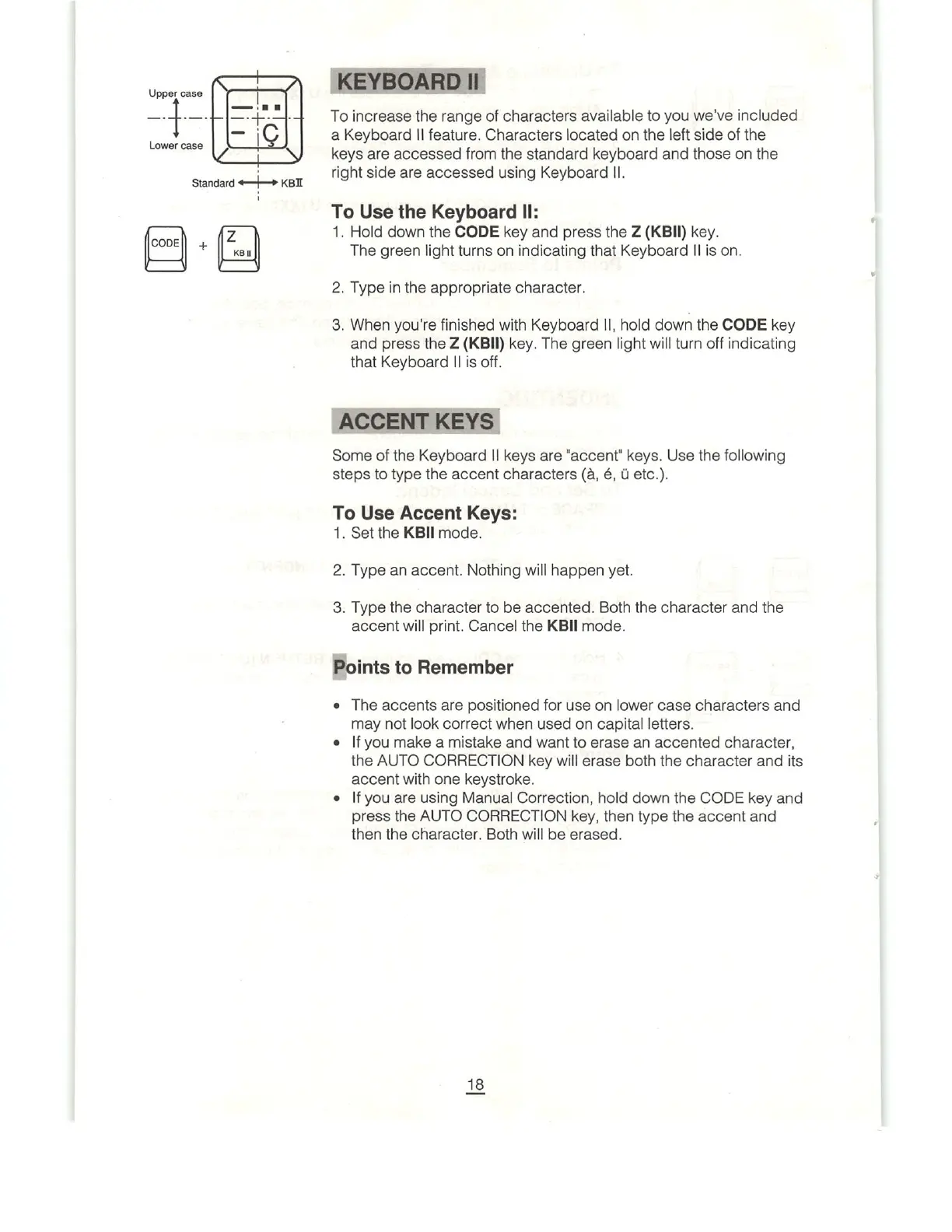
Upper
case
i
W
N
Sa—
_+_
Lower
case
|Q
Standard
+——
KBI
CODE\
+
z
K81
To
increase
the
range
of
characters
available
to
you
we've
included
a
Keyboard
|l
feature.
Characters
located
on
the
left
side
of
the
keys
are
accessed
from
the
standard
keyboard
and
those
on
the
right
side
are
accessed
using
Keyboard
|I.
To
Use
the
Keyboard
II:
1.
Hold
down
the
CODE
key
and
press
the
Z
(KBII)
key.
The
green
light
turns
on
indicating
that
Keyboard
Il
is
on.
2.
Type
in
the
appropriate
character.
3.
When
you're
finished
with
Keyboard
I,
hold
down
the
CODE
key
and
press
the
Z
(KBIIl)
key.
The
green
light
will
turn
off
indicating
that
Keyboard
Il
is
off.
ACCENT
KEYS
Some
of
the
Keyboard
Il
keys
are
"accent’
keys.
Use
the
following
steps
to
type
the
accent
characters
(3,
é,
U
etc.).
To
Use
Accent
Keys:
1.
Set
the
KBIl
mode.
2.
Type
an
accent.
Nothing
will
happen
yet.
3.
Type
the
character
to
be
accented.
Both
the
character
and
the
accent
will
print.
Cancel
the
KBII
mode.
Points
to
Remember
e
The
accents
are
positioned
for
use
on
lower
case
characters
and
may
not
look
correct
when
used
on
capital
letters.
o
|f
you
make
a
mistake
and
want
to
erase
an
accented
character,
the
AUTO
CORRECTION
key
will
erase
both
the
character
and
its
accent
with
one
keystroke.
¢
|f
you
are
using
Manual
Correction,
hold
down
the
CODE
key
and
press
the
AUTO
CORRECTION
key,
then type
the
accent
and
then
the
character.
Both
will
be
erased.

Related product manuals