Basic Operation
n
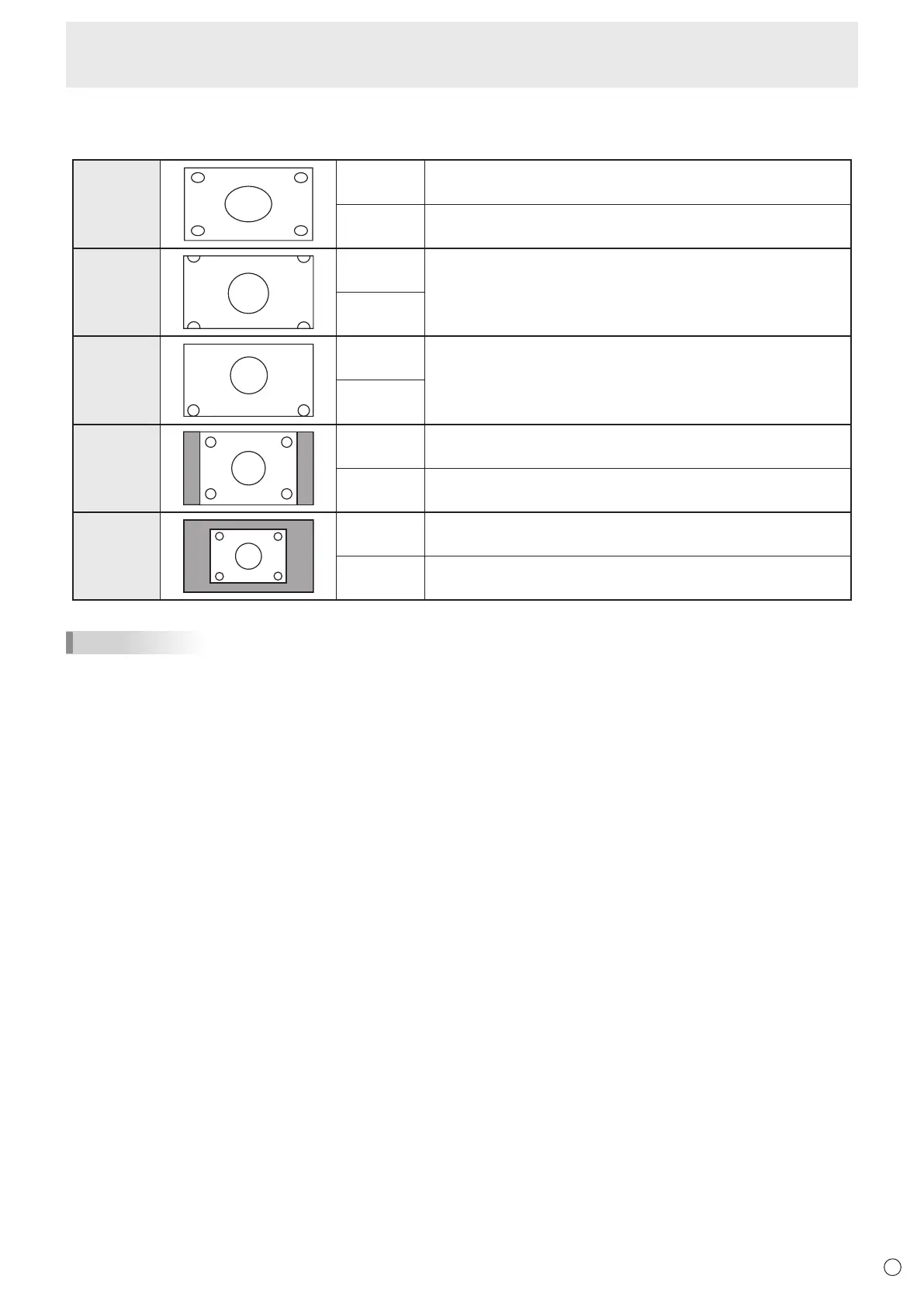
Switching the screen size
Evenwhenthescreensizeischanged,thedisplaymayremainthesamedependingontheinputsignal.
WIDE PCinput Displaysimagesoitllstheentirescreen.
AVinput Animagewitha4:3aspectratioisstretchedtolltheentire
screen.
ZOOM 1
PCinput Animagewitha4:3aspectratioisenlargedtolltheentirescreen
without changing the aspect ratio. The edges of the image may be
cut off.
AVinput
ZOOM 2
PCinput UsethissizeifZOOM1cutsoffthesubtitles.
AVinput
NORMAL
PCinput Displaysimagesoitllsthescreenwithoutchangingtheaspect
ratio of the input signals.
AVinput Displaystheentireimageoftheaspectratioof4:3without
changing the aspect ratio.
Dot by Dot
PCinput DisplaysthedotsofthesignalsinputfromtheconnectedPCas
the corresponding dots on the screen.
AVinput Displaysthedotsoftheinputsignalsasthecorrespondingdotson
the screen.
TIPS
• Usingthismonitor’sscreen-sizeswitchingordual-screendisplayfunctionstocompressorexpandthescreenforcommercial
orpublicviewinginestablishmentslikecafesorhotelsmayinfringeontherightsofthecreators,asprotectedbyCopyright
Law, so please be careful.
• When“Enlarge”isset,thescreensizeisxedto“WIDE”mode.
• Whendual-screendisplayisselected,thescreensizecannotbechanged.
• Theappearanceoftheoriginalvideomaychangeifyouselectascreensizewithadifferentaspectratiothantheoriginal
image(e.g.TVbroadcastorvideoinputfromexternalequipment).
• Whenanordinarynon-wideimage(4:3)isviewedwiththewholescreenusingthescreen-sizeswitchingfunctionofthis
monitor, the edge of the image may be lost or appear distorted. If you wish to respect the creator’s intentions, set the screen
sizeto“NORMAL”.
• Whenplayingcommercialsoftware,partsoftheimage(likesubtitles)maybecropped.Inthiscaseselecttheoptimalscreen
sizeusingthescreen-sizeswitchingfunctionofthismonitor.Withsomesoftware,theremaybenoiseordistortionatthe
edges of the screen. This is due to the characteristics of the software, and is not a malfunction.
• Dependingontheoriginalimagesize,blackbandsmayremainattheedgesofthescreen.



 To Next Page