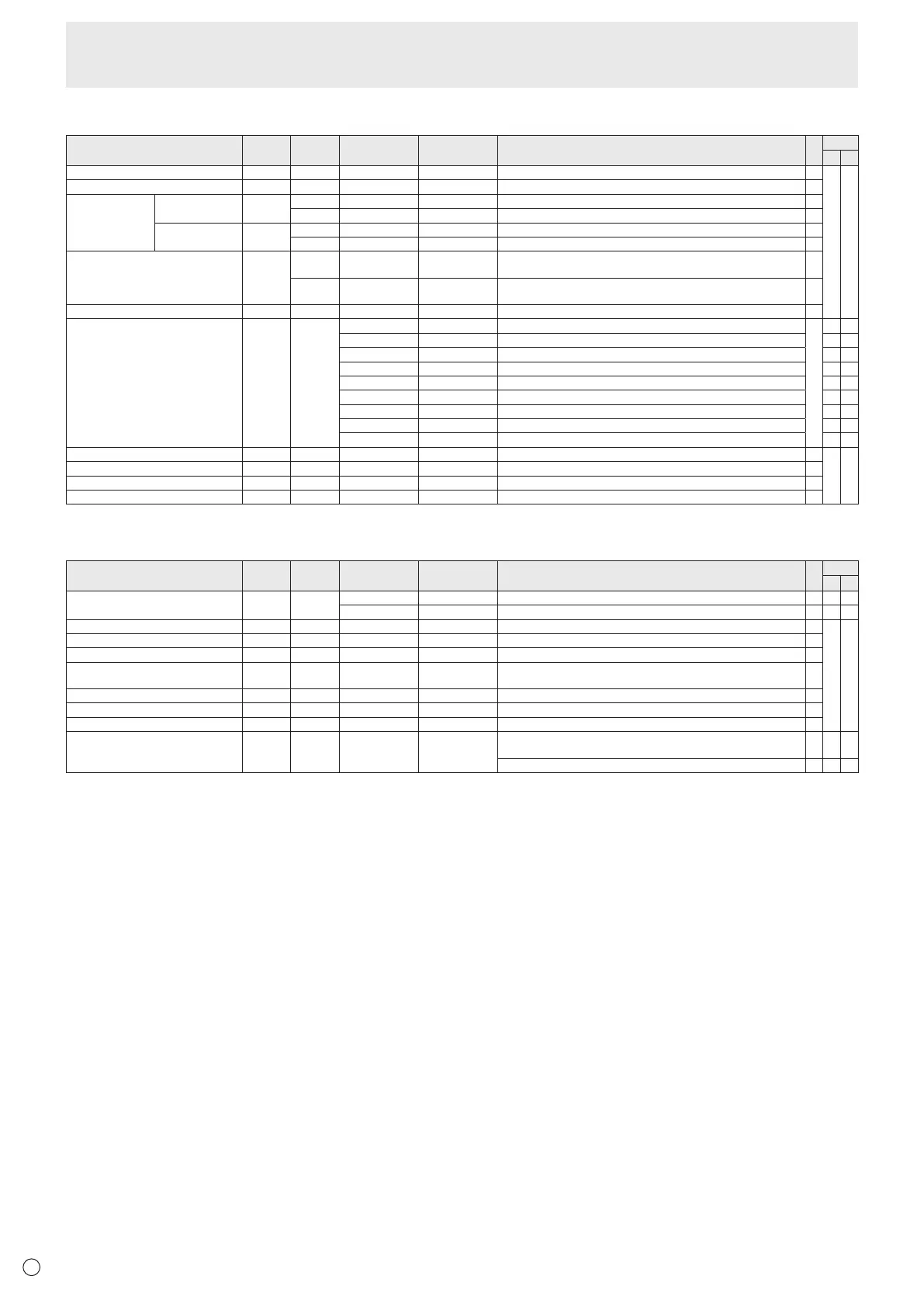
PIP/PbyP menu
Function
Command Direction
Parameter Reply Control/Response contents *1
*2
(A) (B)
PIPMODES MWIN WR 0-3 0-3 0:OFF,1:PIP,2:PbyP,3:PbyP2
○
○ ○
PIPSIZE MPSZ WR 1-64 1-64
○
PIP POS THELONGEST
DIRECTION
MHPS W 0-100
○
R 0-100
○
THESHORTEST
DIRECTION
MVPS W 0-100
○
R 0-100
○
PIPPOSLD+SDBATCH MPOS W 0-100,0-100 Specify the position in MPOSxxxyyy format.
(xxx:Longerside,yyy:Shortersideposition)
○
R 0-100,0-100 Returnsaresponsein(xxx,yyy)format.
(xxx:Longerside,yyy:Shortersideposition)
○
PIPBLEND MWBL WR 0-15 0-15
○
PIPSOURCE MWIP WR 1 1 PCDVI-D
○
-
○
2 2 PCD-SUB
○ ○
3 3 AVCOMPONENT(BNC)/AVCOMPONENT(D-SUB)
○ ○
4 4 AVVIDEO(BNC)/AVVIDEO(D-SUB)
○ ○
6 6 PCRGB -
○
7 7 AVDVI-D -
○
8 8 AVS-VIDEO -
○
9 9 AVHDMI
○ ○
10 10 PCHDMI
○ ○
SOUNDCHANGE MWAD WR 1-2 1-2 1:MAIN,2:SUB
○
○ ○
MAINPOS(Mainscreen) MWPP WR 0-1 0-1 0:POS1,1:POS2
○
PbyP2POS(Subscreen) MW2P WR 0-2 0-2 0:POS1,1:POS2,2:POS3
○
AUTOOFF MOFF WR 0-1 0-1 0:MANUAL,1:AUTO
○
Initialization/Functional Restriction Setting (FUNCTION) menu
Function
Command Direction
Parameter Reply Control/Response contents *1
*2
(A) (B)
ALLRESET RSET W 0 0:ALLRESET -
○
-
0-1 0:ALLRESET1,1:ALLRESET2 - -
○
ADJUSTMENTLOCK ALCK WR 0-2 0-2 0:OFF,1:ON1,2:ON2
○
○ ○
ADJUSTMENTLOCKTARGET ALTG WR 0-2 0-2 0:REMOTECONTROL,1:MONITORBUTTONS,2:BOTH
○
OSDDISPLAY LOSD WR 0-2 0-2 0:ON1,1:OFF,2:ON2
○
LED OFLD WR 0-1 0-1 0:ON,1:OFF
“ERR”whenLOWPOWERisselectedforSTANDBYMODE.
○
TEMPERATUREALERT TALT WR 0-2 0-2 0:OFF,1:OSD&LED,2:LED
○
STATUSALERT SALT WR 0-2 0-2 0:OFF,1:OSD&LED,2:LED
○
POWERBUTTON PBTN WR 0-1 0-1 0:MONITOR,1:CONTROLLER
○
CONTROLLERINPUT PCIP WR 0-2 0-2 0:D-SUB,1:HDMI(“ERR”whenMONITORisselectedforPOWER
BUTTON.)
○ ○ ○
2:DVI-D(“ERR”whenMONITORisselectedforPOWERBUTTON.)
○
-
○
Controlling the Monitor with a PC (RS-232C)



 To Next Page