Key/Mouse Monitoring Tool
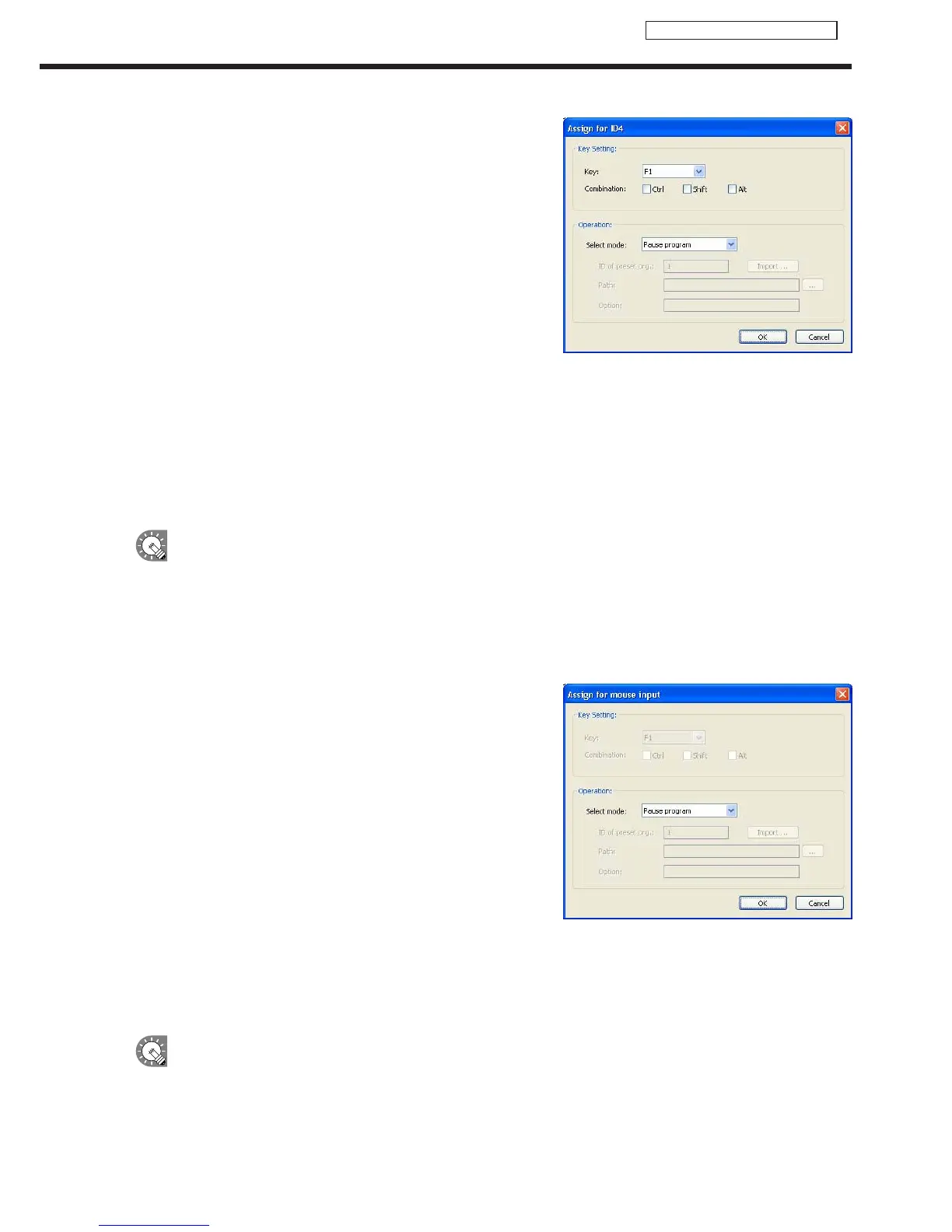
1) Click the option to be edited and click [Edit].
Adialogboxwillappear.
2) Set the options.
•“KeySetting”
Set the combination of keys to be registered.
•“Operation”
Set the action of the registered key.
•Ifyouselect“Viewpresetprogram,”specifytheIDnumberof
thepresetprogramtobedisplayedin“IDofpresetprg.”.
If the preset program has not been imported, specify the ID
number and import the program.
1) Enteranumberin“IDofpresetprg.”.
2) Click[Import].
3) Specifytheexportedprogramdataandclick[Open].
TheprogramisimportedtothespecifiedpresetnumberID.
•Ifyouselect“Runapplication,”enterthepathoftheapplicationtobeexecutedin“Path.”Itisalsopossibleto
enter“Option.”
3) Click [OK].
•IfthesamekeyisassignedtodifferentIDs,theassignedactionisperformedinascendingorderofIDs.
•Ifthe[Ctrl]keyispressedwhenPowerPointViewerislaunched,PowerPointcontentisnotdisplayedin
the correct position. Take care when displaying a program containing PowerPoint content.
•“Changeprogram,ifamouseeventcomeswhenitshowsscheduledprogram.”checkbox.
Whenthischeckboxischecked,actionsareassignedtomouseoperationssothatactionscanbeperformed
by operating the mouse.
1) Click [Detail].
“Assignformouseinput”willappear.
2) Set the options.
•“Operation”
Set the action of the registered mouse operation.
•Ifyouselect“Viewpresetprogram,”specifytheIDnumberof
thepresetprogramtobedisplayedin“IDofpresetprg.”.
If the preset program has not been imported, specify the ID
number and import the program.
1) EntertheIDnumberin“IDofpresetprg.”.
2) Click[Import].
3) Specifytheexportedprogramdataandclick[Open].
•Ifyouselect“Runapplication,”enterthepathoftheapplicationtobeexecutedin“Path.”Itisalsopossibleto
enter“Option.”
3) Click [OK].
•“Program”referstoascheduledprogramorabreak-inprogram.Whenapresetprogramisbeing
displayed, the assigned action cannot be performed.
Key/Mouse Monitoring Tool Window



 To Next Page