R-231NW
8 - 4
[10] Procedure H : BLOWN MINITOR FUSE TEST
1. Disconnect the power supply cord, and then remove outer case.
2. Open the door and block it open.
3. Discharge high voltage capacitor.
4. If the monitor fuse is blown when the door is opened, check the primary interlock relay, secondary interlock switch and monitor
switch according to the “TEST PROCEDURE” for those switches before replacing the blown monitor fuse.
CAUTION: BEFORE REPLACING A BLOWN MONITOR FUSE, TEST THE PRIMARY INTERLOCK RELAY, SECONDARY INTER
LOCK SWITCH, DOOR SENSING SWITCH AND MONITOR SWITCH FOR PROPER OPERATION.
If the monitor fuse is blown by improper switch operation, the monitor fuse and monitor switch must be replaced with “monitor fuse
and monitor switch assembly” part number FFS-BA026WRKZ, even if the monitor switch operates normally. The monitor fuse and
monitor switch assembly is comprised of a 15 ampere fuse and switch.
5. Reconnect all leads removed from components during testing.
6. Reinstall the outer case (cabinet).
7. Reconnect the power supply cord after the outer case is installed.
8. Run the oven and check all functions.
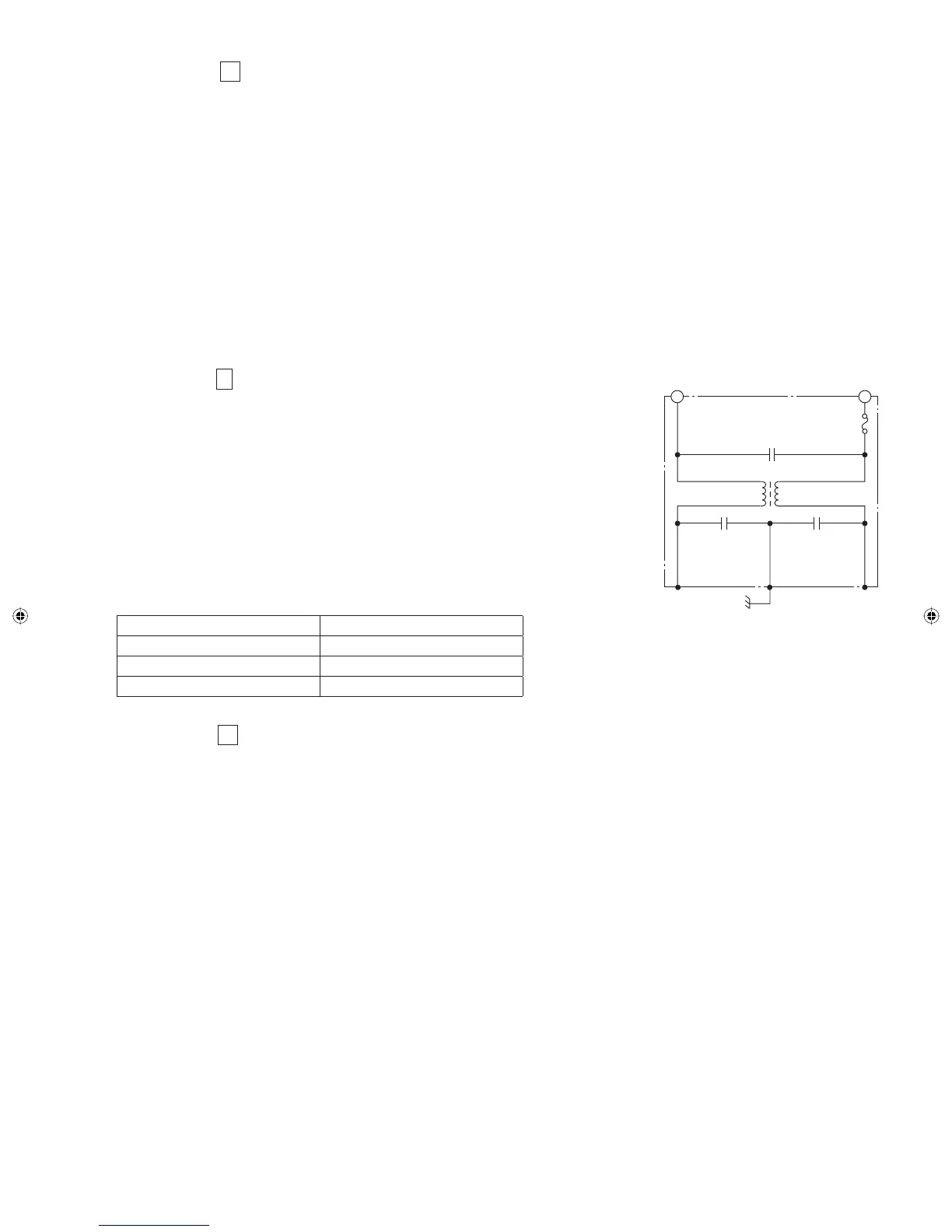
[11] Procedure I : NOISE FILTER TEST
1. Disconnect the power supply cord, and then remove outer case.
2. Open the door and block it open.
3. Discharge high voltage capacitor.
4. Disconnect the lead wires from the terminal the noise fi lter. Using an ohmmeter, check
between the terminals as described in the following table. If incorrect reading are obtained,
replace the noise fi lter.
5. Reconnect all leads removed from components during testing.
6. Reinstall the outer case (cabinet).
7. Reconnect the power supply cord after the outer case is installed.
8. Run the oven and check all functions.
MEASURING POINT INDICATION OF OHMMETER
Between N and L Open circuit.
Between terminal N and WHITE Short circuit.
Between terminal L and RED Short circuit.
[12] Procedure J : TOUCH CONTROL PANEL ASSEMBLY TEST
The touch control panel consists of circuits including semiconductors such as LSI, ICs, etc. Therefore, unlike conventional microwave
ovens, proper maintenance cannot be performed with only a voltmeter and ohmmeter.
In this service manual, the touch control panel assembly is divided into two units, Control Unit and Key Unit, and troubleshooting by
unit replacement is described according to the symptoms indicated.
Before testing,
1) Disconnect the power supply cord and then remove outer case.
2) Open the door and block it open.
3) Discharge high voltage capacitor.
4) Disconnect the leads to the primary of the power transformer.
5) Ensure that these leads remain isolated from other components and oven chassis by using insulation tape.
6) After that procedure, re-connect the power supply cord.
1. Key Unit
NOTE:
1) Check key unit ribbon connection before replacement.
2) Re-install the outer case (cabinet).
3) Reconnect the power supply cord after the outer case is installed.
4) Run the oven and check all functions.
The following symptoms indicate a defective key unit.
a) When touching the pads, a certain pad produces no signal at all.
b) When touching a number pad, two fi gures or more are displayed.
c) When touching the pads, sometimes a pad produces no signal.
FUSE 15A
NOISE FILTER
NOISE SUPPRESSION COIL
LINE CROSS CAPACITOR
0.22µF / AC 250V
LINE BYPASS
CAPACITOR
0.0033µF / AC 250V
LINE BYPASS
CAPACITOR
0.0033µF / AC 250V
L
REDWHITE
N
Service_R-231NW.indd 17Service_R-231NW.indd 17 6/24/09 3:56:44 PM6/24/09 3:56:44 PM


 To Next Page