ADJUSTMENT
m
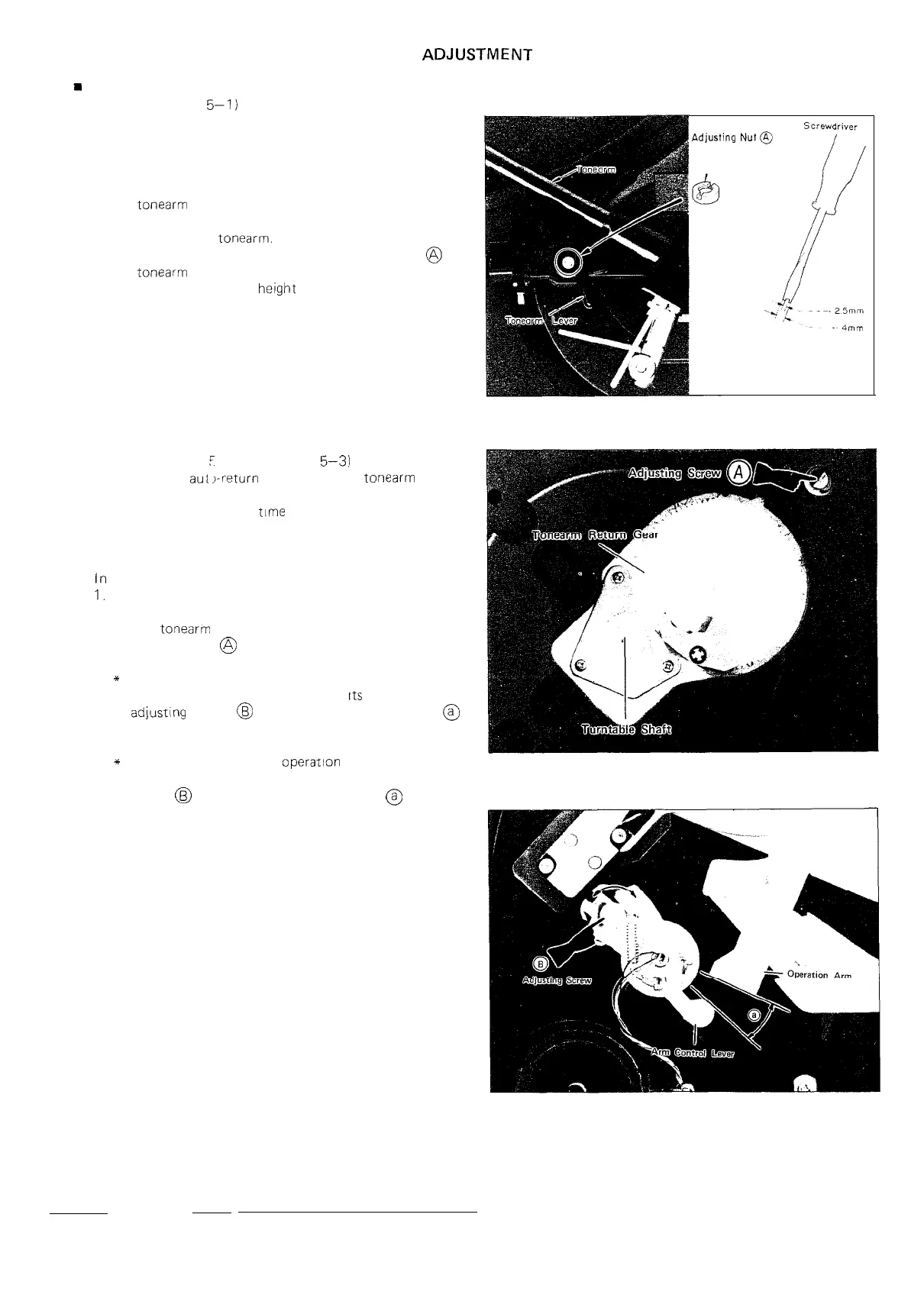
HEIGHT ADJUSTMENT OF STYLUS TIP
(Refer to Figure
5-I)
It may happen that the stylus tip doesn’t leave the record
surface when the cueing/pause control button is set at
“on” or it doesn’t go down to the record when fhat button
is set at “off”. In this case, make the height of the stylus
tip appropriate by changing the movable range (height)
of the
tonearm
lever.
1. Set the cueing/pause control button at “on” position
to raise up the
tonearm.
2. By using a screwdriver, turn the adjusting nut
@
at
the
tonearm
lever to change its height: this change
will provide a proper
height
of the stylus tip.
n
ADJUSTMENT OF AUTO-RETURN OPERATION
(Refer to Figure
F
2 and Figure
5-3)
For a normal
aut
j-return
operation, the
tonearm
must,
at the end of a record playing, return automatically to
its rest and at the same
time
the turntable be stopped.
However, it may happen that the auto-return operation
starts even before a record playing has not yet finished,
or it never occurs even after a completion of the playing.
In this case, take the following adjustments.
1.
Detach the turntable, and see there is not contact
between the teeth of the turntable shaft gear and those
of the
tonearm
return gear. If otherwise turn the
adjusting screw
@
until the turntable shaft can rotate
smoothly.
* In case the auto-return motion starts even before
a record has not yet reached
Its
end, turn the
adjusting
screw
@
to make wider the interval
@
between the arm control lever’s end and operation
arm.
*
In case the auto-return
operatron
never starts even
after a record has reached its end, turn the adjusting
screw
@
to make narrower the interval
@
between
the arm control lever’s end and operation arm.
Adjusting
Nut
Figure 5-l
Figure 5-2
Figure 5-3
5


 To Next Page