I
s-w““.
SF-7X0
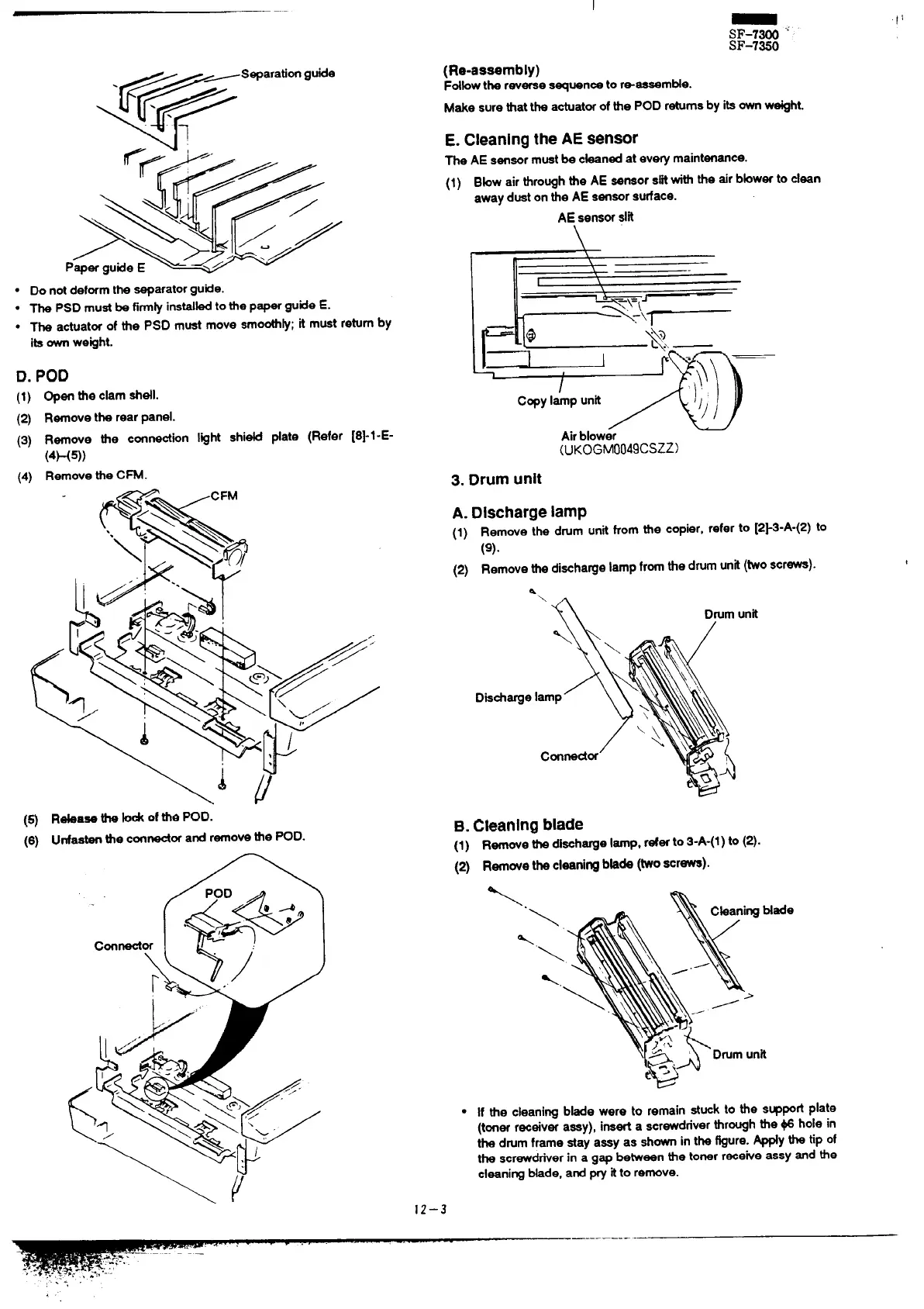
● Do notdeformthe separatorgutie.
.
The PSD mustbe firm~ instibd to the paperguide E.
.
The actuatorof the PSD must move smooth~; it must returnby
itsownweght.
D. POD
(1) Open
theckm ahdl.
(2) Remove the rear panel.
(3) Remove the connection l@ht shi~ date (Refer [8}l-E-
(4F(5))
(4) Remove the CFM.
(Re-aseembly)
Fdbwthereverses~uencetor-aeeem~e.
Make surethat the actuatorof the POD returnsby itsownw~ht.
E. Cleanlngthe AE sensor
The AE sensormustbe cbaned at every maintenance.
(1) Bbw air thro~h the AE Semor slitwiththe airbbwer to dean
away duston the AE sensorsurface.
AE,sensorslit
\\
,
\
I
\
Copy lamp unt
Airblowe~
~
(UK0GM004gCSZZ)
3. Drum unit
A. DischargelamP
(1)
Remove the drum unit from the copier, refer to [2~3-A-(2) to
(9).
(2) Remove thadi~haWel~Pfr~ the drumunit(Woscrewa).
a
\
a
Drumunit
D&chargeI
B.
Cleaningblade
(1) RemovethedishWel~P. referto3-A-(l)to (2).
(2) RmwetkclmniWb~de (~oscrewe).
Rtiaae the W of tie pOD.
Unfastenthe connectorand removethe POD.
●
If the cleaning bbde were to remain stuck to the supped plate
(toner r-eiver assy), inserta screwdriverthr~h the @ hole in
the drumframe stay aasy as shownin the @ure. ~y the tip of
the screwdriverin a gap between the tonerreceive assy and the
cleaningblade, and ~ itto remove.
12–3
-—..-—..—–—“-—



 To Next Page